Building Tetris
In this guide you write Tetris from an empty file on top of the engine's
entity component system. It uses the loop, input, drawing,
the timer and tween packages, the UI and the mixer. The finished program
is examples/tetris in the repository; run it with
go run ./examples/tetris.
1. Entities, resources and events
Tetris has two kinds of thing on the board: blocks that have settled,
and the one piece the player is steering. Both become entities. A
settled block is a Cell; the piece is a Falling:
// Cell is one settled block on the board.
type Cell struct{ X, Y, Kind int }

// Falling is the piece the player controls; there is one at a time.
type Falling struct {
	Kind  int
	Cells [][]bool // Cells[y][x]
	X, Y  int
}
Anything the game has exactly one of is a resource on the world rather than an entity: the score, the occupancy grid, this update's controls, the gravity clock and the bag of upcoming pieces.
type Board struct{ Full [rows][cols]bool }
type Score struct {
	Points, Lines int
	Over          bool
}
type Controls struct{ Left, Right, Rotate, Down, Drop bool }
type Clock struct {
	Timers timer.Scheduler
	Drop   timer.Handle
}
type Bag struct {
	Random *rng.Rand
	Next   int
}
Two events let the game logic report what happened to the effects code without referring to it:
type Locked struct{}          // a piece settled without clearing lines
type Cleared struct{ Rows int } // lines were removed
2. Pieces that rotate
The seven shapes are strings, # for a filled cell, with a colour from
gfx.Hex. Rotation is a transpose with a flip over a square grid:
var shapes = []struct {
	name  string
	cells []string
	color gfx.Color
}{
	{"I", []string{"....", "####", "....", "...."}, gfx.Hex(0x5BC0EB)},
	{"O", []string{"##", "##"}, gfx.Hex(0xFDE74C)},
	{"T", []string{".#.", "###", "..."}, gfx.Hex(0x9B5DE5)},
	// S, Z, J, L ...
}

func (p Falling) rotated() Falling {
	n := len(p.Cells)
	out := Falling{Kind: p.Kind, X: p.X, Y: p.Y, Cells: make([][]bool, n)}
	for y := range n {
		out.Cells[y] = make([]bool, n)
		for x := range n {
			out.Cells[y][x] = p.Cells[n-1-x][y]
		}
	}
	return out
}
Most of the rules reduce to whether a piece fits, which fits answers
against the Board resource:
func fits(b *Board, p Falling) bool {
	for y, row := range p.Cells {
		for x, on := range row {
			if !on {
				continue
			}
			bx, by := p.X+x, p.Y+y
			if bx < 0 || bx >= cols || by >= rows || (by >= 0 && b.Full[by][bx]) {
				return false
			}
		}
	}
	return true
}
3. The world and its systems
Init creates the world, keeps two queries (one per component type)
and registers the systems in the order they should run:
w := ecs.NewWorld()
g.cells = w.Query1[Cell]()
g.falling = w.Query1[Falling]()
w.AddSystem("board", boardSystem)
w.AddSystem("input", inputSystem)
w.AddSystem("gravity", gravitySystem)
w.AddSystem("effects", g.effectsSystem(ctx.Audio))
The first system rebuilds the occupancy grid from the Cell entities,
so the others test collisions against a plain array. Walking two
hundred cells is a small, bounded scan. Rebuilding the grid brings it into
agreement with the entities at that point; code that changes cells later
in the update must rebuild it again before testing occupancy:
func boardSystem(w *ecs.World, dt float64) {
	b := w.Resource[Board]()
	b.Full = [rows][cols]bool{}
	w.Each(func(e ecs.Entity, c *Cell) {
		if c.Y >= 0 {
			b.Full[c.Y][c.X] = true
		}
	})
}
4. Input as a resource
ctx.Input lives outside the world, so each Update copies the key
presses the game uses into the Controls resource and then runs the
systems. The input system is then a function of the world alone, which
makes it testable and, later, replayable:
func (g *game) Update(ctx *engine.Context) error {
	in := ctx.Input
	*g.world.Resource[Controls]() = Controls{
		Left: in.KeyPressed(input.KeyLeft), Right: in.KeyPressed(input.KeyRight),
		Rotate: in.KeyPressed(input.KeyUp), Down: in.KeyPressed(input.KeyDown),
		Drop: in.KeyPressed(input.KeySpace),
	}
	g.world.Update(ctx.Delta)
	return nil
}
The input system fetches the one falling piece with First and tries
moves. Rotation tries a few horizontal nudges so a piece against the
wall still turns, the "wall kick" players expect:
func inputSystem(w *ecs.World, dt float64) {
	in := w.Resource[Controls]()
	_, p, ok := w.Query1[Falling]().First()
	if !ok {
		return
	}
	if in.Left {
		c := *p
		c.X--
		try(w, p, c)
	}
	if in.Rotate {
		r := p.rotated()
		for _, dx := range []int{0, -1, 1, -2, 2} {
			r.X = p.X + dx
			if try(w, p, r) {
				break
			}
		}
	}
	if in.Drop {
		for {
			c := *p
			c.Y++
			if !try(w, p, c) {
				break
			}
		}
		lockPiece(w)
	}
	// ...
}
5. Gravity on a timer
The piece should fall every 600 ms whatever the frame rate. A
timer.Scheduler in the Clock resource runs a
callback on game time, and the gravity system advances it:
clock.Drop = clock.Timers.Every(0.6, func() { drop(w) })

func gravitySystem(w *ecs.World, dt float64) {
	w.Resource[Clock]().Timers.Update(dt)
}

func drop(w *ecs.World) {
	_, p, ok := w.Query1[Falling]().First()
	c := *p
	c.Y++
	if ok && !try(w, p, c) {
		lockPiece(w)
	}
}
6. Locking and clearing lines
When the piece cannot fall, its cells become Cell entities and the
piece entity is despawned. Then every full row is removed: the row's
cells are despawned and every cell above moves down one. Despawning the
entity a query is visiting is safe, so this is one pass per row:
func lockPiece(w *ecs.World) {
	e, p, _ := w.Query1[Falling]().First()
	for y, row := range p.Cells {
		for x, on := range row {
			if on && p.Y+y >= 0 {
				w.SpawnWith(Cell{X: p.X + x, Y: p.Y + y, Kind: p.Kind})
			}
		}
	}
	w.Despawn(e)
	boardSystem(w, 0)
	b := w.Resource[Board]()
	cleared := 0
	for y := rows - 1; y >= 0; y-- {
		full := true
		for x := range cols {
			full = full && b.Full[y][x]
		}
		if !full {
			continue
		}
		w.Each(func(e ecs.Entity, c *Cell) {
			switch {
			case c.Y == y:
				w.Despawn(e)
			case c.Y < y:
				c.Y++
			}
		})
		boardSystem(w, 0)
		cleared++
		y++ // re-check the row that fell into this slot
	}
	if cleared > 0 {
		s := w.Resource[Score]()
		s.Lines += cleared
		s.Points += []int{0, 100, 300, 500, 800}[cleared]
		w.Emit(Cleared{Rows: cleared})
	} else {
		w.Emit(Locked{})
	}
	spawnPiece(w)
}
The game logic never mentions sound or animation. It emits an event and does nothing else.
7. Effects from events
The effects system runs last. It reads the events the earlier systems
emitted and turns them into a sound and a flash. The tones are
synthesised at start with audio.Sine, so the game has no sound files,
and a tween drives the flash from full to nothing
over 0.4 s:
func (g *game) effectsSystem(mixer *audio.Mixer) ecs.System {
	return func(w *ecs.World, dt float64) {
		for range w.Events[Locked]() {
			mixer.Play(g.lock, audio.PlayOptions{Volume: 0.4})
		}
		for _, ev := range w.Events[Cleared]() {
			mixer.Play(g.clear, audio.PlayOptions{Volume: 0.5, Pitch: 1 + 0.2*float32(ev.Rows)})
			g.flash = tween.New(1, 0, 0.4, tween.OutQuad)
		}
		if g.flash != nil {
			if g.flash.Update(float32(dt)); g.flash.Done() {
				g.flash = nil
			}
		}
	}
}
8. Drawing
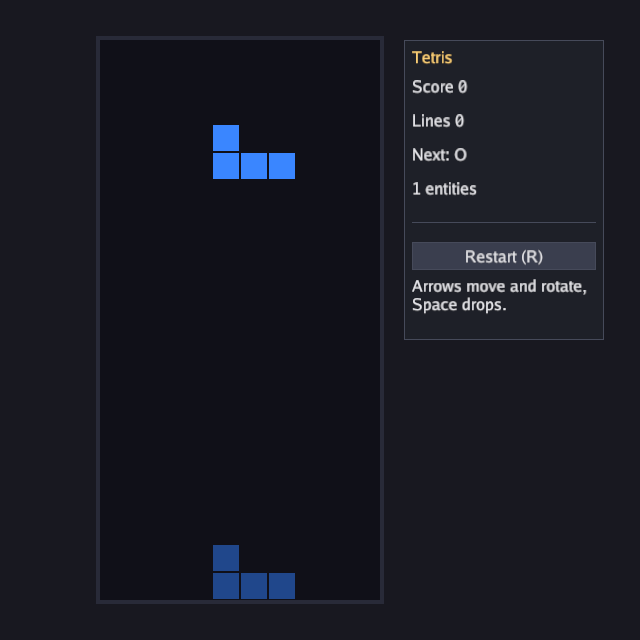
The board and blocks are drawn as filled rectangles. Draw walks the cells
query, then draws a translucent ghost where the piece will land and the
piece itself:
g.cells.Each(func(e ecs.Entity, c *Cell) {
	if c.Y >= 0 {
		drawCell(c.X, c.Y, c.Kind, 1)
	}
})
if _, p, ok := g.falling.First(); ok {
	ghost := *p
	for fits(w.Resource[Board](), ghost) {
		ghost.Y++
	}
	ghost.Y--
	// draw ghost at alpha 0.25, then *p at alpha 1 ...
}
if g.flash != nil {
	gr.FillRect(ox, oy, cols*cell, rows*cell, gfx.Color{R: 1, G: 1, B: 1, A: 0.35 * g.flash.Value()})
}
9. A score panel with the UI
The ui package is immediate mode: build the panel
every frame inside Begin, and widgets report what happened.
Containers take closures, so their extent is visible in the code:
score := w.Resource[Score]()
u.Begin(ctx.Input, func() {
	u.Panel("Tetris", ui.Rect{X: ox + cols*cell + 24, Y: oy, W: 200, H: 300}, func() {
		u.Label(fmt.Sprintf("Score %d", score.Points))
		u.Label(fmt.Sprintf("Lines %d", score.Lines))
		u.Label(fmt.Sprintf("%d entities", w.Len()))
		if score.Over {
			u.Label("Game over")
		}
		if u.Button("Restart (R)") {
			g.restart()
		}
	})
})
10. Running and shipping
The finished source is in examples/tetris/main.go. It accepts the
-seconds and -shot flags used by the screenshot examples, so a script can run it
and save a screenshot:
go run ./examples/tetris -seconds 3 -shot tetris.png
To hand it to someone, build it and wrap it:
go build -o tetris ./examples/tetris
go run ./cmd/bunyip-bundle -name Tetris -exe ./tetris -o dist
Where to take it
- Hold a piece: a
Heldresource and a swap in the input system. - Levels: cancel and re-create the gravity timer with a shorter interval
as
Score.Linesgrows. - Two players: a second
Fallingentity and aPlayercomponent on cells, with queries filtered byWith[PlayerOne](). - Replays: record
Controlsper update along with the initial random seed and reset timing, then replay them with the same simulation step and rules. Keep external effects such as audio separate from the rules. - Music: stream a file with
ctx.Audio.OpenMusicandPlayStream, or write aStreamthat synthesises it, asexamples/audiodoes.