Example examples/gallery
Gallery
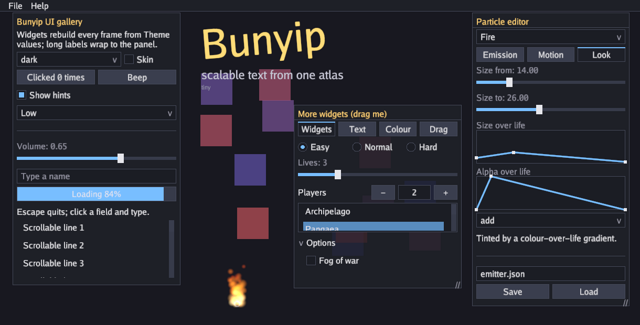
This program is the catalogue of ui. A panel holds buttons, checkboxes, dropdowns, sliders, a text field, a progress bar, a tooltip and a scroll area; a draggable window holds tabs with radios, spinners, list boxes, a tree, a text area, rich labels with links, a colour picker, a table, a reorderable list and drag and drop; a menu bar opens menus; two modals sit over the lot. A dropdown switches between the built-in themes and a checkbox swaps in a texture skin the program generates.
The interface is immediate mode. Nothing here is a retained widget: every
call inside u.Begin builds that widget for this frame, from Go values
the game owns. A widget that edits something takes a pointer to it, and a
widget that can be triggered returns whether it was. Containers take
closures, so nesting is what scopes them and there is no end call to
forget. The interface guide explains the model,
identity and themes.
A third window is a small particle editor: sliders and two curve editors
tune a particle.Emitter while it burns beside them, and Save writes it
as the JSON asset.Emitter loads, so a game ships its effects as assets
rather than as code.
Behind the widgets the program also draws with gfx: a dozen translucent squares moving on a Lissajous path, and three sizes of text from one distance-field atlas.
Run it:
go run ./examples/gallery -seconds 3 -shot out.png
The flags are -seconds N and -shot file.png, -beep to play a tone
at start, -debug for the frame-timing overlay that F3 also toggles,
-skin to start with the texture skin, -theme name for the starting
theme, and -tab N for which tab of the window to open on.
Package and state
Every widget's value lives on the game. That is the shape of an
immediate-mode interface: the checkbox does not remember whether it is
checked, g.check does. The fields are split into the main panel's state
and the second window's.
// Command gallery shows every UI widget, the built-in colour themes, a
// texture skin, scalable SDF text and an audio beep.
package main

import (
	"flag"
	"fmt"
	"image"
	"image/color"
	"math"
	"os"
	"strings"

	"golang.org/x/image/font/gofont/gobold"
	"golang.org/x/image/font/gofont/goregular"

	"github.com/matjam/bunyip/audio"
	"github.com/matjam/bunyip/engine"
	"github.com/matjam/bunyip/gfx"
	"github.com/matjam/bunyip/input"
	"github.com/matjam/bunyip/lin"
	"github.com/matjam/bunyip/ui"
)

type gallery struct {
	seconds  float64
	shot     string
	beep     bool
	skinned  bool
	theme    string
	tone     *audio.Sound
	startTab int

	font     *gfx.Font
	big      *gfx.Font
	ui       *ui.Context
	themeIdx int
	check    bool
	volume   float32
	name     string
	clicks   int
	quality  int
	skin     *ui.Skin
	skinTex  []*gfx.Texture
	useSkin  bool
	shotDone bool

	// The second window's state.
	bold     *gfx.Font
	win      ui.Rect
	tab      int
	radio    int
	lives    int
	players  int
	sel      int
	fog      bool
	notes    string
	linkHits int
	tint     gfx.Color
	confirm  bool
	about    bool
	order    []string
	drops    int
	lastDrop string

	// The particle editor's window and the texture its effects draw with.
	edit *editor
	soft *gfx.Texture
}
Init: fonts, theme, skin and a sound
Three fonts are loaded. NewFont rasterises at one size, which is what
most interface text wants. NewSDFFont builds a distance-field atlas
instead, which stays sharp at any size, so the three headings later are
drawn from that one atlas with different Size values. AtlasSize: 1024
gives it room.
ui.ThemeNames lists the built-in palettes and ui.NamedTheme builds
one around a font. ui.New takes the graphics context and a theme and
returns the interface context, which is the value every widget call goes
through.
g.ui.OnTextInputRect = ctx.SetTextInputRect reports where the focused
text field is, so an input method's candidate window appears beside it.
The last three calls hand the gallery's own state to the
debug console, which main turns on with
Config.Console. Console.Float and Console.Bool bind a name to a
pointer, so set gallery.volume 0.2 at the command line moves the slider
and the Services panel shows both values live. Console.Register adds a
command: theme with no argument lists the palettes and theme light
switches to one, which is the same work the dropdown does. Binding a
pointer rather than copying a value is what keeps the two in step in
both directions; the widget writes through the same pointer the console
reads.
Every console method is safe on a nil console, so these lines stay
compiling and do nothing when Config.Console is off.
func (g *gallery) Init(ctx *engine.Context) error {
	var err error
	if g.font, err = ctx.Gfx.NewFont(goregular.TTF, 16, gfx.FontOptions{}); err != nil {
		return err
	}
	if g.big, err = ctx.Gfx.NewSDFFont(goregular.TTF, 32, gfx.FontOptions{AtlasSize: 1024}); err != nil {
		return err
	}
	if g.bold, err = ctx.Gfx.NewFont(gobold.TTF, 16, gfx.FontOptions{}); err != nil {
		return err
	}
	g.volume, g.check = 0.65, true
	g.win = ui.Rect{X: 560, Y: 200, W: 320, H: 350}
	g.lives, g.players, g.sel = 3, 2, 1
	g.tint = gfx.RGB(255, 140, 40)
	g.order = []string{"Scout", "Archer", "Knight", "Mage"}
	g.tab = g.startTab
	g.notes = "Multi-line notes wrap here.\nSelect with Shift and the arrows, cut, copy, paste and undo."
	names := ui.ThemeNames()
	for i, n := range names {
		if n == g.theme {
			g.themeIdx = i
		}
	}
	theme, _ := ui.NamedTheme(names[g.themeIdx], g.font)
	g.ui = ui.New(ctx.Gfx, theme)
	g.ui.OnTextInputRect = ctx.SetTextInputRect
	if g.skin, g.skinTex, err = makeSkin(ctx.Gfx); err != nil {
		return err
	}
	g.useSkin = g.skinned
	g.applyTheme()
	if g.tone, err = ctx.Audio.NewSound(audio.Sine(440, 0.35, ctx.Audio.Rate())); err != nil {
		return err
	}
	if g.beep {
		ctx.Audio.Play(g.tone, audio.PlayOptions{Volume: 0.4})
	}
	if g.soft, err = softCircle(ctx.Gfx); err != nil {
		return err
	}
	g.edit = newEditor(g.soft, lin.V2(452, 580))
	// Two of the gallery's own values through the console: set them from
	// the command line, or watch them in the Services panel.
	ctx.Console.Float("gallery.volume", &g.volume, "the volume slider's value")
	ctx.Console.Bool("gallery.skin", &g.useSkin, "draw the widgets from the texture skin")
	ctx.Console.Register("theme", "theme <name>: switch the interface theme", func(args []string) (string, error) {
		if len(args) == 0 {
			return strings.Join(ui.ThemeNames(), " "), nil
		}
		for i, n := range ui.ThemeNames() {
			if n == args[0] {
				g.themeIdx = i
				g.applyTheme()
				return "theme " + n, nil
			}
		}
		return "", fmt.Errorf("no theme %q", args[0])
	})
	return nil
}
applyTheme rebuilds the theme whenever the dropdown or the skin
checkbox changes. A theme is a value, so switching one is an assignment;
a skin is a set of nine-slice textures hung on the theme, and the border
width is zeroed because the skin draws its own edges.
// applyTheme rebuilds the theme from the chosen palette and skin.
func (g *gallery) applyTheme() {
	theme, _ := ui.NamedTheme(ui.ThemeNames()[g.themeIdx], g.font)
	if g.useSkin {
		theme.Skin = g.skin
		theme.BorderWidth = 0
	}
	g.ui.Theme = theme
}
func (g *gallery) Shutdown(ctx *engine.Context) {
	g.font.Destroy()
	g.big.Destroy()
	g.bold.Destroy()
	g.soft.Destroy()
	for _, t := range g.skinTex {
		t.Destroy()
	}
}
Update
The interface is built in Draw, so Update only handles quitting and
the screenshot. g.ui.WantsKeyboard is why Escape does not quit while a
text field has focus.
The first thing it does is give way to the console. While the drop-down
is open, returning early prevents gameplay shortcuts in Update from
also responding to console input. Draw still builds the gallery UI;
this early return alone does not prevent its text fields from reading
the same input. Games with both interfaces should gate their own UI input
while the console is open as well.
func (g *gallery) Update(ctx *engine.Context) error {
	if ctx.Console.Open() {
		return nil // the console has the keyboard
	}
	if ctx.Input.KeyPressed(input.KeyEscape) && !g.ui.WantsKeyboard() || (g.seconds > 0 && ctx.Time >= g.seconds) {
		ctx.Quit()
	}
	if g.shot != "" && !g.shotDone && (g.seconds == 0 || ctx.Time >= g.seconds/2) {
		ctx.Screenshot(g.shot)
		g.shotDone = true
	}
	g.edit.update(ctx.Delta)
	return nil
}
Draw: the background and the scalable text
The squares are drawn before the interface, so they end up behind it;
within a layer the order is call order. gfx.RGBA takes an alpha byte
for the translucency.
DrawTextBlock with gfx.TextOptions{Size: ...} draws the
distance-field font at any size, and Angle slants it, both from the
same atlas. A regular font drawn at a size other than the one it was
rasterised at would be blurred instead.
func (g *gallery) Draw(ctx *engine.Context) error {
	t := float32(ctx.Time)
	for i := range 12 {
		x := ctx.Width/2 + 200*float32(math.Cos(float64(t*0.4+float32(i))))
		y := ctx.Height/2 + 150*float32(math.Sin(float64(t*0.6+float32(i)*1.3)))
		ctx.Gfx.FillRect(x-30, y-30, 60, 60, gfx.RGBA(uint8(80+i*12), 90, uint8(200-i*10), 120))
	}
	// Scalable text: one SDF atlas, drawn at three sizes and a slant.
	ctx.Gfx.DrawTextBlock(g.big, "Bunyip", 380, 40, gfx.TextOptions{Size: 72 + 8*float32(math.Sin(float64(t))), Angle: -0.08}, gfx.RGB(255, 220, 120))
	ctx.Gfx.DrawTextBlock(g.big, "scalable text from one atlas", 384, 130, gfx.TextOptions{Size: 22}, gfx.RGB(200, 200, 215))
	ctx.Gfx.DrawTextBlock(g.big, "tiny", 384, 160, gfx.TextOptions{Size: 11}, gfx.RGB(150, 150, 170))
	// The effect the particle editor is tuning, under every window.
	g.edit.preview(ctx.Gfx)
Draw: the frame, the menu bar and the window
u.Theme.BoldFont and u.Clipboard are set before the frame begins:
the bold font is what rich labels use for [b], and the clipboard is an
interface the context satisfies, which is what lets the text fields cut
and paste.
Everything else happens inside u.Begin(ctx.Input, func() { ... }),
which takes this frame's input. u.MenuBar and u.Menu take closures
and u.MenuItem returns true on the frame it is chosen. u.Window takes
a pointer to a ui.Rect, which is how dragging the window moves it: the
widget writes the new position back into the game's own value.
u.Tabs takes the labels and a pointer to the selected index, and the
switch that follows builds only the widgets of the open tab. That is
worth noticing: a widget that is not called does not exist this frame, so
there is nothing to hide or show.
The tabs run through the rest of the catalogue. u.Radio writes an index
into one variable, u.IntSlider and u.Spinner edit integers,
u.ListBox and u.TreeOpen hold a selection and a fold, u.TextArea
edits a multi-line string, u.RichLabel returns the name of a link that
was clicked, u.ColorPicker edits a gfx.Color, and u.Table calls
back for each cell. u.ReorderableList returns the indices of a move,
which ui.Move applies to the slice, and u.DragSource with
u.DropTarget carries an arbitrary value from one to the other.
	u := g.ui
	u.Theme.BoldFont = g.bold
	u.Clipboard = ctx
	u.Begin(ctx.Input, func() {
		u.MenuBar(ui.Rect{X: 0, Y: 0, W: ctx.Width, H: 22}, func() {
			u.Menu("File", func() {
				if u.MenuItem("Reset clicks") {
					g.clicks = 0
				}
				if u.MenuItem("Quit") {
					g.confirm = true
				}
			})
			u.Menu("Help", func() {
				if u.MenuItem("About") {
					g.about = true
				}
			})
		})
		u.Window("More widgets (drag me)", &g.win, func() {
			u.Tabs([]string{"Widgets", "Text", "Colour", "Drag"}, &g.tab)
			switch g.tab {
			case 0:
				u.Row(3, func() {
					for i, d := range []string{"Easy", "Normal", "Hard"} {
						u.Radio(d, &g.radio, i)
					}
				})
				u.IntSlider("Lives", &g.lives, 1, 9)
				u.Spinner("Players", &g.players, 1, 8, 1)
				u.ListBox("Maps", 56, []string{"Archipelago", "Pangaea", "Fractal", "Highlands"}, &g.sel)
				u.TreeOpen("Options", func() {
					u.Checkbox("Fog of war", &g.fog)
				})
			case 1:
				u.TextArea("Notes", &g.notes, 120)
				if link := u.RichLabel("[b]Rich[/b] labels mix [#ff8a5c]colour[/#], [u]underlines[/u] and a [link=docs]link[/link] you can click."); link != "" {
					g.linkHits++
				}
				u.Label(fmt.Sprintf("Link clicks: %d", g.linkHits))
			case 2:
				u.ColorPicker("Tint", &g.tint)
				u.Table([]string{"Channel", "Value"}, []float32{1, 1}, 3, func(row, col int) {
					names, vals := []string{"Red", "Green", "Blue"}, []float32{g.tint.R, g.tint.G, g.tint.B}
					if col == 0 {
						u.Cell(names[row])
					} else {
						u.Cell(fmt.Sprintf("%.2f", vals[row]))
					}
				})
			case 3:
				// Rows drag to a new place (or Ctrl and an arrow move the
				// focused one); the buttons drag onto the label below.
				if from, to, ok := u.ReorderableList("Turn order", g.order, 100); ok {
					ui.Move(g.order, from, to)
				}
				u.Row(3, func() {
					for _, item := range []string{"Sword", "Shield", "Potion"} {
						u.DragSource(item, item, func() { u.Button(item) })
					}
				})
				u.Label(fmt.Sprintf("Drop here: %d (%s)", g.drops, g.lastDrop))
				if p, ok := u.DropTarget("chest", nil); ok {
					g.drops++
					g.lastDrop = p.(string)
				}
			}
		})
Draw: modals and the main panel
u.Modal takes a pointer to the bool that says whether it is open, so a
menu item opens it by setting the bool and a button closes it by clearing
it. Modals and menus are drawn deferred at the end of the frame, which is
what puts them over the widgets that were built before them.
u.Columns and u.Row lay the next widgets out side by side.
u.Dropdown and u.Checkbox return whether they changed, which is what
triggers the theme rebuild. u.Tooltip attaches to the widget just
built, u.Separator draws a rule, and u.ScrollArea takes a rectangle,
the height of its content and a closure that builds it.
		u.Modal("Quit?", ui.Rect{X: ctx.Width/2 - 140, Y: ctx.Height/2 - 60, W: 280, H: 110}, &g.confirm, func() {
			u.Label("Leave the gallery?")
			u.Row(2, func() {
				if u.Button("Quit") {
					ctx.Quit()
				}
				if u.Button("Stay") {
					g.confirm = false
				}
			})
		})
		u.Modal("About", ui.Rect{X: ctx.Width/2 - 160, Y: ctx.Height/2 - 70, W: 320, H: 130}, &g.about, func() {
			u.Label("Bunyip's immediate-mode interface: every widget here is rebuilt each frame.")
			if u.Button("Close") {
				g.about = false
			}
		})
		u.Panel("Bunyip UI gallery", ui.Rect{X: 24, Y: 24, W: 320, H: 520}, func() {
			u.Label("Widgets rebuild every frame from Theme values; long labels wrap to the panel.")
			u.Columns([]float32{2, 1}, func() {
				if u.Dropdown("Theme", &g.themeIdx, ui.ThemeNames()) {
					g.applyTheme()
				}
				if u.Checkbox("Skin", &g.useSkin) {
					g.applyTheme()
				}
			})
			u.Row(2, func() {
				if u.Button(fmt.Sprintf("Clicked %d times", g.clicks)) {
					g.clicks++
				}
				u.Tooltip("Tab and Shift-Tab move focus; Enter activates.")
				if u.Button("Beep") {
					ctx.Audio.Play(g.tone, audio.PlayOptions{Volume: g.volume, Pan: 0})
				}
				u.Tooltip("Plays a 440 Hz sine through the mixer.")
			})
			u.Checkbox("Show hints", &g.check)
			u.Dropdown("Quality", &g.quality, []string{"Low", "Medium", "High", "Ultra"})
			u.Separator()
			u.Slider("Volume", &g.volume, 0, 1)
			u.TextField("Type a name", &g.name)
			u.Progress(fmt.Sprintf("Loading %d%%", int(50+50*math.Sin(float64(t)))), 0.75+0.25*float32(math.Sin(float64(t))))
			if g.check {
				u.Label("Escape quits; click a field and type.")
			}
			u.ScrollArea("log", ui.Rect{X: 36, Y: 420, W: 296, H: 110}, 20*28, func() {
				for i := range 20 {
					u.Label(fmt.Sprintf("Scrollable line %d", i+1))
				}
			})
		})
		g.edit.draw(u)
	})
	// The engine draws the console above the gallery after this returns:
	// ` opens it and F4 opens the debug panels.
	return nil
}
Building a skin
makeSkin generates the textures a skin needs, standing in for the art a
game would load. A ui.Slice is a nine-slice: a texture and four border
widths, so the middle stretches and the corners do not.
NoMipmaps: true keeps a skin texture crisp, since it is never seen at a
distance.
Each field of ui.Skin is the image for one part in one state, and any
left nil falls back to the theme's flat drawing.
// makeSkin draws a small set of rounded, bevelled textures and wires
// them into a Skin, standing in for the art a game would load.
func makeSkin(g *gfx.Graphics) (*ui.Skin, []*gfx.Texture, error) {
	var texs []*gfx.Texture
	slice := func(img image.Image, border float32) (*ui.Slice, error) {
		tex, err := g.NewTexture(img, gfx.TextureOptions{Linear: true, NoMipmaps: true})
		if err != nil {
			return nil, err
		}
		texs = append(texs, tex)
		return &ui.Slice{Tex: tex, Left: border, Top: border, Right: border, Bottom: border}, nil
	}
	c := func(r, g, b, a uint8) color.NRGBA { return color.NRGBA{r, g, b, a} }
	var err error
	sk := &ui.Skin{}
	set := func(dst **ui.Slice, img image.Image, border float32) {
		if err == nil {
			*dst, err = slice(img, border)
		}
	}
	set(&sk.Panel, rounded(48, 12, 3, c(36, 30, 52, 235), c(140, 120, 190, 255), c(60, 50, 85, 235)), 14)
	set(&sk.Button, rounded(32, 9, 2, c(96, 72, 150, 255), c(170, 150, 220, 255), c(70, 52, 112, 255)), 11)
	set(&sk.ButtonHover, rounded(32, 9, 2, c(120, 92, 180, 255), c(200, 180, 240, 255), c(90, 70, 140, 255)), 11)
	set(&sk.ButtonActive, rounded(32, 9, 2, c(60, 44, 100, 255), c(120, 100, 170, 255), c(50, 36, 80, 255)), 11)
	set(&sk.Field, rounded(32, 7, 2, c(22, 18, 34, 255), c(110, 95, 150, 255), c(22, 18, 34, 255)), 9)
	set(&sk.FieldFocus, rounded(32, 7, 2, c(22, 18, 34, 255), c(250, 200, 90, 255), c(22, 18, 34, 255)), 9)
	set(&sk.Check, rounded(24, 6, 2, c(22, 18, 34, 255), c(110, 95, 150, 255), c(22, 18, 34, 255)), 8)
	set(&sk.CheckOn, rounded(24, 6, 2, c(250, 200, 90, 255), c(255, 230, 150, 255), c(220, 160, 60, 255)), 8)
	set(&sk.Track, rounded(16, 5, 1, c(30, 24, 44, 255), c(80, 66, 110, 255), c(30, 24, 44, 255)), 6)
	set(&sk.Fill, rounded(16, 5, 1, c(250, 200, 90, 255), c(255, 230, 150, 255), c(220, 160, 60, 255)), 6)
	set(&sk.Knob, rounded(24, 11, 2, c(240, 235, 250, 255), c(255, 255, 255, 255), c(180, 170, 210, 255)), 11)
	set(&sk.Thumb, rounded(16, 6, 1, c(150, 130, 200, 255), c(200, 180, 240, 255), c(120, 100, 170, 255)), 7)
	if err != nil {
		for _, t := range texs {
			t.Destroy()
		}
		return nil, nil, err
	}
	return sk, texs, nil
}
rounded draws one of those images: a rounded square from a signed
distance function, filled with a vertical gradient, ringed with an edge
colour and antialiased over the last half pixel. Returning an
image.NRGBA matters, because the alpha is unpremultiplied and
NewTexture premultiplies it in linear light on the way to the GPU.
// rounded draws a size×size rounded square: fill graded from top to
// bottom colour with an edge ring of the given width.
func rounded(size int, radius, edge float64, top, ring, bottom color.NRGBA) *image.NRGBA {
	img := image.NewNRGBA(image.Rect(0, 0, size, size))
	mix := func(a, b color.NRGBA, t float64) color.NRGBA {
		l := func(x, y uint8) uint8 { return uint8(float64(x)*(1-t) + float64(y)*t) }
		return color.NRGBA{l(a.R, b.R), l(a.G, b.G), l(a.B, b.B), l(a.A, b.A)}
	}
	for y := range size {
		for x := range size {
			// Signed distance to the rounded square's edge.
			px, py := float64(x)+0.5, float64(y)+0.5
			half := float64(size) / 2
			dx := math.Abs(px-half) - (half - radius)
			dy := math.Abs(py-half) - (half - radius)
			d := math.Hypot(math.Max(dx, 0), math.Max(dy, 0)) + math.Min(math.Max(dx, dy), 0) - radius
			if d > 0.5 {
				continue
			}
			col := mix(top, bottom, float64(y)/float64(size-1))
			if d > -edge {
				col = ring
			}
			if d > -0.5 { // anti-aliased rim
				col.A = uint8(float64(col.A) * (0.5 - d))
			}
			img.SetNRGBA(x, y, col)
		}
	}
	return img
}
main
Debug: *debug starts with the frame-timing overlay showing, which F3
toggles at any time.
func main() {
	seconds := flag.Float64("seconds", 0, "exit after this many seconds")
	shot := flag.String("shot", "", "write a screenshot to this PNG")
	beep := flag.Bool("beep", false, "play a tone at start")
	debug := flag.Bool("debug", false, "show the frame-timing overlay (F3 toggles it)")
	skin := flag.Bool("skin", false, "start with the texture skin on")
	theme := flag.String("theme", "dark", "starting theme: "+fmt.Sprint(ui.ThemeNames()))
	tab := flag.Int("tab", 0, "the tab of the More widgets window to open on (0-3)")
	flag.Parse()
	err := engine.Run(engine.Config{Title: "Bunyip gallery", Width: 1220, Height: 620, Resizable: true, Debug: *debug, Console: true},
		&gallery{seconds: *seconds, shot: *shot, beep: *beep, skinned: *skin, theme: *theme, startTab: *tab})
	if err != nil {
		fmt.Fprintln(os.Stderr, "gallery:", err)
		os.Exit(1)
	}
}
The particle editor: state
particles.go holds a second, larger widget: a window that tunes a
particle.Emitter while it burns. It is the case an immediate-mode
interface is built for. Nothing is registered, nothing is bound; every
widget writes into a field of the emitter, and when one reports a change
the emitter goes straight back to the running system.
Two fields are kept beside the emitter rather than in it. The curves are
held as the []lin.Vec2 points ui.CurveEditor edits, and the angles
are held in degrees, because that is what anyone tuning an effect thinks
in while the engine works in radians.
// editor tunes a particle emitter while it burns: every widget writes
// into the emitter and hands it straight back to the running system, so
// the preview beside the panel is always the effect the numbers
// describe. Save writes the emitter as JSON, the form asset.Emitter
// loads, so a game ships its effects as assets rather than as code.
type editor struct {
	emitter particle.Emitter
	system  *particle.System
	win     ui.Rect
	tab     int
	preset  int
	blend   int
	// The two curves as the points ui.CurveEditor edits, converted back
	// into the emitter whenever they change.
	size  []lin.Vec2
	alpha []lin.Vec2
	// spread and direction are shown in degrees, which is what anyone
	// tuning an effect thinks in; the emitter keeps radians.
	direction float32
	spread    float32
	gravity   float32
	path      string
	status    string
	soft      *gfx.Texture
	at        lin.Vec2
}
The dropdown at the top of the window starts from one of the package's presets. Two of them are burst effects, which would pop once and stop, so they are given a rate instead.
// presets are the starting points the dropdown offers, in the order it
// lists them.
var presets = []string{"Fire", "Smoke", "Sparks", "Confetti"}

// preset returns one of them by index.
func preset(i int) particle.Emitter {
	switch i {
	case 1:
		return particle.Smoke()
	case 2:
		e := particle.Sparks()
		e.Rate, e.Burst = 120, 0 // a steady fountain rather than one pop
		return e
	case 3:
		e := particle.Confetti()
		e.Rate, e.Burst = 40, 0
		return e
	}
	return particle.Fire()
}
The particle editor: loading and applying
load is the one direction, taking an emitter apart into the widgets'
state, and apply is the other, putting it back together. SetEmitter
retunes the running system without throwing away the particles already in
the air, so a slider drag reads as the effect changing rather than
restarting.
Points and CurveOf convert between a particle.Curve and the points
the curve editor drags.
// newEditor starts the editor on the fire preset at a point in the view.
func newEditor(soft *gfx.Texture, at lin.Vec2) *editor {
	ed := &editor{
		win:  ui.Rect{X: 900, Y: 24, W: 300, H: 560},
		soft: soft,
		at:   at,
		path: "emitter.json",
		// The Look tab holds the curve editors, which is the widget this
		// panel exists to show, so the gallery opens on it.
		tab: 2,
	}
	ed.load(preset(0))
	return ed
}

// load takes an emitter as the one being edited: the texture and the
// position are the editor's, the widgets read their state out of it, and
// a fresh system runs it.
func (ed *editor) load(e particle.Emitter) {
	e.Position = ed.at
	e.Texture = ed.soft
	e.TextureName = "soft-circle" // what asset.Emitter would load
	e.Layer = 1
	if e.Seed == 0 {
		e.Seed = 5 // a fixed stream, so the preview replays the same way
	}
	ed.emitter = e
	ed.size = e.SizeOverLife.Points()
	ed.alpha = e.AlphaOverLife.Points()
	ed.direction = lin.Degrees(e.Direction)
	ed.spread = lin.Degrees(e.Spread)
	ed.gravity = e.Acceleration.Y
	ed.blend = int(e.Blend)
	ed.system = particle.New(e)
}

// apply pushes the widgets' values back into the emitter and retunes the
// running system, keeping the particles already in the air.
func (ed *editor) apply() {
	e := &ed.emitter
	e.Direction = lin.Radians(ed.direction)
	e.Spread = lin.Radians(ed.spread)
	e.Acceleration.Y = ed.gravity
	e.SizeOverLife = particle.CurveOf(ed.size)
	e.AlphaOverLife = particle.CurveOf(ed.alpha)
	e.Blend = gfx.Blend(ed.blend)
	ed.system.SetEmitter(*e)
}

// update advances the preview.
func (ed *editor) update(dt float64) { ed.system.Update(dt) }

// preview draws the effect and a mark where it is emitting from.
func (ed *editor) preview(g *gfx.Graphics) {
	g.SetLayer(0)
	g.StrokeCircle(ed.at.X, ed.at.Y, 5, 1, gfx.RGBA(200, 200, 220, 90))
	ed.system.Draw(g)
	g.SetLayer(0)
}
The particle editor: the window
The tabs keep the panel short: emission, motion and look. Each widget
returns whether it changed something, so they are folded together with
|| and the emitter is rebuilt once, at the end, only if one of them
did.
u.CurveEditor is the widget the rest of the gallery does not have: a
graph of a curve over a particle's lifetime, edited by dragging its
points. Clicking an empty part of the graph adds a point and
right-clicking one takes it away, down to the two that anchor the ends.
The lo and hi arguments are the range the values may take, which is 0
to 3 for a size multiplier and 0 to 1 for an alpha.
// draw builds the editor window. Every widget reports whether it changed
// something, so the emitter is rebuilt only when one did.
func (ed *editor) draw(u *ui.Context) {
	u.Window("Particle editor", &ed.win, func() {
		if u.Dropdown("Preset", &ed.preset, presets) {
			ed.load(preset(ed.preset))
		}
		u.Tabs([]string{"Emission", "Motion", "Look"}, &ed.tab)
		changed := false
		switch ed.tab {
		case 0:
			changed = u.Slider("Rate (per second)", &ed.emitter.Rate, 0, 400) || changed
			changed = u.Slider("Life from (s)", &ed.emitter.Lifetime.Min, 0.05, 4) || changed
			changed = u.Slider("Life to (s)", &ed.emitter.Lifetime.Max, 0.05, 4) || changed
			changed = u.Slider("Radius", &ed.emitter.Shape.Radius, 0, 80) || changed
			u.Label(fmt.Sprintf("%d alive of %d", ed.system.Alive(), ed.emitter.Max))
		case 1:
			changed = u.Slider("Direction (deg)", &ed.direction, -180, 180) || changed
			changed = u.Slider("Spread (deg)", &ed.spread, 0, 360) || changed
			changed = u.Slider("Speed from", &ed.emitter.Speed.Min, 0, 400) || changed
			changed = u.Slider("Speed to", &ed.emitter.Speed.Max, 0, 400) || changed
			changed = u.Slider("Gravity", &ed.gravity, -400, 400) || changed
			changed = u.Slider("Damping", &ed.emitter.Damping, 0, 4) || changed
		case 2:
			changed = u.Slider("Size from", &ed.emitter.Size.Min, 1, 60) || changed
			changed = u.Slider("Size to", &ed.emitter.Size.Max, 1, 60) || changed
			// Drag a point to bend the curve, click the graph to add one,
			// right-click a point to take it away.
			changed = u.CurveEditor("Size over life", &ed.size, 0, 3, 64) || changed
			changed = u.CurveEditor("Alpha over life", &ed.alpha, 0, 1, 64) || changed
			changed = u.Dropdown("Blend", &ed.blend, []string{"alpha", "add", "multiply", "screen"}) || changed
			if len(ed.emitter.ColorOverLife) == 0 {
				changed = u.ColorPicker("Tint", &ed.emitter.Color) || changed
			} else {
				u.Label("Tinted by a colour-over-life gradient.")
			}
		}
		if changed {
			ed.apply()
		}
		u.Separator()
		u.TextField("File", &ed.path)
		u.Row(2, func() {
			if u.Button("Save") {
				ed.status = ed.save()
			}
			if u.Button("Load") {
				ed.status = ed.loadFile()
			}
		})
		if ed.status != "" {
			u.Label(ed.status)
		}
	})
}
The particle editor: saving an effect as an asset
particle.Save and particle.Load write and read an emitter as JSON.
Everything a file can hold is written; the texture cannot be, so
TextureName carries the path instead and asset.Emitter loads the
image it names. That is the whole point of the editor: a game tunes an
effect here, saves it beside its other assets, and loads it at startup
without the numbers ever appearing in the code.
// save writes the emitter as JSON and reports what happened, for the
// line under the buttons.
func (ed *editor) save() string {
	data, err := particle.Save(ed.emitter)
	if err != nil {
		return err.Error()
	}
	if err := os.WriteFile(ed.path, data, 0o644); err != nil {
		return err.Error()
	}
	return fmt.Sprintf("Saved %d bytes to %s", len(data), ed.path)
}

// loadFile reads an emitter back. The texture and the position are the
// editor's own, so a file written anywhere still previews here.
func (ed *editor) loadFile() string {
	data, err := os.ReadFile(ed.path)
	if err != nil {
		return err.Error()
	}
	e, err := particle.Load(data)
	if err != nil {
		return err.Error()
	}
	ed.load(e)
	return "Loaded " + ed.path
}

// softCircle uploads the white disc that fades at its edge, the texture
// most glowing particles want.
func softCircle(g *gfx.Graphics) (*gfx.Texture, error) {
	return g.NewTexture(particle.SoftCircle(64), gfx.TextureOptions{Linear: true})
}
What to try
- Comment out a widget in
Drawand see it disappear with no other change: there is nothing to unregister. - Give two buttons in
Drawthe same label inside one panel. Their occurrence order distinguishes them; keep that order stable across frames.u.Rowchanges layout, not the identity scope. - Add a field to the game and a
u.Sliderfor it inDraw; that is the whole procedure for a new control. - Change a colour in the theme returned by
applyThemeand see every widget follow it. - Draw the squares in
Drawafteru.Beginand watch them cover the interface, then useSetLayerto order them instead. - Drag the points of
Size over lifein the particle editor and watch the flame change shape as you do; click the graph to add a point and right-click one to take it away. - Press Save in the particle editor and read the
emitter.jsonit writes. Every field is one anEmitterdocuments, so the file is worth editing by hand; press Load to see the change. - Point
asset.Emitterat that file from another game and the effect loads with its texture, with none of its numbers in the code.