Example examples/autotile
Autotile
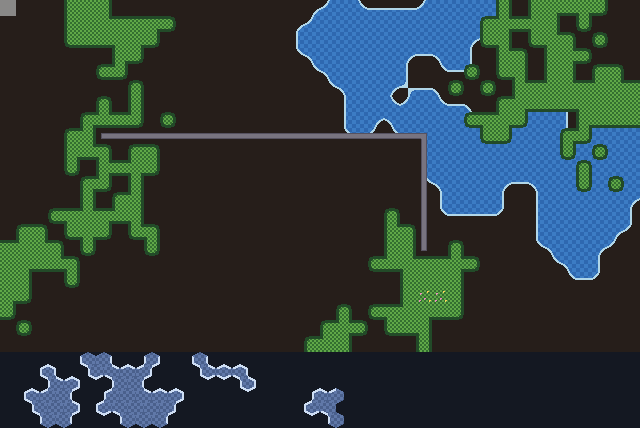
Painting terrain and choosing tiles are separate jobs. This program keeps one grid of terrain ids and lets grid/autotile choose the frame for every cell, three times over with three different schemes:
- Grass is a blob set: all eight neighbours matter, reduced to the 47
distinct cases. Its sheet is generated from a six-tile template by
autotile.ExpandBlob, and a flower tile is added as a random variant of the fully surrounded case. - Walls are an edge set: only the four edge neighbours matter, so sixteen tiles cover every case.
- Water is a two-colour corner Wang set: colours are matched at the four corners rather than at the edges, so shorelines curve around the land rather than following the cell boundaries.
All three read the same grid. The wall and grass rules read the terrain ids directly; the water rules read the same grid through a function that maps it to two Wang colours. That is the pattern the package is built for: the game owns one grid, and each layer has its own rules over it.
The strip along the bottom of the window is a fourth mapper on a
different layout. Mapper.Layout says where each direction's
neighbour lies, and its zero value is the square grid the map above
uses. The strip sets autotile.HexRowsOdd instead, so the same package
walks pointy-top hexagons in staggered rows, and picks frames from a
64-tile Edge64 set: six neighbours instead of four, and no diagonals.
The tiles are drawn by gfx as three tilemaps and, for
the hexagons, one sheet drawn a frame at a time.
The 2D graphics guide covers sheets,
tilemaps, autotiling and layouts, and tiled reads
terrain sets from the Tiled editor into the same rules, taking the
layout from Map.Layout.
Run it:
go run ./examples/autotile -seconds 3 -shot out.png
The flags are -seconds N and -shot file.png. A left click paints with
the current brush, a right click erases, and 1, 2 and 3 select grass,
wall and water. The hexagonal strip is generated once and is not
paintable.
Package, constants and state
The terrain ids are a plain enumeration and the Wang colours are a second
one, because they are different things: an id says what a cell is, a Wang
colour says what a corner should show. The game keeps a texture, a
tilemap and a *autotile.Mapper per layer.
The second half of the first constant block is the hexagonal strip's
geometry. Pointy-top hexagons in staggered rows sit a tile apart
horizontally but only three quarters of a tile apart vertically, because
consecutive rows interlock; hexRow is that spacing, hexStripH the
height of hexH such rows plus the last row's overhang, and windowH
the map plus the strip. hexTerrainW is one wider than the strip is
drawn, so the odd rows, which are shifted half a tile right, still have
a neighbour to the east inside the grid.
// Command autotile paints terrain that picks its own tiles. Grass is a
// 47-tile blob set composed from a six-tile template by ExpandBlob, with
// a flower variant mixed into the filled tiles; walls are a 16-tile edge
// set; water is a two-colour corner Wang set whose shorelines curve
// around the land. All three read the same terrain grid through one
// autotile.Mapper each. Paint with the left mouse button, erase with the
// right; 1 selects the grass brush, 2 the wall brush and 3 the water
// brush. Escape quits.
//
// The strip along the bottom is the same idea on a hexagonal layout: a
// 64-tile edge set on hexagons in staggered rows, where each tile shows
// a rim on the sides no neighbour continues.
package main

import (
	"flag"
	"fmt"
	"image"
	"image/color"
	"image/draw"
	"math"
	"os"

	"github.com/matjam/bunyip/engine"
	"github.com/matjam/bunyip/gfx"
	"github.com/matjam/bunyip/grid/autotile"
	"github.com/matjam/bunyip/input"
	"github.com/matjam/bunyip/lin"
	"github.com/matjam/bunyip/rng"
)

const (
	tile = 16
	mapW = 40
	mapH = 22
	// The hexagonal strip below the square map: pointy-top hexagons in
	// staggered rows, a tile wide, with rows three quarters of a tile
	// apart and the odd rows shifted half a tile right.
	hexW, hexH  = 20, 6
	hexRow      = tile * 3 / 4
	hexTop      = mapH * tile
	hexStripH   = hexH*hexRow + tile/4
	windowH     = mapH*tile + hexStripH
	hexSideLen  = tile / 2 // the vertical sides of a pointy-top hexagon
	hexTerrainW = hexW + 1 // one column of margin, so the shifted rows fit
)

const (
	empty = iota
	grass
	wall
	water
)

// Wang colours for the water set: land and water.
const (
	landColor  = 1
	waterColor = 2
)

type game struct {
	seconds float64
	shot    string

	terrain  []int
	grassTex *gfx.Texture
	wallTex  *gfx.Texture
	waterTex *gfx.Texture
	grassMap *gfx.Tilemap
	wallMap  *gfx.Tilemap
	waterMap *gfx.Tilemap
	grassRul *autotile.Mapper
	wallRul  *autotile.Mapper
	waterRul *autotile.Mapper
	hexTex   *gfx.Texture
	hexSheet *gfx.Sheet
	hexLand  []int // the hexagonal strip's terrain, hexTerrainW by hexH
	hexFrame []int // its frames, one per cell
	brush    int
	shotDone bool
}
The two accessors are the whole interface the rules have to the map. at
returns the terrain id at a cell, and color reports the same grid as
Wang colours, water or land.
func (g *game) at(x, y int) int { return g.terrain[y*mapW+x] }

// color is the terrain grid seen as Wang colours: water or land.
func (g *game) color(x, y int) int {
	if g.at(x, y) == water {
		return waterColor
	}
	return landColor
}
Init: three sheets and three rule sets
autotile.ExpandBlob takes a six-tile template and a tile size and
returns a sheet of the 47 blob tiles in canonical order, with the frames
array that indexes it. Drawing six tiles by hand instead of 47 is the
point of it.
autotile.Blob47(grass, grassFrames) builds the rules for cells whose id
is grass, and .Variant(255, 47, 0.4) adds an alternative for one
neighbourhood: mask 255 is the fully surrounded case, frame 47 is the
flower tile added past the 47 the expander wrote, and 0.4 is its weight
against the original's 1. The choice is made from the cell position, so
it is stable from frame to frame rather than flickering.
autotile.Edge16(wall, wallFrames) indexes its frames by a four-bit mask
of connected neighbours, north 1, east 2, south 4 and west 8, which is
the order makeWalls draws them in.
autotile.Wang(autotile.WangCorners, waterTiles()) matches colours at
the four diagonal positions. For each cell the mapper works out what
colour every corner should show and places the tile that matches; where
two terrains meet, the higher colour wins.
gfx.NewSheet cuts a texture into tiles of a size, and gfx.NewTilemap
is a grid of frame indices over one sheet.
The map is then seeded with a few random walks and a wall run so there is
something to look at, refresh fills every tilemap, and initHexes
builds the strip below.
func (g *game) Init(ctx *engine.Context) error {
	// The grass sheet: 47 blob tiles composed from a drawn template,
	// with a 48th flower tile added as a variant of the filled case.
	img, frames := autotile.ExpandBlob(makeTemplate(), tile)
	addFlowers(img)
	var err error
	if g.grassTex, err = ctx.Gfx.NewTexture(img, gfx.TextureOptions{}); err != nil {
		return err
	}
	var grassFrames [47]int
	copy(grassFrames[:], frames[:])
	g.grassRul = &autotile.Mapper{Rules: autotile.Blob47(grass, grassFrames).Variant(255, 47, 0.4)}
	g.grassMap = gfx.NewTilemap(gfx.NewSheet(g.grassTex, tile, tile), mapW, mapH)

	if g.wallTex, err = ctx.Gfx.NewTexture(makeWalls(), gfx.TextureOptions{}); err != nil {
		return err
	}
	var wallFrames [16]int
	for i := range wallFrames {
		wallFrames[i] = i
	}
	g.wallRul = &autotile.Mapper{Rules: autotile.Edge16(wall, wallFrames)}
	g.wallMap = gfx.NewTilemap(gfx.NewSheet(g.wallTex, tile, tile), mapW, mapH)

	// The water sheet: one tile per combination of water corners, which
	// is the complete two-colour corner Wang set.
	if g.waterTex, err = ctx.Gfx.NewTexture(makeWater(), gfx.TextureOptions{}); err != nil {
		return err
	}
	g.waterRul = &autotile.Mapper{Rules: autotile.Wang(autotile.WangCorners, waterTiles())}
	g.waterMap = gfx.NewTilemap(gfx.NewSheet(g.waterTex, tile, tile), mapW, mapH)

	// Seed the map so there is something to look at: grass blobs from a
	// few random walks, a pond, and a wall run.
	g.terrain = make([]int, mapW*mapH)
	r := rng.New(7)
	walk := func(id, steps int) {
		x, y := r.Intn(mapW), r.Intn(mapH)
		for range steps {
			if x >= 0 && y >= 0 && x < mapW && y < mapH {
				g.terrain[y*mapW+x] = id
			}
			x += r.Intn(3) - 1
			y += r.Intn(3) - 1
		}
	}
	for range 6 {
		walk(grass, 90)
	}
	for range 3 {
		walk(water, 60)
	}
	for x := 6; x < 26; x++ {
		g.terrain[8*mapW+x] = wall
	}
	for y := 8; y < 16; y++ {
		g.terrain[y*mapW+26] = wall
	}
	g.brush = grass
	g.refresh()
	return g.initHexes(ctx)
}
The hexagonal strip: a layout instead of a grid
autotile.HexRowsOdd is the layout the strip uses: pointy-top hexagons
in staggered rows with the odd rows shifted right, which is what the
Tiled editor calls stagger axis Y with stagger index odd. The other
layouts are HexRowsEven, HexColsOdd and HexColsEven for flat-top
hexagons in staggered columns, HexAxial for the same six directions in
axial coordinates, and IsoDiamond for a diamond grid. The zero value,
Square, is what the three mappers above use without saying so.
The layout is not a drawing decision. It answers one question, which cell
lies in a given direction from this one, and everything else follows.
Layout.Neighbour and Layout.Dirs are exported for a game's own code,
and the random walk here uses them directly: it picks one of the six
directions the layout lists and steps to whatever cell the layout names.
Nothing in initHexes knows that a hexagon's neighbour to the north-east
is (x, y-1) on even rows and (x+1, y-1) on odd ones. That table lives
in the layout.
autotile.Edge64 is Edge16's hexagonal counterpart: a hexagon has six
sides, so a six-bit mask of connected neighbours needs 64 tiles. Bit i
is the i-th direction the layout uses, clockwise, which for the rows
layouts is north-east, east, south-east, south-west, west and north-west.
makeHexes draws one tile per mask, so frames[i] = i here: the sheet is
the complete set in mask order and needs no indirection.
A hexagonal layout has six neighbours and no diagonals, so it takes
Edge64 or Wang rules. Blob47 and Corner16 need the eight
neighbours of a square or isometric grid.
Mapper.Apply is the same call as for the square map, with the layout
set: it walks hexTerrainW by hexH cells, reads terrain through
g.hexAt and writes a frame per cell into g.hexFrame. The strip is
generated once, so nothing recomputes it after Init.
// hexLayout is the strip's grid: pointy-top hexagons in staggered rows
// with the odd rows shifted right, which is what the Tiled editor calls
// stagger axis Y with stagger index odd.
const hexLayout = autotile.HexRowsOdd

// initHexes builds the hexagonal strip: a 64-tile edge set, a patch of
// terrain walked over the layout's own neighbours, and the frames for
// it. Nothing here knows the hexagon offsets; the layout does.
func (g *game) initHexes(ctx *engine.Context) error {
	var err error
	if g.hexTex, err = ctx.Gfx.NewTexture(makeHexes(), gfx.TextureOptions{}); err != nil {
		return err
	}
	g.hexSheet = gfx.NewSheet(g.hexTex, tile, tile)
	g.hexLand = make([]int, hexTerrainW*hexH)
	r := rng.New(11)
	for _, start := range [][2]int{{3, 2}, {9, 3}, {15, 2}, {19, 4}} {
		x, y := start[0], start[1]
		dirs := hexLayout.Dirs()
		for range 40 {
			if x >= 0 && y >= 0 && x < hexTerrainW && y < hexH {
				g.hexLand[y*hexTerrainW+x] = 1
			}
			x, y = hexLayout.Neighbour(x, y, dirs[r.Intn(len(dirs))])
		}
	}
	var frames [64]int
	for i := range frames {
		frames[i] = i // frame = mask: the set is complete
	}
	g.hexFrame = make([]int, hexTerrainW*hexH)
	m := autotile.Mapper{Rules: autotile.Edge64(1, frames), Layout: hexLayout}
	m.Apply(hexTerrainW, hexH, g.hexAt, func(x, y, f int) { g.hexFrame[y*hexTerrainW+x] = f })
	return nil
}

func (g *game) hexAt(x, y int) int { return g.hexLand[y*hexTerrainW+x] }
Apply computes a frame for every cell and hands it to a setter, which
is Tilemap.Set for the square layers and a closure that fills a slice
for the strip, and passes -1 for cells its rules leave empty. The water
rules get g.color and the other two get g.at, which is the only
difference between the three calls.
// refresh reapplies every rule set to the whole map.
func (g *game) refresh() {
	g.grassRul.Apply(mapW, mapH, g.at, g.grassMap.Set)
	g.wallRul.Apply(mapW, mapH, g.at, g.wallMap.Set)
	g.waterRul.Apply(mapW, mapH, g.color, g.waterMap.Set)
}
Update: painting
The pointer is converted to a cell by integer division. Painting happens while a button is held rather than on the press edge, so dragging paints a line.
Cell is the reason painting stays cheap: a change at one cell can only
affect that cell and its neighbours, so it recomputes those instead of
the whole map. Calling refresh here would work and would do 880 cells
of work per painted cell.
func (g *game) Update(ctx *engine.Context) error {
	in := ctx.Input
	if in.KeyPressed(input.KeyEscape) || (g.seconds > 0 && ctx.Time >= g.seconds) {
		ctx.Quit()
	}
	if in.KeyPressed(input.Key1) {
		g.brush = grass
	}
	if in.KeyPressed(input.Key2) {
		g.brush = wall
	}
	if in.KeyPressed(input.Key3) {
		g.brush = water
	}
	mx, my := in.Mouse()
	x, y := int(mx)/tile, int(my)/tile
	if x >= 0 && y >= 0 && x < mapW && y < mapH {
		want := -1
		if in.MouseDown(input.MouseLeft) {
			want = g.brush
		} else if in.MouseDown(input.MouseRight) {
			want = empty
		}
		if want >= 0 && g.terrain[y*mapW+x] != want {
			g.terrain[y*mapW+x] = want
			// One changed cell only needs its neighbourhood redone.
			g.grassRul.Cell(x, y, mapW, mapH, g.at, g.grassMap.Set)
			g.wallRul.Cell(x, y, mapW, mapH, g.at, g.wallMap.Set)
			g.waterRul.Cell(x, y, mapW, mapH, g.color, g.waterMap.Set)
		}
	}
	return nil
}
The pointer test uses the square map's bounds, so a click in the strip paints nothing.
Draw: three tilemaps and the strip
The layers are drawn in order, water first, so grass covers water and
walls cover both. DrawTilemap takes a position and a tint; a zero
gfx.Color means white, which is no tint at all. The hover highlight is
a translucent rectangle over the cell under the pointer.
func (g *game) Draw(ctx *engine.Context) error {
	gr := ctx.Gfx
	gr.FillRect(0, 0, float32(mapW*tile), float32(mapH*tile), gfx.RGB(38, 30, 26))
	gr.DrawTilemap(g.waterMap, 0, 0, gfx.Color{})
	gr.DrawTilemap(g.grassMap, 0, 0, gfx.Color{})
	gr.DrawTilemap(g.wallMap, 0, 0, gfx.Color{})
	mx, my := ctx.Input.Mouse()
	x, y := int(mx)/tile, int(my)/tile
	if x >= 0 && y >= 0 && x < mapW && y < mapH {
		gr.FillRect(float32(x*tile), float32(y*tile), tile, tile, gfx.RGBA(255, 255, 255, 60))
	}
	g.drawHexes(gr)
	if g.shot != "" && !g.shotDone && (g.seconds == 0 || ctx.Time >= g.seconds/2) {
		g.shotDone = true
		ctx.Screenshot(g.shot)
	}
	return nil
}
The strip is not a Tilemap, because a tilemap lays its frames out on a
square lattice and these hexagons interlock. DrawFrame draws one frame
of a sheet at a position instead, and the placement is the drawing half
of the layout: every second row moves half a tile right, matching
HexRowsOdd, and consecutive rows are hexRow apart, three quarters of
a tile, so the pointed tops and bottoms overlap. A frame of -1, which
Apply writes for a cell the rules leave empty, draws nothing.
// drawHexes draws the hexagonal strip. Every second row is shifted half
// a tile right and the rows overlap by a quarter of a tile, which is how
// pointy-top hexagons in staggered rows meet.
func (g *game) drawHexes(gr *gfx.Graphics) {
	gr.FillRect(0, hexTop, mapW*tile, hexStripH, gfx.RGB(20, 24, 34))
	for y := range hexH {
		for x := range hexTerrainW {
			f := g.hexFrame[y*hexTerrainW+x]
			if f < 0 {
				continue
			}
			px := float32(x * tile)
			if y%2 == 1 {
				px += tile / 2
			}
			gr.DrawFrame(g.hexSheet, f, gfx.Sprite{Pos: lin.V2(px, float32(hexTop+y*hexRow))})
		}
	}
}

func (g *game) Shutdown(ctx *engine.Context) {
	g.grassTex.Destroy()
	g.wallTex.Destroy()
	g.waterTex.Destroy()
	g.hexTex.Destroy()
}
The hexagon tiles
makeHexes draws all 64 tiles into an eight by eight sheet. Each tile is
a pointy-top hexagon a tile wide, given by six vertices clockwise from
the top, with vertical left and right sides hexSideLen long.
Whether a pixel is inside the hexagon is one test done six times: the cross product of the vector to the pixel with the edge, divided by the edge length, is the signed distance to that edge's line. The vertices run clockwise on a y-down screen, so a positive distance means the pixel is outside, and the smallest magnitude among the six says which side the pixel is nearest.
That nearest side is what makes the tile mean something. If the mask bit for it is clear, this cell has no neighbour of the same terrain on that side, so the pixels within a couple of units of it are drawn in the rim colour. Where a neighbour does continue, the side is drawn as plain body and the two hexagons read as one region. The mask bits are in the layout's own direction order, clockwise from north-east, which is the order the vertex loop walks the sides in.
// makeHexes draws the 64 hexagon tiles: a pointy-top hexagon filled with
// a checker, with a light rim along each side the mask says has no
// neighbour of the same terrain. Bit i is the i-th direction the rows
// layout uses, clockwise from north-east, which is the order the sides
// are walked here.
func makeHexes() *image.RGBA {
	const cols = 8
	img := image.NewRGBA(image.Rect(0, 0, cols*tile, 64/cols*tile))
	body := color.RGBA{R: 96, G: 120, B: 168, A: 255}
	shade := color.RGBA{R: 74, G: 96, B: 140, A: 255}
	rim := color.RGBA{R: 206, G: 222, B: 244, A: 255}
	// The hexagon's vertices, clockwise from the top, for a tile-wide
	// pointy-top hexagon whose left and right sides are vertical.
	const half, side = tile / 2, hexSideLen
	verts := [6][2]float64{
		{half, 0}, {tile, (tile - side) / 2}, {tile, (tile + side) / 2},
		{half, tile}, {0, (tile + side) / 2}, {0, (tile - side) / 2},
	}
	for mask := range 64 {
		ox, oy := mask%cols*tile, mask/cols*tile
		for py := range tile {
			for px := range tile {
				fx, fy := float64(px)+0.5, float64(py)+0.5
				inside, nearest, nearD := true, 0, math.Inf(1)
				for i := range 6 {
					a, b := verts[i], verts[(i+1)%6]
					ex, ey := b[0]-a[0], b[1]-a[1]
					// The vertices run clockwise on a y-down screen, so a
					// point outside an edge is on its left.
					d := ((fx-a[0])*ey - (fy-a[1])*ex) / math.Hypot(ex, ey)
					if d > 0 {
						inside = false
						break
					}
					if -d < nearD {
						nearD, nearest = -d, i
					}
				}
				if !inside {
					continue
				}
				c := body
				if (px/3+py/3)%2 == 0 {
					c = shade
				}
				if nearD < 2.2 && mask&(1<<nearest) == 0 {
					c = rim
				}
				img.SetRGBA(ox+px, oy+py, c)
			}
		}
	}
	return img
}
The Wang tile set
waterTiles describes the sixteen tiles to the rules: for each frame,
which of its four corners are water. autotile.WangTile carries a frame
and a colour per direction, and the directions used for a corner set are
DirNW, DirNE, DirSW and DirSE. Frame 0, all land, is drawn empty,
so a dry cell contributes nothing.
// waterTiles lists the sixteen corner Wang tiles: frame m has water at
// the corners whose bits are set (north-west 1, north-east 2,
// south-west 4, south-east 8) and land elsewhere. Frame 0, all land,
// is a transparent tile so dry cells draw nothing.
func waterTiles() []autotile.WangTile {
	tiles := make([]autotile.WangTile, 16)
	for m := range tiles {
		t := autotile.WangTile{Frame: m}
		for i, d := range []int{autotile.DirNW, autotile.DirNE, autotile.DirSW, autotile.DirSE} {
			t.Colors[d] = landColor
			if m&(1<<i) != 0 {
				t.Colors[d] = waterColor
			}
		}
		tiles[m] = t
	}
	return tiles
}
makeWater draws them. Each pixel interpolates the four corners'
wetness bilinearly and is water past the halfway mark, which is what
makes a single wet corner round off and two adjacent wet corners meet in
a straight shore. A band just inside the boundary is foam.
// makeWater draws the sixteen water tiles. Each pixel interpolates the
// four corners' wetness and is water past the halfway mark, so a lone
// wet corner rounds off and two wet corners meet in a straight shore;
// a band just inside the shore is foam.
func makeWater() *image.RGBA {
	img := image.NewRGBA(image.Rect(0, 0, 16*tile, tile))
	deep := color.RGBA{R: 46, G: 104, B: 176, A: 255}
	wave := color.RGBA{R: 60, G: 124, B: 196, A: 255}
	foam := color.RGBA{R: 176, G: 214, B: 232, A: 255}
	for m := range 16 {
		var c [4]float64 // NW, NE, SW, SE wetness
		for i := range c {
			if m&(1<<i) != 0 {
				c[i] = 1
			}
		}
		for py := range tile {
			for px := range tile {
				u := (float64(px) + 0.5) / tile
				v := (float64(py) + 0.5) / tile
				wet := c[0]*(1-u)*(1-v) + c[1]*u*(1-v) + c[2]*(1-u)*v + c[3]*u*v
				if wet < 0.5 {
					continue
				}
				col := deep
				if (px/4+py/4)%2 == 0 {
					col = wave
				}
				if wet < 0.62 {
					col = foam
				}
				img.SetRGBA(m*tile+px, py, col)
			}
		}
	}
	return img
}
The blob template
makeTemplate draws the six tiles ExpandBlob expects: the inner tile,
a preview it does not read, and the four corners of a filled two by two
block. The expander builds each of the 47 outputs from four quarter
tiles taken from those, so the art only has to be consistent at the
quarter boundaries.
The rim logic is where the care goes. Edges get a three-pixel rim, outer corners are rounded through a circle test, and the inner tile carries a rim block in each corner so that two grass edges meeting around an empty diagonal turn the corner at the same width.
// makeTemplate draws the six-tile grass template ExpandBlob expects:
// the inside-corner tile, a preview, and the four corners of a filled
// two-by-two block. Edges get a dark rim and rounded silhouettes.
func makeTemplate() *image.RGBA {
	img := image.NewRGBA(image.Rect(0, 0, 2*tile, 3*tile))
	light := color.RGBA{R: 96, G: 168, B: 72, A: 255}
	dark := color.RGBA{R: 52, G: 112, B: 48, A: 255}
	rim := color.RGBA{R: 34, G: 74, B: 40, A: 255}
	// fill paints one template tile: grass with a subtle checker, a rim
	// on the exposed sides, and rounded corners where two rims meet.
	fill := func(tx, ty int, top, right, bottom, left bool) {
		const r = 5
		for py := range tile {
			for px := range tile {
				c := light
				if (px/2+py/2)%2 == 0 {
					c = dark
				}
				edge := top && py < 3 || bottom && py >= tile-3 || left && px < 3 || right && px >= tile-3
				if edge {
					c = rim
				}
				// Round the silhouette at outer corners.
				cx, cy, corner := 0, 0, false
				if top && left && px < r && py < r {
					cx, cy, corner = r, r, true
				}
				if top && right && px >= tile-r && py < r {
					cx, cy, corner = tile-1-r, r, true
				}
				if bottom && left && px < r && py >= tile-r {
					cx, cy, corner = r, tile-1-r, true
				}
				if bottom && right && px >= tile-r && py >= tile-r {
					cx, cy, corner = tile-1-r, tile-1-r, true
				}
				if corner {
					dx, dy := px-cx, py-cy
					switch d := dx*dx + dy*dy; {
					case d > r*r:
						continue // outside the rounded corner
					case d > (r-3)*(r-3):
						c = rim
					}
				}
				img.SetRGBA(tx*tile+px, ty*tile+py, c)
			}
		}
	}
	fill(1, 0, true, true, true, true) // preview: the island look
	fill(0, 1, true, false, false, true)
	fill(1, 1, true, true, false, false)
	fill(0, 2, false, false, true, true)
	fill(1, 2, false, true, true, false)
	// The inner tile: interior grass with a rim block in each corner.
	// Where two grass edges meet around an empty diagonal cell, the
	// 3-pixel rims arriving from both neighbours turn the corner
	// through this block at the same width. The empty cell itself lies
	// entirely in the neighbour, so nothing here is transparent.
	fill(0, 0, false, false, false, false)
	for _, c := range [4][2]int{{0, 0}, {tile - 3, 0}, {0, tile - 3}, {tile - 3, tile - 3}} {
		for dy := range 3 {
			for dx := range 3 {
				img.SetRGBA(c[0]+dx, c[1]+dy, rim)
			}
		}
	}
	return img
}
addFlowers copies the filled tile into the sheet's unused 48th slot and
scatters a few pixels on it. The sheet is eight tiles wide, which is why
the source and destination are computed with 8 as the divisor.
// addFlowers copies the filled tile into the sheet's spare 48th slot and
// scatters flowers on it, for the Variant of the full neighbourhood.
func addFlowers(img *image.RGBA) {
	src := image.Pt(46%8*tile, 46/8*tile) // frame 46 is the filled tile
	dst := image.Rect(47%8*tile, 47/8*tile, 47%8*tile+tile, 47/8*tile+tile)
	draw.Draw(img, dst, img, src, draw.Src)
	pink := color.RGBA{R: 235, G: 140, B: 190, A: 255}
	gold := color.RGBA{R: 245, G: 210, B: 90, A: 255}
	for i, p := range [][2]int{{4, 5}, {11, 3}, {8, 10}, {13, 12}, {3, 12}} {
		c := pink
		if i%2 == 1 {
			c = gold
		}
		img.SetRGBA(dst.Min.X+p[0], dst.Min.Y+p[1], c)
		img.SetRGBA(dst.Min.X+p[0]+1, dst.Min.Y+p[1], c)
		img.SetRGBA(dst.Min.X+p[0], dst.Min.Y+p[1]+1, c)
	}
}
The wall tiles
makeWalls draws the sixteen edge tiles: a core block with an arm
towards each connected side, indexed by the same mask Edge16 uses. The
shape is filled first and outlined afterwards, and a pixel on the tile
border is not outlined because the arm continues into the next tile,
which is what makes a straight run read as one wall.
// makeWalls draws the 16 edge tiles: a stone block with arms toward each
// connected side, indexed by the Edge16 mask. The shape is filled first
// and outlined afterwards, so a straight run reads as one wall rather
// than a chain of blocks.
func makeWalls() *image.RGBA {
	img := image.NewRGBA(image.Rect(0, 0, 16*tile, tile))
	stone := color.RGBA{R: 120, G: 116, B: 128, A: 255}
	shade := color.RGBA{R: 86, G: 82, B: 96, A: 255}
	const a, b = 5, 11 // the core block
	for mask := range 16 {
		var solid [tile][tile]bool
		fill := func(x0, y0, x1, y1 int) {
			for py := y0; py < y1; py++ {
				for px := x0; px < x1; px++ {
					solid[py][px] = true
				}
			}
		}
		fill(a, a, b, b)
		if mask&1 != 0 { // north
			fill(a, 0, b, a)
		}
		if mask&2 != 0 { // east
			fill(b, a, tile, b)
		}
		if mask&4 != 0 { // south
			fill(a, b, b, tile)
		}
		if mask&8 != 0 { // west
			fill(0, a, a, b)
		}
		for py := range tile {
			for px := range tile {
				if !solid[py][px] {
					continue
				}
				// Outline pixels are those with an empty neighbour inside
				// the tile; at the tile border the arm continues next door.
				c := stone
				for _, o := range [4][2]int{{0, -1}, {1, 0}, {0, 1}, {-1, 0}} {
					nx, ny := px+o[0], py+o[1]
					if nx >= 0 && ny >= 0 && nx < tile && ny < tile && !solid[ny][nx] {
						c = shade
					}
				}
				img.SetRGBA(mask*tile+px, py, c)
			}
		}
	}
	return img
}
main
The window is exactly the map plus the strip below it, so a cell is 16
pixels on the screen and the pointer arithmetic in Update needs no
camera.
func main() {
	seconds := flag.Float64("seconds", 0, "exit after this many seconds")
	shot := flag.String("shot", "", "write the frame at -seconds/2 to this PNG")
	flag.Parse()
	err := engine.Run(engine.Config{Title: "Bunyip autotile", Width: mapW * tile, Height: windowH},
		&game{seconds: *seconds, shot: *shot})
	if err != nil {
		fmt.Fprintln(os.Stderr, "autotile:", err)
		os.Exit(1)
	}
}
What to try
- Raise the flower weight in
Initfrom 0.4 to 4 and watch the variant take over the filled cells. - Paint a single water cell and look at the four corners it rounds; then
paint one beside it and watch
CellinUpdateredo just the neighbourhood. - Change
hexLayouttoautotile.HexRowsEvenand watch the strip's terrain change shape without a line of drawing code changing. The drawing indrawHexesstill shifts the odd rows, so it now disagrees with the layout: fix it by shifting the even rows instead, and see how little else has to move. - Give the hexagonal walk a longer run or a different seed in
initHexesand watchEdge64rim only the sides that reach open water. - Give the wall rules a
VariantinInitfor the fully connected mask and draw a cracked block for it inmakeWalls. - Set
OutsideFixedandOutsideon aMapperinInitand see how the map's border behaves when the outside is treated as empty. - Swap the grass rules for
autotile.Edge16inInitand see what the 47-tile set buys over the sixteen.