Example examples/tiles
Tiles
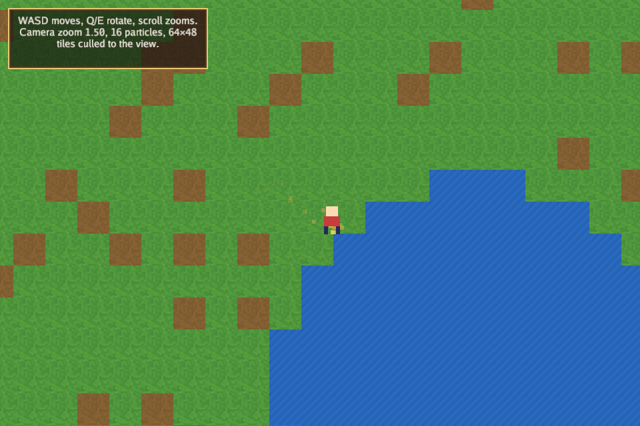
This is the tour of the 2D half of the engine. It generates a sprite
sheet at start-up, fills a 64 by 48 tilemap from it, follows a walking
character with a Camera2D that zooms and rotates, plays a four-frame
walk cycle, sorts the world into draw layers, sprinkles particles from a
repeating timer with a tween for each one's life, and draws a nine-slice
HUD with wrapped, centred text in screen space.
The engine areas are gfx for the sheet, the tilemap, the camera, the animation and the nine-slice, timer for the repeating spawn, tween for the particle fade and the character's bob, rng for a seeded map, and input for movement. The guides that cover it are 2D graphics and Animation.
Run it with:
go run ./examples/tiles -seconds 3 -shot out.png
The flags are -seconds N and -shot file.png. Move with WASD or the
arrow keys, Q and E rotate the camera, the scroll wheel zooms, Escape
quits. When -seconds is given and nothing is pressed, the character
wanders on its own so an unattended run still shows motion.
Constants and the frame indices
Two tile sizes are kept apart on purpose. tile is the size of a frame
in the sheet image and tileDraw is the size a tile occupies on screen,
so the art is 16 pixels and the world is drawn at 32 units per tile.
Keeping them separate means the map can be scaled without touching the
art.
The frame constants are an iota block naming positions in the sheet.
frameWalk0 is the first of four consecutive walk frames, which is what
lets the animation be written as a list of offsets from it.
const (
	tile     = 16 // sheet frame size
	tileDraw = 32 // on-screen tile size
	mapW     = 64
	mapH     = 48
)

// Sheet frames.
const (
	frameGrass = iota
	frameDirt
	frameWater
	frameWall
	frameWalk0 // four walking frames follow
)
The particle and game types
A particle is a position, a velocity, a colour and a *tween.Tween that
runs from 1 to 0 over 0.8 seconds. Using a tween rather than a float
lets the fade have an easing curve without any extra code, and
Done() says when to drop the particle.
game holds the two textures and the objects built from them, the
animation and its playback state, the player position and facing, the
camera, a timer scheduler, the particle slice, the bob tween and a
seeded random source.
type particle struct {
	pos   lin.Vec2
	vel   lin.Vec2
	life  *tween.Tween
	color gfx.Color
}

type game struct {
	seconds float64
	shot    string

	font      *gfx.Font
	sheetTex  *gfx.Texture
	hudTex    *gfx.Texture
	sheet     *gfx.Sheet
	tilemap   *gfx.Tilemap
	walk      gfx.Animation
	anim      gfx.AnimState
	player    lin.Vec2
	facing    float32
	cam       gfx.Camera2D
	timers    timer.Scheduler
	particles []particle
	bob       *tween.Tween
	random    *rng.Rand
	shotDone  bool
}
Init: sheet, map, animation, camera and timer
gfx.NewSheet(tex, w, h) divides a texture into frames of a given size,
numbered left to right and top to bottom. gfx.NewTilemap(sheet, w, h)
is a grid of frame indices; TileW and TileH say how large each cell
is drawn, and Set writes one cell. Drawing the map later is one call
that culls to the view, so a large map costs what is on screen rather
than what exists.
The map is generated from rng.New(7), a seeded source, so the same
map appears on every run. random.Chance(0.12) is the package's
convenience for a weighted coin.
gfx.Animation is a list of frame indices with a rate and a loop flag;
gfx.AnimState is the playback position, advanced separately, so many
characters can share one animation. anim.Play(&g.walk) points the
state at it.
The camera is a gfx.Camera2D with a position and a zoom. Its zero
value is a camera at the origin with zoom 1, so only the fields that
differ are set.
The bob tween is set to repeat forever with Repeat = -1 and to reverse
on each pass with YoYo = true, which gives a value that oscillates
between 0 and 1 without any per-frame arithmetic.
The timer at the end fires every 0.05 seconds for the life of the
program and appends a particle behind the player, but only while the
animation is playing, which is this program's way of saying "while
moving". timer.Scheduler is advanced by the game in Update, so it
runs on game time and stops when the game does.
func (g *game) Init(ctx *engine.Context) error {
	var err error
	if g.font, err = ctx.Gfx.NewFont(goregular.TTF, 15, gfx.FontOptions{}); err != nil {
		return err
	}
	if g.sheetTex, err = ctx.Gfx.NewTexture(makeSheet(), gfx.TextureOptions{}); err != nil {
		return err
	}
	if g.hudTex, err = ctx.Gfx.NewTexture(makeHUD(), gfx.TextureOptions{Linear: true, NoMipmaps: true}); err != nil {
		return err
	}
	g.sheet = gfx.NewSheet(g.sheetTex, tile, tile)
	g.random = rng.New(7)
	g.tilemap = gfx.NewTilemap(g.sheet, mapW, mapH)
	g.tilemap.TileW, g.tilemap.TileH = tileDraw, tileDraw
	for y := range mapH {
		for x := range mapW {
			f := frameGrass
			switch {
			case x == 0 || y == 0 || x == mapW-1 || y == mapH-1:
				f = frameWall
			case (x-40)*(x-40)+(y-30)*(y-30) < 40:
				f = frameWater
			case g.random.Chance(0.12):
				f = frameDirt
			}
			g.tilemap.Set(x, y, f)
		}
	}
	g.walk = gfx.Animation{Frames: []int{frameWalk0, frameWalk0 + 1, frameWalk0 + 2, frameWalk0 + 3}, FPS: 8, Loop: true}
	g.anim.Play(&g.walk)
	g.player = lin.V2(mapW*tileDraw/2, mapH*tileDraw/2)
	g.cam = gfx.Camera2D{Position: g.player, Zoom: 1.5}
	g.bob = tween.New(0, 1, 0.6, tween.InOutSine)
	g.bob.Repeat, g.bob.YoYo = -1, true
	// A timer sprinkles particles behind the player while it moves.
	g.timers.Every(0.05, func() {
		if g.anim.Anim == nil {
			return
		}
		g.particles = append(g.particles, particle{
			pos:   g.player.Add(lin.V2(tileDraw/2, tileDraw)),
			vel:   lin.V2(g.random.Between(-40, 40), g.random.Between(-60, -20)),
			life:  tween.New(1, 0, 0.8, tween.OutQuad),
			color: gfx.RGB(uint8(200+g.random.Intn(55)), uint8(160+g.random.Intn(60)), 80),
		})
	})
	return nil
}

func (g *game) Shutdown(ctx *engine.Context) {
	g.font.Destroy()
	g.sheetTex.Destroy()
	g.hudTex.Destroy()
}
The HUD texture is created with NoMipmaps: true. That is the named
zero-with-meaning convention: the zero value of TextureOptions builds
mipmaps, and a field whose zero must mean something of its own is named
for what it turns off. A nine-slice drawn at one scale wants no
mipmaps.
Update: movement, camera and particles
Movement accumulates a direction from the keys, normalises it so
diagonals are not faster, and scales it by 160 units per second times
ctx.Delta. The candidate position is tested with walkable before it
is taken, which is collision by lookup rather than by physics.
The animation is only advanced while moving, and g.anim.Anim = nil
when stopped, which both freezes the character and stops the particle
timer's body from doing anything.
The camera position is not set to the player's; it is interpolated
towards it with Lerp and a factor of 1 - 0.02^dt. That form is
frame-rate independent: it converges at the same speed whatever the step
is, which a plain Lerp(a, b, 0.1) does not.
The particle update walks the slice, advances each tween, moves each
particle and compacts the survivors into g.particles[:0], which
rewrites the same backing array rather than allocating.
func (g *game) Update(ctx *engine.Context) error {
	in := ctx.Input
	if in.KeyPressed(input.KeyEscape) || (g.seconds > 0 && ctx.Time >= g.seconds) {
		ctx.Quit()
	}
	if g.shot != "" && !g.shotDone && (g.seconds == 0 || ctx.Time >= g.seconds/2) {
		ctx.Screenshot(g.shot)
		g.shotDone = true
	}
	dt := float32(ctx.Delta)
	var move lin.Vec2
	if in.KeyDown(input.KeyA) || in.KeyDown(input.KeyLeft) {
		move.X--
	}
	if in.KeyDown(input.KeyD) || in.KeyDown(input.KeyRight) {
		move.X++
	}
	if in.KeyDown(input.KeyW) || in.KeyDown(input.KeyUp) {
		move.Y--
	}
	if in.KeyDown(input.KeyS) || in.KeyDown(input.KeyDown) {
		move.Y++
	}
	if g.seconds > 0 && move == (lin.Vec2{}) {
		move = lin.V2(float32(math.Cos(ctx.Time)), float32(math.Sin(ctx.Time*0.7))) // wander for screenshots
	}
	if move != (lin.Vec2{}) {
		next := g.player.Add(move.Norm().Mul(160 * dt))
		if g.walkable(next) {
			g.player = next
		}
		g.facing = move.X
		if g.anim.Anim == nil {
			g.anim.Play(&g.walk)
		}
		g.anim.Advance(ctx.Delta)
	} else {
		g.anim.Anim = nil
	}
	if in.KeyDown(input.KeyQ) {
		g.cam.Rotation += dt
	}
	if in.KeyDown(input.KeyE) {
		g.cam.Rotation -= dt
	}
	_, dy := in.Scroll()
	g.cam.Zoom = lin.Clamp(g.cam.Zoom*float32(math.Pow(1.1, float64(dy))), 0.4, 4)
	// The camera eases toward the player.
	g.cam.Position = g.cam.Position.Lerp(g.player.Add(lin.V2(tileDraw/2, tileDraw/2)), 1-float32(math.Pow(0.02, ctx.Delta)))
	g.timers.Update(ctx.Delta)
	g.bob.Update(dt)
	live := g.particles[:0]
	for _, p := range g.particles {
		p.life.Update(dt)
		p.pos = p.pos.Add(p.vel.Mul(dt))
		if !p.life.Done() {
			live = append(live, p)
		}
	}
	g.particles = live
	return nil
}
Rotation is in radians, like every angle in the engine, and Q and E
add or subtract dt radians per second.
walkable
The tile under the sprite's feet decides whether a position is legal:
half a tile right and a whole tile down from the sprite's top-left
corner. Tilemap.Get returns a negative frame outside the map, which is
why the test includes f >= 0.
// walkable keeps the player off walls and water; the map cell under the
// sprite's feet decides.
func (g *game) walkable(p lin.Vec2) bool {
	x, y := int((p.X+tileDraw/2)/tileDraw), int((p.Y+tileDraw)/tileDraw)
	f := g.tilemap.Get(x, y)
	return f != frameWall && f != frameWater && f >= 0
}
Draw: layers, the sprite flip and screen space
SetCamera2D puts the following 2D calls in world space; everything is
then transformed by the camera's position, zoom and rotation.
SetLayer sets the sort key for the calls that follow: layer 0 is the
map, layer 1 the particles, layer 2 the character. Within a layer the
order is call order, so layers are only needed when the call order and
the drawing order differ.
The horizontal flip is done by swapping the horizontal texture
coordinates rather than by scaling: Sheet.UV gives the frame's two
corners, and the sprite is given them crossed over. Because that needs
the raw UVs, the flipped case draws with Draw and the texture while
the unflipped case uses DrawFrame with the sheet.
ScreenSpace() ends the camera transform, so the HUD is drawn in view
units with the origin at the top-left whatever the camera is doing. The
nine-slice takes a texture and four inset sizes, and stretches the
middle of the image while leaving the corners alone, so one 24 by 24
image makes a panel of any size. The final SetLayer(0) restores the
default for the next frame.
func (g *game) Draw(ctx *engine.Context) error {
	gr := ctx.Gfx
	gr.SetCamera2D(g.cam)
	gr.SetLayer(0)
	gr.DrawTilemap(g.tilemap, 0, 0, gfx.White)
	gr.SetLayer(1)
	for _, p := range g.particles {
		a := p.life.Value()
		c := p.color
		c.A = a
		gr.FillRect(p.pos.X-2, p.pos.Y-2, 4, 4, c)
	}
	gr.SetLayer(2)
	frame := frameWalk0
	if g.anim.Anim != nil {
		frame = g.anim.Frame()
	}
	bob := g.bob.Value() * 2
	s := gfx.Sprite{Pos: lin.V2(g.player.X, g.player.Y-bob), Size: lin.V2(tileDraw, tileDraw), Color: gfx.White}
	if g.facing < 0 { // flip by swapping the horizontal UVs
		uv0, uv1 := g.sheet.UV(frame)
		s.UV0, s.UV1 = lin.V2(uv1.X, uv0.Y), lin.V2(uv0.X, uv1.Y)
		gr.Draw(g.sheetTex, s)
	} else {
		gr.DrawFrame(g.sheet, frame, s)
	}
	// The HUD is in screen space, above everything.
	gr.ScreenSpace()
	gr.SetLayer(10)
	gr.DrawNineSlice(gfx.NineSlice{Tex: g.hudTex, Left: 8, Top: 8, Right: 8, Bottom: 8}, lin.R(12, 12, 300, 92), gfx.White)
	text := fmt.Sprintf("WASD moves, Q/E rotate, scroll zooms. Camera zoom %.2f, %d particles, %d×%d tiles culled to the view.",
		g.cam.Zoom, len(g.particles), mapW, mapH)
	gr.DrawTextBlock(g.font, text, 22, 22, gfx.TextOptions{Width: 280, Align: gfx.AlignCenter}, gfx.RGB(240, 235, 220))
	gr.SetLayer(0)
	return nil
}
The generated art
makeSheet paints eight frames in a row of one image: four terrain
tiles and four walk frames. The terrain frames get per-pixel noise from
a second seeded source so they do not look flat, the water gets a sine
ripple and the wall gets an 8 by 8 mortar grid. The walker is a head, a
body and two legs whose x offsets come from []int{0, 1, 0, -1}[f], so
the four frames read as a stride.
makeHUD paints a 24 by 24 box with a two-pixel light border, a
two-pixel dark border and a translucent middle, which is the smallest
image a nine-slice needs. It uses image.NewNRGBA rather than
image.NewRGBA because the middle is translucent and NRGBA keeps the
colour and the alpha independent.
// makeSheet paints the tile and character frames.
func makeSheet() image.Image {
	img := image.NewRGBA(image.Rect(0, 0, tile*8, tile))
	set := func(frame, x, y int, c color.RGBA) { img.SetRGBA(frame*tile+x, y, c) }
	r := rng.New(3)
	for y := range tile {
		for x := range tile {
			v := uint8(r.Intn(20))
			set(frameGrass, x, y, color.RGBA{70 + v, 140 + v, 60, 255})
			set(frameDirt, x, y, color.RGBA{120 + v, 90 + v/2, 50, 255})
			w := uint8(20 * math.Abs(math.Sin(float64(x+y)*0.8)))
			set(frameWater, x, y, color.RGBA{40, 90 + w, 180 + w/2, 255})
			edge := x%8 == 0 || y%8 == 0
			c := color.RGBA{110 + v, 105 + v, 100, 255}
			if edge {
				c = color.RGBA{60, 58, 55, 255}
			}
			set(frameWall, x, y, c)
		}
	}
	// A little walker: head, body, and legs that alternate per frame.
	for f := range 4 {
		frame := frameWalk0 + f
		for y := 2; y < 7; y++ {
			for x := 5; x < 11; x++ {
				set(frame, x, y, color.RGBA{250, 220, 180, 255})
			}
		}
		for y := 7; y < 12; y++ {
			for x := 4; x < 12; x++ {
				set(frame, x, y, color.RGBA{200, 60, 60, 255})
			}
		}
		stride := []int{0, 1, 0, -1}[f]
		for y := 12; y < 16; y++ {
			set(frame, 5+stride, y, color.RGBA{40, 40, 90, 255})
			set(frame, 6+stride, y, color.RGBA{40, 40, 90, 255})
			set(frame, 9-stride, y, color.RGBA{40, 40, 90, 255})
			set(frame, 10-stride, y, color.RGBA{40, 40, 90, 255})
		}
	}
	return img
}

// makeHUD draws a 24×24 bordered box for nine-slicing.
func makeHUD() image.Image {
	img := image.NewNRGBA(image.Rect(0, 0, 24, 24))
	for y := range 24 {
		for x := range 24 {
			d := min(x, y, 23-x, 23-y)
			switch {
			case d < 2:
				img.SetNRGBA(x, y, color.NRGBA{230, 200, 120, 255})
			case d < 4:
				img.SetNRGBA(x, y, color.NRGBA{90, 60, 30, 255})
			default:
				img.SetNRGBA(x, y, color.NRGBA{30, 24, 20, 220})
			}
		}
	}
	return img
}
main
func main() {
	seconds := flag.Float64("seconds", 0, "exit after this many seconds")
	shot := flag.String("shot", "", "write a screenshot to this PNG")
	flag.Parse()
	err := engine.Run(engine.Config{Title: "Bunyip tiles", Width: 960, Height: 640, Resizable: true},
		&game{seconds: *seconds, shot: *shot})
	if err != nil {
		fmt.Fprintln(os.Stderr, "tiles:", err)
		os.Exit(1)
	}
}
What to try
- Raise
mapWandmapHto 512 and watch the frame time; the map is culled to the view, while a larger map still uses more storage and takes longer to generate. Compare several zoom levels. - Change the easing in the timer callback in
Initfromtween.OutQuadtotween.OutBouncefor the particle life and see the fade change shape. - Give the particles a layer above the character in
Drawby swapping the twoSetLayercalls. - Make
walkablesample the four corners of the sprite instead of one point, so the character cannot clip a wall diagonally. - Add a second animation in
Initfor standing still, and switch between them inUpdateinstead of settingg.anim.Animto nil.