Example examples/physics2d
Physics 2D
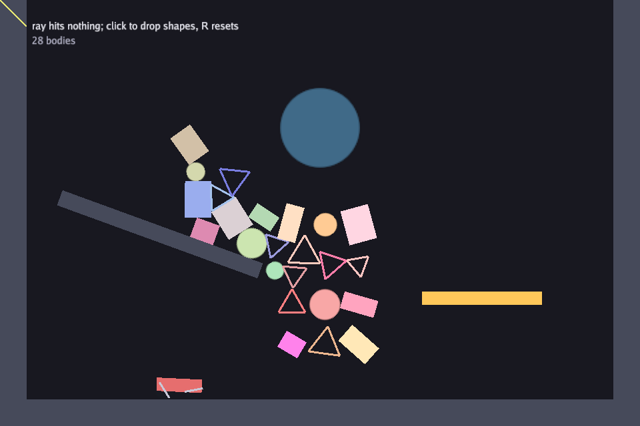
This program is the 2D half of phys. Static walls make a pit, a rotated static box makes a ramp, a kinematic paddle sweeps back and forth, a car on two sprung wheel joints drives up and down the floor, a circular trigger tints whatever passes through it, and two dozen dynamic circles, boxes and triangles fall into the pile. A ray is cast from the top left corner to the pointer every update and the entity it hits is named.
Physics in Bunyip is a set of components on the
entity component system. A body is phys.Body2, a
shape is phys.Collider2, and the position they act on is
gfx.Transform2, the same component the drawing reads. The simulation is
a system registered on the world, and the game steps it by calling
world.Update. Names carry the dimension, so Body2 and Box2 are the
2D forms and Circle has no suffix because it exists in one dimension
only. The physics guide covers the model, and
the entities and systems guide the world.
Run it:
go run ./examples/physics2d -seconds 3 -shot out.png
The flags are -seconds N and -shot file.png. A left click drops a new
random shape at the pointer, R resets the scene and Escape quits.
Package and state
look is the game's own component: the colour to draw a collider in, and
a value that fades after the entity has touched the trigger. Storing it
as a component rather than in a map keeps it in the same tables as the
transform, so one query reads all three.
ecs.Query3 is a query over three component types, cached on the world.
It is created once and walked every frame.
// Command physics2d shows the 2D rigid bodies: balls, boxes and a
// triangle fall into a pit, a kinematic paddle sweeps through them, a
// car on sprung wheel joints drives back and forth along the floor, a
// trigger zone tints whatever enters it, and a raycast from the corner
// to the pointer reports what it hits. Click to drop more shapes at the
// pointer; R resets; Escape quits.
package main

import (
	"flag"
	"fmt"
	"image"
	"image/color"
	"math"
	"os"

	"golang.org/x/image/font/gofont/goregular"

	"github.com/matjam/bunyip/ecs"
	"github.com/matjam/bunyip/engine"
	"github.com/matjam/bunyip/gfx"
	"github.com/matjam/bunyip/input"
	"github.com/matjam/bunyip/lin"
	"github.com/matjam/bunyip/phys"
	"github.com/matjam/bunyip/rng"
)

// look says how to draw an entity's collider.
type look struct {
	Color gfx.Color
	Hot   float32 // fades after touching the trigger
}

type game struct {
	seconds float64
	shot    string

	font    *gfx.Font
	white   *gfx.Texture
	dot     *gfx.Texture
	world   *ecs.World
	shapes  *ecs.Query3[gfx.Transform2, phys.Collider2, look]
	random  *rng.Rand
	paddle  ecs.Entity
	trigger ecs.Entity
	car     ecs.Entity
	wheels  [2]ecs.Entity
	axles   [2]ecs.Entity // the wheel joints, whose motors drive the car
	forward bool
	hit     string
	rayEnd  lin.Vec2

	shotDone bool
}

// Collision layers: the car's own parts pass through each other and
// through nothing else.
const (
	layerWorld  = 1
	layerFrame  = 2
	layerWheels = 4
)
The car is five entities: a chassis, two wheels and the two joints holding them on. The joints are kept because their motors are what drives the car, and a joint is an ordinary entity with a joint component, so driving means fetching that component and writing a field.
The three layer constants are a bitmask scheme rather than an
enumeration: each is a single bit, so a collider's Mask can name a set
of layers. layerWorld is everything that is not part of the car.
Init: the textures
Two textures cover every shape here: a two by two white image stretched
into rectangles, and a soft-edged disc for circles. The disc asks for
Linear: true so it stays smooth when it is scaled up. rng.New(9)
seeds the shape generator so a screenshot of the pile is reproducible.
func (g *game) Init(ctx *engine.Context) error {
	var err error
	if g.font, err = ctx.Gfx.NewFont(goregular.TTF, 15, gfx.FontOptions{}); err != nil {
		return err
	}
	white := image.NewRGBA(image.Rect(0, 0, 2, 2))
	for i := range white.Pix {
		white.Pix[i] = 255
	}
	if g.white, err = ctx.Gfx.NewTexture(white, gfx.TextureOptions{}); err != nil {
		return err
	}
	if g.dot, err = ctx.Gfx.NewTexture(circle(64), gfx.TextureOptions{Linear: true}); err != nil {
		return err
	}
	g.random = rng.New(9)
	g.reset(ctx)
	return nil
}
Building the scene
reset builds a whole world from nothing, which is why R can restart the
scene by calling it again.
phys.Settings2 is a resource on the world rather than a component: one
value the simulation reads. Gravity is positive on Y because 2D view
units run downwards from the top left. Substeps splits each step into
smaller integrations and Iterations is the solver's passes per substep;
both trade time for a stiffer pile.
The three walls and the ramp are colliders with no body, which is what
makes them static: they collide and never move. The paddle is
phys.Kinematic2, a body that is moved by setting its velocity and is
not pushed back by what it hits. The trigger is a collider with
Trigger: true, so overlaps are reported as events and never resolved.
w.SpawnWith creates an entity with the components given. gfx.At2 is
the short form of a gfx.Transform2 at a position with no rotation.
Two systems are registered. phys.System2 is the simulation. The second
is a closure over the game: it reads this step's phys.Trigger2 events,
lights up the entity on the other side of each overlap, and fades every
Hot value towards zero. Events are drained per step, so a system reads
them by asking the world rather than by subscribing.
func (g *game) reset(ctx *engine.Context) {
	w := ecs.NewWorld()
	g.world = w
	g.shapes = w.Query3[gfx.Transform2, phys.Collider2, look]()
	// Screen space: y grows downward, so gravity is positive, in pixels/s².
	w.SetResource(phys.Settings2{Gravity: lin.V2(0, 900), Substeps: 4, Iterations: 10})
	W, H := ctx.Width, ctx.Height
	wallLook := look{Color: gfx.RGB(70, 74, 90)}
	w.SpawnWith(gfx.At2(W/2, H-20), phys.Collider2{Shape: phys.Box2{HalfW: W / 2, HalfH: 20}}, wallLook)
	w.SpawnWith(gfx.At2(20, H/2), phys.Collider2{Shape: phys.Box2{HalfW: 20, HalfH: H / 2}}, wallLook)
	w.SpawnWith(gfx.At2(W-20, H/2), phys.Collider2{Shape: phys.Box2{HalfW: 20, HalfH: H / 2}}, wallLook)
	// A ramp: a static rotated box.
	w.SpawnWith(gfx.Transform2{Position: lin.V2(W*0.25, H*0.55), Rotation: 0.35}, phys.Collider2{Shape: phys.Box2{HalfW: 160, HalfH: 12}}, wallLook)
	// A kinematic paddle sweeps back and forth; bodies ride it.
	paddle := phys.Kinematic2()
	g.paddle = w.SpawnWith(gfx.At2(W*0.7, H*0.7), paddle, phys.Collider2{Shape: phys.Box2{HalfW: 90, HalfH: 10}}, look{Color: gfx.RGB(255, 200, 90)})
	// A trigger zone: overlaps are reported, never resolved.
	g.trigger = w.SpawnWith(gfx.At2(W*0.5, H*0.3), phys.Collider2{Shape: phys.Circle{Radius: 60}, Trigger: true}, look{Color: gfx.RGBA(120, 200, 255, 60)})
	// The chassis rides an axle drop above the wheels, which rest on the
	// floor whose top is 40 below the bottom of the view.
	g.buildCar(w, lin.V2(140, H-66))
	for i := range 24 {
		g.spawn(lin.V2(W*0.3+float32(i%6)*50, 60+float32(i/6)*60))
	}
	w.AddSystem("physics", phys.System2)
	// Entities that enter the trigger light up.
	w.AddSystem("trigger", func(w *ecs.World, dt float64) {
		for _, ev := range w.Events[phys.Trigger2]() {
			if l, ok := w.Get[look](ev.Other); ok {
				l.Hot = 1
			}
		}
		g.shapes.Each(func(e ecs.Entity, _ *gfx.Transform2, _ *phys.Collider2, l *look) {
			l.Hot = max(0, l.Hot-float32(dt))
		})
	})
}
The car: two wheel joints as a suspension
buildCar is the whole vehicle. A phys.WheelJoint2 is a wheel on a
suspension: A is the chassis, B is the wheel, the wheel spins freely
about its centre, and the centre is free to slide along Axis in the
chassis frame. That one joint is doing two jobs a game would otherwise
build from a slider and a hinge.
AnchorA is where the wheel sits when the suspension is at rest, given
in the chassis frame, which is why the parts are spawned at exactly that
offset: spawning them where the joint wants them means the springs start
at rest rather than snapping the car into shape on the first step.
The spring is described in physical terms rather than as a stiffness.
Frequency: 5 is five hertz, how often the suspension would bounce a
second if it were undamped, and DampingRatio: 0.8 is a fraction of
critical damping, where 1 settles without overshooting. Describing it
this way means the response does not change when the chassis mass
changes: an eight-kilogram body and a one-kilogram body on the same
numbers behave the same.
MaxMotorTorque: 60000 gives the axles something to push with, but no
MotorSpeed is set here; drive sets that every update, which is what
steers the car.
The layers keep the car from fighting itself. The chassis is on
layerFrame and the wheels on layerWheels, and both mask only
layerWorld, so neither collides with the other or with the other
wheel: the joint holds them together, and a contact between them would
only jitter. Everything else in the scene leaves Layers zero, which
collides with everything.
// buildCar puts a chassis on two wheels held by WheelJoint2 springs,
// with the axle motors driving the wheels. The wheel's centre is where
// the joint's AnchorA in the chassis frame points, so the suspension
// rests at the height the parts were spawned at.
func (g *game) buildCar(w *ecs.World, at lin.Vec2) {
	const (
		halfW  = 34.0 // chassis half width
		halfH  = 10.0 // chassis half height
		radius = 14.0 // wheel radius
		axleX  = 22.0 // wheel offset from the chassis centre
		axleY  = 12.0 // wheel drop below the chassis centre
	)
	frame := phys.Dynamic2(8)
	frame.Friction = 0.6
	g.car = w.SpawnWith(gfx.Transform2{Position: at}, frame,
		phys.Collider2{Shape: phys.Box2{HalfW: halfW, HalfH: halfH},
			Layers: phys.Layers{Layer: layerFrame, Mask: layerWorld}},
		look{Color: gfx.RGB(230, 110, 110)})
	for i, dx := range [2]float32{-axleX, axleX} {
		wheel := phys.Dynamic2(1)
		wheel.Friction = 0.9
		g.wheels[i] = w.SpawnWith(gfx.Transform2{Position: at.Add(lin.V2(dx, axleY))}, wheel,
			phys.Collider2{Shape: phys.Circle{Radius: radius},
				Layers: phys.Layers{Layer: layerWheels, Mask: layerWorld}},
			look{Color: gfx.RGB(24, 26, 34)})
		g.axles[i] = w.SpawnWith(phys.WheelJoint2{A: g.car, B: g.wheels[i],
			AnchorA: lin.V2(dx, axleY), Axis: lin.V2(0, 1),
			Frequency: 5, DampingRatio: 0.8, MaxMotorTorque: 60000})
	}
	g.forward = true
}
The wheels' high friction, 0.9 against the chassis's 0.6, is what turns motor torque into motion. A motor that spins a frictionless wheel moves nothing; the car pulls itself along the floor through the wheel contacts, exactly as a real one does, so a slippery floor would leave it spinning its wheels in place.
drive reverses at either end and writes MotorSpeed on both axles.
Nothing here applies a force to the chassis: the motors turn the wheels,
the wheels grip the floor, and the car follows. The comment about the
sign is worth reading twice, because 2D view units put Y downwards,
which flips the sense of a positive angle: a wheel turning the way its
angle grows rolls to the right, not the left.
// drive turns the wheels, reversing when the car nears a wall. Screen
// coordinates grow downward, so a wheel turning the way the angle grows
// rolls to the right.
func (g *game) drive(ctx *engine.Context) {
	t, ok := g.world.Get[gfx.Transform2](g.car)
	if !ok {
		return
	}
	if t.Position.X > ctx.Width-120 {
		g.forward = false
	} else if t.Position.X < 120 {
		g.forward = true
	}
	speed := float32(16)
	if !g.forward {
		speed = -16
	}
	for _, e := range g.axles {
		if j, ok := g.world.Get[phys.WheelJoint2](e); ok {
			j.MotorSpeed = speed
		}
	}
}
ecs.World.Get returns a pointer into the component's table, so writing
j.MotorSpeed changes the joint the solver will read this step. The
ok on the transform lookup checks that the entity has that component
in the current world. Handles are scoped to a world: the same numeric
handle can resolve to a different entity in a new world. reset therefore
also replaces the stored car handles.
Dropping shapes
spawn drops one random shape. phys.Dynamic2(1) is a body of mass one;
Restitution is bounciness from zero to one and Friction resists
sliding. The shape is one of phys.Circle, phys.Box2 or
phys.Polygon2, all of which satisfy phys.Shape2. A polygon's points
are in the body's own frame and must be convex, in either winding order;
the triangle here is built around the origin so it spins about its
middle. Rotation is in radians.
// spawn drops a random shape at p.
func (g *game) spawn(p lin.Vec2) {
	body := phys.Dynamic2(1)
	body.Restitution = g.random.Between(0, 0.5)
	body.Friction = 0.4
	c := gfx.RGB(uint8(120+g.random.Intn(120)), uint8(120+g.random.Intn(120)), uint8(120+g.random.Intn(120)))
	var shape phys.Shape2
	switch g.random.Intn(3) {
	case 0:
		shape = phys.Circle{Radius: g.random.Between(12, 24)}
	case 1:
		shape = phys.Box2{HalfW: g.random.Between(12, 28), HalfH: g.random.Between(12, 28)}
	default:
		r := g.random.Between(18, 30)
		shape = phys.Polygon2{Points: []lin.Vec2{{X: 0, Y: -r}, {X: r * 0.87, Y: r * 0.5}, {X: -r * 0.87, Y: r * 0.5}}}
	}
	g.world.SpawnWith(gfx.Transform2{Position: p, Rotation: g.random.Float() * 6}, body, phys.Collider2{Shape: shape}, look{Color: c})
}
func (g *game) Shutdown(ctx *engine.Context) {
	g.dot.Destroy()
	g.white.Destroy()
	g.font.Destroy()
}
Update: input, the paddle and the ray
Update runs at the fixed step, which is what the simulation needs: a
fixed ctx.Delta keeps the numerical step independent of rendering speed.
It does not by itself guarantee identical results across machines.
The paddle is driven by writing its velocity. ecs.World.Get returns a pointer
to the component in its table, so assigning through it changes the
world's copy. A kinematic body ignores forces, so a velocity written here
holds until it is written again, and bodies resting on the paddle are
carried along by the contact.
The paddle and the car are the two ways to move something, side by side. The paddle is told where to go and nothing can argue with it; the car is given torque at its wheels and has to find traction. A kinematic body suits a lift or a moving platform, whose path the game decides; a driven body suits anything that should be stopped by a wall it drives into.
Both are set before world.Update, because the step reads what is in
the components at the moment it runs.
g.world.Update(ctx.Delta) runs the registered systems in order, which
is where the simulation actually steps.
The raycast comes after the step, so it sees the positions the frame will
draw. phys.Ray2 is an origin and a direction whose length is the
distance to search; the final argument of phys.Raycast2 is a layer
mask, and zero means every layer. Triggers are never hit by a ray. The
hit carries the entity, the point, the surface normal and the distance,
and the drawing uses the point to stop the line where it struck.
func (g *game) Update(ctx *engine.Context) error {
	in := ctx.Input
	if in.KeyPressed(input.KeyEscape) || (g.seconds > 0 && ctx.Time >= g.seconds) {
		ctx.Quit()
	}
	if g.shot != "" && !g.shotDone && (g.seconds == 0 || ctx.Time >= g.seconds/2) {
		ctx.Screenshot(g.shot)
		g.shotDone = true
	}
	if in.KeyPressed(input.KeyR) {
		g.reset(ctx)
	}
	if in.MousePressed(input.MouseLeft) {
		x, y := in.Mouse()
		g.spawn(lin.V2(float32(x), float32(y)))
	}
	if b, ok := g.world.Get[phys.Body2](g.paddle); ok {
		b.Vel = lin.V2(220*float32(math.Sin(ctx.Time*0.8)), 0)
	}
	g.drive(ctx)
	g.world.Update(ctx.Delta)
	// A raycast from the corner to the pointer.
	x, y := in.Mouse()
	ray := phys.Ray2{Origin: lin.V2(40, 40), Dir: lin.V2(float32(x)-40, float32(y)-40)}
	if hit, ok := phys.Raycast2(g.world, ray, 0); ok {
		g.hit = fmt.Sprintf("ray hits %v at (%.0f, %.0f)", hit.Entity, hit.Point.X, hit.Point.Y)
		g.rayEnd = hit.Point
	} else {
		g.hit = "ray hits nothing"
		g.rayEnd = ray.Origin.Add(ray.Dir)
	}
	return nil
}
Draw: the shapes
One walk of the query draws everything. The Each callback is handed
pointers into the component tables, so no copying happens and the values
seen are the ones the simulation just wrote.
A collider's shape is an interface value, so a type switch decides how to
draw it. t.Apply takes a sprite and returns it positioned and rotated
by the transform, which keeps the drawing in step with the body without
recomputing the matrix. UV1: lin.V2(1, 1) uses the whole texture.
Triangles are drawn as three lines, rotating each point by the
transform's own angle. This example chooses outlines; gfx.FillPolygon
can draw a filled triangle instead.
The wheels get a second pass afterwards, drawing a diameter through each one. A disc drawn from a texture looks identical however fast it turns, so without the spoke there is nothing on screen to show that the motors are doing anything; with it, a stopped car and a car spinning its wheels against a wall look different.
func (g *game) Draw(ctx *engine.Context) error {
	gr := ctx.Gfx
	g.shapes.Each(func(e ecs.Entity, t *gfx.Transform2, c *phys.Collider2, l *look) {
		col := l.Color
		if l.Hot > 0 {
			col = gfx.Color{R: min(1, col.R+l.Hot), G: col.G, B: col.B, A: col.A}
		}
		switch s := c.Shape.(type) {
		case phys.Circle:
			gr.Draw(g.dot, t.Apply(gfx.Sprite{Size: lin.V2(2*s.Radius, 2*s.Radius), UV1: lin.V2(1, 1), Color: col}))
		case phys.Box2:
			gr.Draw(g.white, t.Apply(gfx.Sprite{Size: lin.V2(2*s.HalfW, 2*s.HalfH), UV1: lin.V2(1, 1), Color: col}))
		case phys.Polygon2:
			cs, sn := float32(math.Cos(float64(t.Rotation))), float32(math.Sin(float64(t.Rotation)))
			n := len(s.Points)
			for i := range n {
				a, b := s.Points[i], s.Points[(i+1)%n]
				wa := t.Position.Add(lin.V2(cs*a.X-sn*a.Y, sn*a.X+cs*a.Y))
				wb := t.Position.Add(lin.V2(cs*b.X-sn*b.Y, sn*b.X+cs*b.Y))
				g.segment(gr, wa, wb, 3, col)
			}
		}
	})
	// A spoke on each wheel, so the drive is visible.
	for _, e := range g.wheels {
		t, ok := g.world.Get[gfx.Transform2](e)
		c, ok2 := g.world.Get[phys.Collider2](e)
		if !ok || !ok2 {
			continue
		}
		r := c.Shape.(phys.Circle).Radius
		dir := lin.V2(float32(math.Cos(float64(t.Rotation))), float32(math.Sin(float64(t.Rotation))))
		g.segment(gr, t.Position.Sub(dir.Mul(r)), t.Position.Add(dir.Mul(r)), 3, gfx.RGB(200, 200, 215))
	}
	g.segment(gr, lin.V2(40, 40), g.rayEnd, 2, gfx.RGBA(255, 255, 120, 200))
	gr.DrawText(g.font, g.hit+"; click to drop shapes, R resets", 48, 30, gfx.RGB(230, 230, 240))
	gr.DrawText(g.font, fmt.Sprintf("%d bodies", g.world.Count[phys.Body2]()), 48, 52, gfx.RGB(170, 170, 190))
	return nil
}
segment draws a line as a thin rectangle: the midpoint is the sprite's
position, the length its width and the angle between the endpoints its
rotation. It is the smallest way to draw a line with the sprite path.
gfx also has a vector path API, which the vector
example uses.
// segment draws a line as a thin rotated rectangle.
func (g *game) segment(gr *gfx.Graphics, a, b lin.Vec2, thick float32, col gfx.Color) {
	d := b.Sub(a)
	t := gfx.Transform2{Position: a.Add(b).Mul(0.5), Rotation: float32(math.Atan2(float64(d.Y), float64(d.X)))}
	gr.Draw(g.white, t.Apply(gfx.Sprite{Size: lin.V2(d.Len(), thick), UV1: lin.V2(1, 1), Color: col}))
}
circle builds the disc texture: white everywhere, with the alpha
falling off over the last unit of the radius, which is a cheap
antialiased edge. It returns an image.NRGBA, unpremultiplied, and
NewTexture premultiplies it in linear light on the way to the GPU.
func circle(size int) image.Image {
	img := image.NewNRGBA(image.Rect(0, 0, size, size))
	r := float64(size) / 2
	for y := range size {
		for x := range size {
			d := math.Hypot(float64(x)+0.5-r, float64(y)+0.5-r)
			a := math.Max(0, math.Min(1, r-d))
			img.SetNRGBA(x, y, color.NRGBA{255, 255, 255, uint8(255 * a)})
		}
	}
	return img
}
main
func main() {
	seconds := flag.Float64("seconds", 0, "exit after this many seconds")
	shot := flag.String("shot", "", "write a screenshot to this PNG")
	flag.Parse()
	err := engine.Run(engine.Config{Title: "Bunyip physics 2D", Width: 960, Height: 640},
		&game{seconds: *seconds, shot: *shot})
	if err != nil {
		fmt.Fprintln(os.Stderr, "physics2d:", err)
		os.Exit(1)
	}
}
What to try
- Raise
SubstepsandIterationsinresetand watch the pile settle harder and the frame cost rise. - Set
Restitutionto 0.9 inspawnand drop a few shapes onto the ramp. - Make the trigger a solid collider by removing
Trigger: trueinreset, and see the overlap resolved instead of reported. - Give the paddle a vertical velocity as well in
Updateand watch bodies ride it. - Drop
FrequencyinbuildCarto 1 and watch the car wallow, then raise it to 20 for a suspension that barely gives. Setting it to 0 leaves the suspension axis free, without a spring restoring its offset. - Set
DampingRatioto 0.05 and drive the car over the debris; the bouncing takes a long time to die away. - Cut
MaxMotorTorqueinbuildCarto 600 and watch the car struggle up the ramp, or set the wheels'Frictionto 0.05 and watch them spin without moving it. - Give the car's chassis and wheels the same layer in
buildCarand see what a joint holding two colliding bodies together does. - Cast the ray from the pointer in a direction in
Updaterather than towards it, and draw the surface normal the hit reports.