Example examples/text
Shaped text
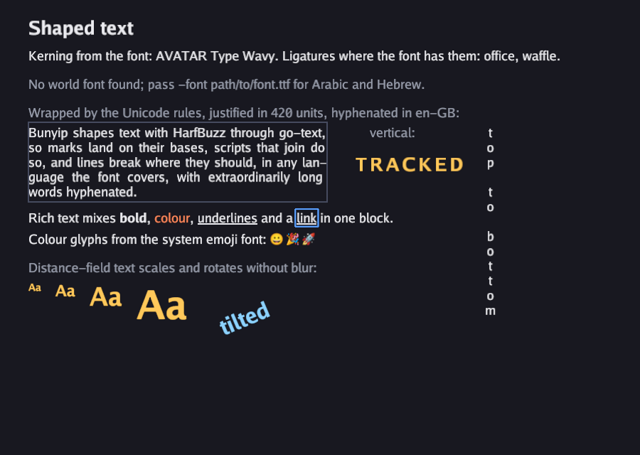
This example is a page of text that exercises the parts of the text system a game needs once it leaves English. It shows kerning and ligatures taken from the font, Arabic that joins its letters and runs right to left, a mixed-direction line, a fallback chain that fills in glyphs the main font lacks, line breaking by the Unicode rules with justification and hyphenation in the text's own language, vertical text, letter spacing, rich text with styles and links, colour glyphs from whatever emoji font the system has, and distance-field glyphs that scale and rotate without blurring.
Everything here comes from gfx: NewFont,
NewSDFFont, DrawText, DrawTextBlock, DrawRichText,
Font.Measure and TextOptions. Shaping is done with HarfBuzz through
go-text, which is why marks land on their bases and joining scripts
join. The 2D graphics guide covers the
same API in prose.
Run it with:
go run ./examples/text -seconds 3 -shot out.png
-font path/to/font.ttf supplies a font with Arabic and Hebrew glyphs
to use as a fallback. Without it the program tries Arial at its macOS
path, and on a machine where that file is missing it says so on screen
and draws the rest. The program adapts rather than failing, so it runs
headless on a build machine with no system fonts.
The game type
The three flags come first, then four fonts and the two font files read
from disk. body is the regular face with the fallbacks behind it,
bold and heading are the same bold face at two sizes, and sdf is a
distance-field face. A font at a given size is a separate object because
each one owns a glyph atlas.
type game struct {
	seconds  float64
	shot     string
	fontPath string

	body     *gfx.Font // Go Regular with the world font behind it
	bold     *gfx.Font
	heading  *gfx.Font
	sdf      *gfx.Font
	hasWorld bool // a world font was found
	hasEmoji bool // an emoji font was found
	shotDone bool
}
Init: loading the fonts
The two optional font files are read with os.ReadFile and a failure is
ignored, leaving the slice nil. The slices are local: a font copies the
tables it uses from the bytes it is given, so they are not kept once the
font is made, which matters for an emoji collection of a couple of
hundred megabytes. What the drawing code tests later is whether each was
found, kept in hasWorld and hasEmoji. The main faces come from
gofont, which is compiled into the binary, so the program always has
something to draw with.
FontOptions.Fallbacks is a list of font files consulted in order for
any rune the main font does not cover. The world font goes first and the
emoji font second, so Arabic and Hebrew come from one and emoji from the
other.
The emoji font is looked for in four places, one per platform, and the
first that opens wins: Apple's on macOS, Noto in either of the two
places distributions put it on Linux, and Segoe UI Emoji on Windows.
Those four files are not one kind of font. Apple's holds bitmap strikes,
Noto's holds either strikes or COLR layers depending on the build, and
Segoe's holds COLR. The engine draws all of them in colour, along with
faces whose glyphs are SVG documents, so the example does not care which
one it found; the g.hasEmoji test below is about whether any font was
found at all, not about what sort it is.
NewFont rasterises glyphs into an atlas as they are first used.
NewSDFFont stores a signed distance field instead, which costs more to
build but can be drawn at any size and any angle from one atlas. The
size passed to NewSDFFont is the size the field is generated at, not a
limit on how large it can be drawn.
func (g *game) Init(ctx *engine.Context) error {
	if g.fontPath == "" {
		g.fontPath = "/System/Library/Fonts/Supplemental/Arial.ttf"
	}
	// The font files are only needed while the font is made: it copies
	// what it uses, so the bytes are not kept.
	var world, emoji []byte
	if data, err := os.ReadFile(g.fontPath); err == nil {
		world = data
	}
	// An emoji font as a further fallback draws emoji in colour, whether
	// it holds bitmap strikes, COLR layers or SVG documents.
	for _, path := range []string{
		"/System/Library/Fonts/Apple Color Emoji.ttc",
		"/usr/share/fonts/noto/NotoColorEmoji.ttf",
		"/usr/share/fonts/truetype/noto/NotoColorEmoji.ttf",
		"C:\\Windows\\Fonts\\seguiemj.ttf",
	} {
		if data, err := os.ReadFile(path); err == nil {
			emoji = data
			break
		}
	}
	var err error
	opts := gfx.FontOptions{}
	if world != nil {
		opts.Fallbacks = append(opts.Fallbacks, world)
	}
	if emoji != nil {
		opts.Fallbacks = append(opts.Fallbacks, emoji)
	}
	g.hasWorld, g.hasEmoji = world != nil, emoji != nil
	if g.body, err = ctx.Gfx.NewFont(goregular.TTF, 18, opts); err != nil {
		return err
	}
	if g.bold, err = ctx.Gfx.NewFont(gobold.TTF, 18, gfx.FontOptions{}); err != nil {
		return err
	}
	if g.heading, err = ctx.Gfx.NewFont(gobold.TTF, 26, gfx.FontOptions{}); err != nil {
		return err
	}
	if g.sdf, err = ctx.Gfx.NewSDFFont(gobold.TTF, 32, gfx.FontOptions{}); err != nil {
		return err
	}
	return nil
}

func (g *game) Shutdown(ctx *engine.Context) {
	g.sdf.Destroy()
	g.heading.Destroy()
	g.bold.Destroy()
	g.body.Destroy()
}
A Font is a GPU resource and each one is destroyed in Shutdown.
Update
There is no simulation. Update quits on Escape or on the deadline, and
writes the screenshot once, halfway through the run. Text layout uploads
new glyphs before queuing their sprites, so a glyph can appear in the
same frame in which it is first drawn.
func (g *game) Update(ctx *engine.Context) error {
	if ctx.Input.KeyPressed(input.KeyEscape) || (g.seconds > 0 && ctx.Time >= g.seconds) {
		ctx.Quit()
	}
	if g.shot != "" && !g.shotDone && (g.seconds == 0 || ctx.Time >= g.seconds/2) {
		ctx.Screenshot(g.shot)
		g.shotDone = true
	}
	return nil
}
Draw: shaping, direction and fallbacks
Draw lays the page out top to bottom by advancing a y cursor, which
keeps the source in the same order as the screen.
DrawText draws one line at a baseline-independent position: the
coordinates are the top-left of the line box, in view units.
DrawTextBlock takes TextOptions instead, which is where width,
alignment, direction, letter spacing, size and hyphenation live. Its
zero value is a single unwrapped line, so the two calls differ only in
how much control they offer.
Kerning and ligatures need no options: the shaper applies whatever the font specifies, so "AVATAR" tightens and "office" ligates when the face has those features.
The Arabic line is drawn with Align: gfx.AlignRight and a width. The
letters join and the run is laid out right to left because the shaper
knows the script, not because the program asked. The mixed line needs
nothing at all: the Hebrew word inside an English sentence is reordered
by the bidirectional algorithm, and the digits stay in logical order.
func (g *game) Draw(ctx *engine.Context) error {
	gr := ctx.Gfx
	white, dim := gfx.RGB(235, 235, 240), gfx.RGB(150, 155, 170)
	y := float32(24)
	gr.DrawText(g.heading, "Shaped text", 40, y, white)
	y += 44
	gr.DrawText(g.body, "Kerning from the font: AVATAR Type Wavy. Ligatures where the font has them: office, waffle.", 40, y, white)
	y += 40

	if !g.hasWorld {
		gr.DrawText(g.body, "No world font found; pass -font path/to/font.ttf for Arabic and Hebrew.", 40, y, dim)
		y += 40
	} else {
		gr.DrawText(g.body, "Arabic joins its letters and runs right to left:", 40, y, dim)
		y += 28
		gr.DrawTextBlock(g.body, "السلام عليكم، هذا نص عربي يُعرض بشكل صحيح", 40, y, gfx.TextOptions{Width: 600, Align: gfx.AlignRight}, white)
		y += 40
		gr.DrawText(g.body, "Mixed directions on one line: the word שלום is Hebrew, and 123 stays 123.", 40, y, white)
		y += 40
	}
Wrapping, measuring, vertical text and tracking
The paragraph is wrapped to 420 units by the Unicode line breaking rules, justified, and hyphenated, which is what stops justification from opening rivers of space around a word like "extraordinarily".
The hyphenation is asked for by language rather than by hyphenator.
AutoHyphenate: true with Language: "en-GB" picks the British English
patterns; the same two fields with "de" would pick the German ones,
and a language the engine ships no patterns for is simply left
unhyphenated rather than hyphenated wrongly. The patterns are TeX's, by
Liang's method, and the engine ships American and British English,
German, French, Spanish, Italian, Dutch, Portuguese, Swedish, Danish,
Norwegian, Finnish, Polish and Russian, loading a set on first use. The
older way is still there: Hyphenate takes a hyphenator directly, from
gfx.EnglishHyphenator() or gfx.HyphenatorFor("de-AT"), which is what
a game wants when it has its own patterns from ParseTeXPatterns. The
language form is the one to reach for in a translated interface, because
the same TextOptions then hyphenate whatever language is on screen
without the game choosing a hyphenator per string.
Language does more than pick patterns: it is passed down to the
shaper, where it selects the language-specific forms a font offers.
British and American English differ only in where they break words, but
the same field is what makes a Serbian italic or a Turkish dotless i
come out right in a font that distinguishes them.
Font.Measure returns the size
the same text and options produce without drawing it, and the height it
returns is used twice: once to stroke a box around the paragraph, and
once to advance y past it. Measuring with the options the text is
drawn with is the only way to get the right answer, since width,
alignment and hyphenation all change the height.
Direction: gfx.DirectionTTB lays the run out top to bottom.
LetterSpacing: 4 adds four units between clusters, which is how a
heading is tracked out.
	gr.DrawText(g.body, "Wrapped by the Unicode rules, justified in 420 units, hyphenated in en-GB:", 40, y, dim)
	y += 28
	para := "Bunyip shapes text with HarfBuzz through go-text, so marks land on their bases, scripts that join do so, and lines break where they should, in any language the font covers, with extraordinarily long words hyphenated."
	// AutoHyphenate picks the patterns for the language the text is in.
	popts := gfx.TextOptions{Width: 420, Align: gfx.AlignJustify, Language: "en-GB", AutoHyphenate: true}
	gr.DrawTextBlock(g.body, para, 40, y, popts, white)
	_, ph := g.body.Measure(para, popts)
	gr.StrokeRect(40, y-4, 420, ph+8, 1, gfx.RGB(70, 75, 95))

	// Vertical text in a column on the right of the paragraph, and a
	// tracked-out heading beside it.
	gr.DrawText(g.body, "vertical:", 520, y, dim)
	gr.DrawTextBlock(g.body, "top to bottom", 700, y, gfx.TextOptions{Direction: gfx.DirectionTTB}, white)
	gr.DrawTextBlock(g.heading, "TRACKED", 500, y+40, gfx.TextOptions{LetterSpacing: 4}, gfx.RGB(255, 200, 90))
	y += ph + 16
Rich text and emoji
gfx.ParseRich turns a small markup into a rich text value: [b] for
bold, [#rrggbb] for a colour, [u] for an underline and [link=id]
for a link. DrawRichText needs a RichFonts saying which face to use
for each style, and returns the rectangles of the links it drew, in view
units, so the game can test them against the pointer or outline them as
here. Nothing about links is built in beyond reporting where they
landed.
The emoji line is drawn only when one of the four emoji fonts was found,
and the fallback line says so rather than leaving a blank. The escapes
in the string are the emoji code points written as \U0001F600 and so
on, which keeps the source readable in any editor.
Nothing here asks for colour. The emoji font is a fallback like any
other, so the shaper reaches it for runes goregular does not cover,
and the glyphs it returns happen to carry colour: a bitmap strike, a
stack of COLR layers each with its own paint, or an SVG document the
engine rasterises. All three end up in the same atlas as the outline
glyphs beside them and draw in the same batch.
	// Rich text: styles and a link in one block, and colour emoji.
	rich := gfx.ParseRich("Rich text mixes [b]bold[/b], [#ff8a5c]colour[/#], [u]underlines[/u] and a [link=docs]link[/link] in one block.")
	links := gr.DrawRichText(gfx.RichFonts{Regular: g.body, Bold: g.bold}, rich, 40, y, gfx.TextOptions{Width: 700}, white)
	for _, l := range links {
		gr.StrokeRect(l.Rect.X-2, l.Rect.Y-2, l.Rect.W+4, l.Rect.H+4, 1, gfx.RGB(90, 160, 255))
	}
	y += 30
	if g.hasEmoji {
		gr.DrawText(g.body, "Colour glyphs from the system emoji font: \U0001F600 \U0001F389 \U0001F680", 40, y, white)
	} else {
		gr.DrawText(g.body, "No emoji font found; a fallback with strikes, COLR layers or SVG glyphs draws emoji in colour.", 40, y, dim)
	}
	y += 40
Distance-field text
The last block draws the same two letters from the distance-field font
at four sizes and then at an angle. TextOptions.Size overrides the
size the font was created at, and Angle rotates the run in radians.
Both also work with rasterised fonts, which resample their atlas when
scaled; a distance-field face preserves sharper edges over a wider range.
Measure is used again to advance
x past each pair by the width it will actually occupy.
	// Distance-field text at several sizes and a rotation.
	gr.DrawText(g.body, "Distance-field text scales and rotates without blur:", 40, y, dim)
	y += 30
	x := float32(40)
	for _, size := range []float32{14, 22, 36, 56} {
		gr.DrawTextBlock(g.sdf, "Aa", x, y, gfx.TextOptions{Size: size}, gfx.RGB(255, 200, 90))
		w, _ := g.sdf.Measure("Aa", gfx.TextOptions{Size: size})
		x += w + 20
	}
	gr.DrawTextBlock(g.sdf, "tilted", x+20, y+50, gfx.TextOptions{Size: 30, Angle: -0.4}, gfx.RGB(140, 210, 255))
	return nil
}
main
func main() {
	seconds := flag.Float64("seconds", 0, "exit after this many seconds")
	shot := flag.String("shot", "", "write a screenshot to this PNG")
	font := flag.String("font", "", "a TTF with Arabic and Hebrew glyphs, used as a fallback")
	flag.Parse()
	err := engine.Run(engine.Config{Title: "Bunyip text", Width: 900, Height: 640},
		&game{seconds: *seconds, shot: *shot, fontPath: *font})
	if err != nil {
		fmt.Fprintln(os.Stderr, "text:", err)
		os.Exit(1)
	}
}
What to try
- Pass
-fonta font from your own system, inmain's-fontflag, and add a line inDrawin a script that font covers. - Change
poptsinDrawtoAlign: gfx.AlignLeftand dropAutoHyphenateto see what justification and hyphenation are doing to the ragged edge. - Change
Languageinpoptsto"de"and translate the paragraph, or set it to a language the engine ships no patterns for, and watch the long words stop breaking rather than break in the wrong places. - Draw the paragraph twice in
Draw, once with the ordinary font and once withg.sdfat the same size, and compare the edges when the window is resized. - Add
[i]italic[/i]to the rich text string inDrawand giveRichFontsan italic face, which shows what happens when a style has no font behind it. - Set
TextOptions.Directionon the wrapped paragraph and watch the wrapping follow the direction.