Example examples/solar
Solar system
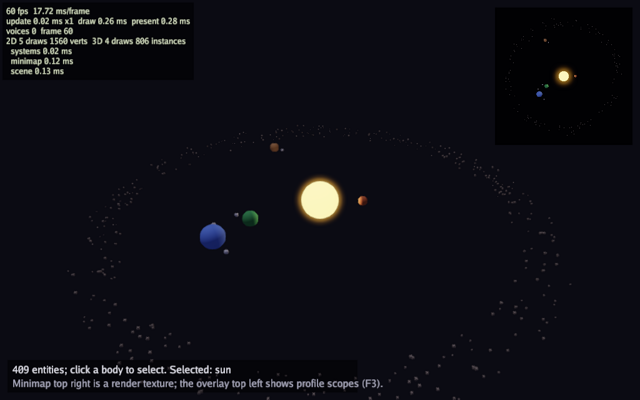
This example is the entity component system used as a scene graph. A sun
with its planets and their moons comes from a scene document
(system.json) instantiated into the world, with the moons as references
to a prefab (moon.json), so the shape of the system is data rather than
code. The hierarchy does the rest: a moon follows its planet without
anything saying so. Hundreds of asteroids are spawned in code, share one
mesh and one material, and draw as a single instanced call. Two systems
move everything, a click picks a body with a screen ray, the same scene
is drawn a second time from above into a render texture for the minimap,
and the work is bracketed by profile scopes that the F3 overlay reports.
The packages are ecs for the world, the components, the queries, the resources, the hierarchy, the scene format and the systems, asset for reading the documents, and gfx for the meshes, the camera, the lights, the render texture and picking. The guides are Entities and systems and 3D graphics.
Run it with:
go run ./examples/solar -seconds 3 -shot out.png
The flags are -seconds N and -shot file.png. Click a body to select
it, press F3 for the debug overlay, Escape quits. Config.Debug is
true, which is what makes the overlay and its profile scopes available.
Components and resources
A component is any Go type. body is what a thing looks like, orbit
is a circular path with an angle, spin is a rotation rate, and
asteroid is an empty marker type used only to tell belt members apart
in a query. clock is a resource: the world has exactly one, so it is
not attached to an entity.
The three components a scene document names are registered from init
with ecs.Register[T](name). The name in the file is that string rather
than the Go type's own, so a document stays valid when a type is renamed
or moved. system.json and moon.json are embedded in the binary here;
a game would read the same files from its asset directory, through the
same call.
game holds the meshes, the world, one cached query, the render texture
and the selected entity. ecs.Entity is a generational handle, so
keeping one across frames is safe: it does not dangle if the entity is
despawned, the lookup simply fails.
// The scene document and the prefab it references ship inside the
// binary. A game would read them from its asset directory instead; the
// call is the same.
//
//go:embed system.json moon.json
var files embed.FS

// Components. The names they are registered under are what the scene
// document holds, so a file stays valid when a type moves or is
// renamed.
type body struct {
	Name     string
	Radius   float32
	Color    gfx.Color
	Emissive float32
}

type orbit struct {
	Radius float32
	Speed  float32 // radians per second
	Angle  float32
}

type spin struct{ Speed float32 }

func init() {
	ecs.Register[body]("solar.body")
	ecs.Register[orbit]("solar.orbit")
	ecs.Register[spin]("solar.spin")
}

// asteroid marks belt members, which draw as cubes.
type asteroid struct{}

// clock is a resource: elapsed time for the spin system.
type clock struct{ Time float32 }

type game struct {
	seconds float64
	shot    string

	font     *gfx.Font
	sphere   *gfx.Mesh
	cube     *gfx.Mesh
	world    *ecs.World
	bodies   *ecs.Query1[body]
	minimap  *gfx.RenderTexture
	selected ecs.Entity
	yaw      float32
	shotDone bool
}
Init: the scene, the prefab and the belt
NewRenderTexture(220, 220) allocates an offscreen target and
SetView(220, 220) gives it its own view size, so drawing into it uses
those coordinates rather than the window's.
asset.OpenFS(asset.FSSource(files)) opens the embedded files as an
asset filesystem, asset.Scene reads and parses a scene document, and
asset.Prefab reads one prefab.
ecs.NewWorld creates the world and ecs.World.SetResource installs the clock
and the ecs.PrefabLibrary the scene's references are resolved against.
w.Instantiate(scene) spawns every entity the document describes, with
its parents, and returns a handle whose Entity(name) finds one by the
name the file gave it. A prefab reference spawns the prefab's components
first and writes the scene entity's own over the top.
The belt is procedural, so it stays in code: a few hundred entities with
the same components, parented to the entity the scene named sun.
Because they share a mesh and a material, the renderer merges them into
one instanced draw, which is the point worth remembering: entities are
cheap, draws are not. The count and the seed come from the document's
own Properties, which is where a scene keeps values that belong to no
entity.
func (g *game) Init(ctx *engine.Context) error {
	var err error
	if g.font, err = ctx.Gfx.NewFont(goregular.TTF, 16, gfx.FontOptions{}); err != nil {
		return err
	}
	sv, si := gfx.SphereMesh(20, 40)
	if g.sphere, err = ctx.Gfx.NewMesh(sv, si); err != nil {
		return err
	}
	cv, ci := gfx.CubeMesh()
	if g.cube, err = ctx.Gfx.NewMesh(cv, ci); err != nil {
		return err
	}
	if g.minimap, err = ctx.Gfx.NewRenderTexture(220, 220); err != nil {
		return err
	}
	g.minimap.SetView(220, 220)

	// The scene and the prefab it references come through the asset
	// system, here over the embedded files.
	fs, err := asset.OpenFS(asset.FSSource(files))
	if err != nil {
		return err
	}
	defer fs.Close()
	scene, err := asset.Scene(fs, "system.json")
	if err != nil {
		return err
	}
	moon, err := asset.Prefab(fs, "moon.json")
	if err != nil {
		return err
	}

	w := ecs.NewWorld()
	w.SetResource(clock{})
	// Instantiate resolves the scene's "moon" references against this
	// library and writes each entity's own components over the prefab's.
	w.SetResource(ecs.PrefabLibrary{"moon": moon})
	system, err := w.Instantiate(scene)
	if err != nil {
		return err
	}
	sun, ok := system.Entity("sun")
	if !ok {
		return errors.New("the scene names no sun")
	}
	// The belt is procedural, so it is spawned in code and parented to
	// the entity the scene named. Many small entities with the same mesh
	// and material draw as one instanced call.
	count, _ := scene.Properties["belt"].(float64)
	seed, _ := scene.Properties["beltSeed"].(float64)
	random := rng.New(uint64(seed))
	for range int(count) {
		a := w.SpawnWith(body{Name: "asteroid", Radius: 0.05 + random.Float()*0.06, Color: gfx.RGB(150, 140, 130)}, asteroid{},
			orbit{Radius: 13.5 + random.Float()*2.5, Speed: 0.1 + random.Float()*0.05, Angle: random.Float() * 6.28},
			gfx.Transform{Position: lin.V3(0, random.Between(-0.4, 0.4), 0)})
		ecs.SetParent(w, a, sun)
	}
The systems
A system is a func(w *ecs.World, dt float64) registered by name and
run in registration order on every world.Update. The queries are
created once, outside the system, and captured by the closure: a query
caches the archetype tables it matches, so making one per frame would
throw that away.
The orbit system writes each entity's local position from its angle,
which is why a moon's orbit radius is small: it is relative to its
planet. The spin system reads the clock resource, advances it, and
sets each rotation from the elapsed time, so the rotation is exact
rather than accumulated.
w.Query1[body]() is stored on the game because Draw uses it
every frame.
	// Systems: orbits place bodies on their circles, spin turns them.
	orbits := w.Query2[orbit, gfx.Transform]()
	w.AddSystem("orbits", func(w *ecs.World, dt float64) {
		orbits.Each(func(e ecs.Entity, o *orbit, t *gfx.Transform) {
			o.Angle += o.Speed * float32(dt)
			t.Position.X = o.Radius * float32(math.Cos(float64(o.Angle)))
			t.Position.Z = o.Radius * float32(math.Sin(float64(o.Angle)))
		})
	})
	spins := w.Query2[spin, gfx.Transform]()
	w.AddSystem("spin", func(w *ecs.World, dt float64) {
		c := w.Resource[clock]()
		c.Time += float32(dt)
		spins.Each(func(e ecs.Entity, s *spin, t *gfx.Transform) {
			t.Rotation = lin.AxisAngle(lin.V3(0, 1, 0), c.Time*s.Speed)
		})
	})
	g.world = w
	g.bodies = w.Query1[body]()
	g.selected = sun
	return nil
}

func (g *game) Shutdown(ctx *engine.Context) {
	g.minimap.Destroy()
	g.sphere.Destroy()
	g.cube.Destroy()
	g.font.Destroy()
}
The query callbacks take pointers to the components, so writing through them writes into the table.
Update: running the world under a profile scope
world.Update(ctx.Delta) runs every registered system once with the
fixed step. ctx.Profile("systems") opens a named scope and End()
closes it; the pair is timed and reported in the F3 overlay, which is
how the cost of the simulation is separated from the cost of drawing.
func (g *game) Update(ctx *engine.Context) error {
	if ctx.Input.KeyPressed(input.KeyEscape) || (g.seconds > 0 && ctx.Time >= g.seconds) {
		ctx.Quit()
	}
	if g.shot != "" && !g.shotDone && (g.seconds == 0 || ctx.Time >= g.seconds/2) {
		ctx.Screenshot(g.shot)
		g.shotDone = true
	}
	systems := ctx.Profile("systems")
	g.world.Update(ctx.Delta)
	systems.End()
	g.yaw += float32(ctx.Delta) * 0.05
	return nil
}

func (g *game) camera() gfx.Camera {
	return gfx.OrbitCamera(lin.V3(0, 0, 0), g.yaw, 0.55, 26)
}
Draw: one scene, two cameras
The bodies are drawn by a closure so the same code can run twice, once
into the minimap and once into the window. It walks the body query and
picks a mesh per entity: w.Has[asteroid](e) tests for the marker
component, so belt members draw as cubes.
ecs.WorldMatrix(w, e) composes an entity's transform with those of its
parents, which is where the hierarchy pays off: the moon's matrix
includes its planet's position without the moon knowing about it. The
scale is applied on the right, so the sphere is scaled about its own
centre before being placed.
DrawTo(target, clear, body) redirects everything the closure draws
into a render texture, clearing it first. Inside it the camera and light
are set again, because those are per-output state. The minimap camera
looks straight down from 40 units, offset by 0.01 in z so the view
direction and the up vector are not parallel.
func (g *game) Draw(ctx *engine.Context) error {
	gr := ctx.Gfx
	w := g.world
	light := gfx.Light{Direction: lin.V3(0.3, -1, 0.2), Color: gfx.Color{R: 0.6, G: 0.6, B: 0.7, A: 1},
		Ambient: gfx.Color{R: 0.08, G: 0.08, B: 0.12, A: 1}}
	drawBodies := func(withSelection bool) {
		gr.AddPointLight(lin.V3(0, 0, 0), gfx.Color{R: 40, G: 32, B: 20, A: 1}, 60)
		g.bodies.Each(func(e ecs.Entity, b *body) {
			mat := gfx.Material{BaseColor: b.Color, Emissive: b.Emissive, Roughness: 0.8}
			if withSelection && e == g.selected && b.Emissive == 0 {
				mat.Emissive = 1.5
			}
			mesh := g.sphere
			if w.Has[asteroid](e) {
				mesh = g.cube
			}
			gr.DrawMesh(mesh, mat, ecs.WorldMatrix(w, e).Mul(lin.Scale(lin.V3(b.Radius, b.Radius, b.Radius))))
		})
	}
	// The minimap: the same scene from straight above into a render texture.
	minimap := ctx.Profile("minimap")
	gr.DrawTo(g.minimap, gfx.RGB(5, 5, 12), func() {
		gr.SetCamera(gfx.Camera{Position: lin.V3(0, 40, 0.01), Target: lin.V3(0, 0, 0), FovY: lin.Radians(50)})
		gr.SetLight(light)
		drawBodies(false)
	})
	minimap.End()

	scene := ctx.Profile("scene")
	gr.SetCamera(g.camera())
	gr.SetLight(light)
	drawBodies(true)
	scene.End()
Picking
The pick is done in Draw, after SetCamera, and the comment says why:
ScreenRay needs the camera that the ray should be cast through, and
the scene camera is only set here. Each body is tested with
Mesh.Intersect under the same matrix it was drawn with, and the
nearest hit wins. Testing the sphere mesh for every body, including the
asteroids drawn as cubes, is an approximation this example accepts.
Selection then feeds back into the next frame's draw: the selected body's material gets an emissive term, unless it already has one.
	// Picking happens here because the ray needs the camera just set.
	if ctx.Input.MousePressed(input.MouseLeft) {
		mx, my := ctx.Input.Mouse()
		ray := gr.ScreenRay(float32(mx), float32(my))
		best := float32(math.MaxFloat32)
		g.bodies.Each(func(e ecs.Entity, b *body) {
			m := ecs.WorldMatrix(w, e).Mul(lin.Scale(lin.V3(b.Radius, b.Radius, b.Radius)))
			if hit, ok := g.sphere.Intersect(m, ray); ok && hit.Distance < best {
				best, g.selected = hit.Distance, e
			}
		})
	}
The overlay
ScreenSpace() leaves the 3D camera and draws in view units.
g.minimap.Texture() is the render texture's colour image, drawn as an
ordinary sprite; UV1: lin.V2(1, 1) uses the whole image.
w.Get[body](g.selected) returns the component and whether the
entity still exists, which is the check a stored handle needs.
ecs.NameOf returns the name the scene document gave an entity, carried
in the world as an ecs.Name component, which is what tells two moons
spawned from one prefab apart. w.Len() is the number of live
entities.
	gr.ScreenSpace()
	gr.Draw(g.minimap.Texture(), gfx.Sprite{Pos: lin.V2(ctx.Width-232, 12), Size: lin.V2(220, 220), UV1: lin.V2(1, 1), Color: gfx.White})
	// A scene's names arrive as ecs.Name components, so a moon spawned
	// from the shared prefab still knows which moon it is.
	name := "nothing"
	if b, ok := w.Get[body](g.selected); ok {
		name = b.Name
	}
	if n, ok := ecs.NameOf(w, g.selected); ok {
		name = n
	}
	y := ctx.Height - 64
	gr.FillRect(12, y, 560, 52, gfx.RGBA(0, 0, 0, 150))
	gr.DrawText(g.font, fmt.Sprintf("%d entities; click a body to select. Selected: %s", w.Len(), name), 20, y+6, gfx.RGB(230, 230, 240))
	gr.DrawText(g.font, "Minimap top right is a render texture; the overlay top left shows profile scopes (F3).", 20, y+28, gfx.RGB(170, 170, 190))
	return nil
}
main
func main() {
	seconds := flag.Float64("seconds", 0, "exit after this many seconds")
	shot := flag.String("shot", "", "write a screenshot to this PNG")
	flag.Parse()
	err := engine.Run(engine.Config{Title: "Bunyip solar", Width: 1024, Height: 640, Resizable: true, Debug: true},
		&game{seconds: *seconds, shot: *shot})
	if err != nil {
		fmt.Fprintln(os.Stderr, "solar:", err)
		os.Exit(1)
	}
}
What to try
- Raise the belt in
system.jsonfrom a few hundred to 20000 and watch the entity count, the frame time and the draw count. Compatible belt draws can still instance together, but culling, material changes such as selection, and renderer batch limits affect the final draw count. - Add a planet to
system.json, with a moon that references the prefab, and see it appear without a line of Go changing. - Add a
trailcomponent and a third system inInitthat records past positions, then draw it inDrawwithDrawLine3D. - Despawn the selected body on a keypress in
Updatewithw.Despawn, and confirm its moons go with it or are left behind, depending on how the hierarchy handles it. - Replace the sphere test in the picking loop with a distance test against each body's screen position, and compare which one feels better to click.