Example examples/vector
Vector paths
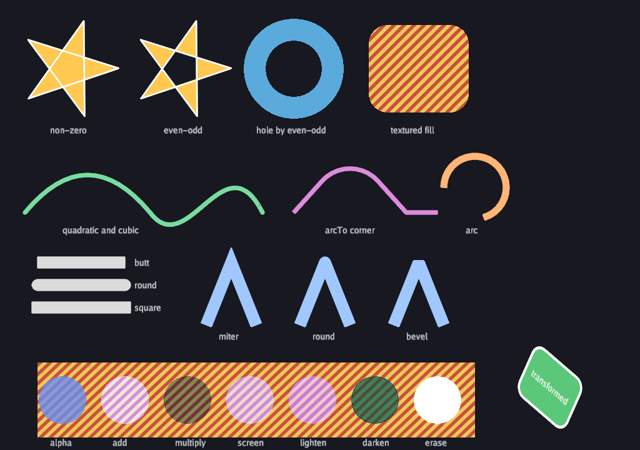
This example draws with paths rather than sprites. It covers the two fill rules, circles and rounded rectangles, quadratic and cubic curves, arcs by radius and by sweep, every line cap and join, a fill textured by an image, seven blend modes and the transform stack. All of it is anti-aliased, and all of it goes through the same 2D vertex stream as sprites and text, so paths merge with the rest of the frame instead of costing a pass of their own.
The API is the path half of gfx: gfx.Path with
MoveTo, LineTo, QuadTo, CubicTo, ArcTo, Arc, Circle,
RoundRect and Close, drawn with FillPath and StrokePath under
FillOptions and StrokeOptions. Blended and Transformed take
closures, the same shape the interface package uses for containers. The
2D graphics guide is the prose version.
Run it with:
go run ./examples/vector -seconds 3 -shot out.png
The only flags are -seconds N and -shot file.png. Escape quits.
The game type and Init
One font for the labels and one striped texture, used both as a fill
image and as a background for the blend modes. The texture is created
with Repeat: true, which is what lets a fill tile it across a shape
larger than the image, and Linear: true so the stripes are smoothed
when scaled.
type game struct {
	seconds float64
	shot    string

	font     *gfx.Font
	stripes  *gfx.Texture
	shotDone bool
}

func (g *game) Init(ctx *engine.Context) error {
	var err error
	if g.font, err = ctx.Gfx.NewFont(goregular.TTF, 14, gfx.FontOptions{}); err != nil {
		return err
	}
	img := image.NewRGBA(image.Rect(0, 0, 64, 64))
	for y := range 64 {
		for x := range 64 {
			c := color.RGBA{240, 200, 90, 255}
			if (x+y)/8%2 == 0 {
				c = color.RGBA{200, 80, 60, 255}
			}
			img.SetRGBA(x, y, c)
		}
	}
	if g.stripes, err = ctx.Gfx.NewTexture(img, gfx.TextureOptions{Linear: true, Repeat: true}); err != nil {
		return err
	}
	return nil
}

func (g *game) Shutdown(ctx *engine.Context) {
	g.stripes.Destroy()
	g.font.Destroy()
}
Update and the label helper
Update only handles quitting and the screenshot; the page is static
apart from the animations driven by ctx.Time. label is a small
helper so the captions under each group are one call rather than four
arguments repeated.
func (g *game) Update(ctx *engine.Context) error {
	if ctx.Input.KeyPressed(input.KeyEscape) || (g.seconds > 0 && ctx.Time >= g.seconds) {
		ctx.Quit()
	}
	if g.shot != "" && !g.shotDone && (g.seconds == 0 || ctx.Time >= g.seconds/2) {
		ctx.Screenshot(g.shot)
		g.shotDone = true
	}
	return nil
}

func (g *game) label(gr *gfx.Graphics, text string, x, y float32) {
	gr.DrawText(g.font, text, x, y, gfx.RGB(200, 205, 215))
}
Fill rules
One gfx.Path value is reused for the whole frame. p.Reset() clears
it and keeps the memory it has already allocated. Larger paths can still
grow that storage, and fill or stroke tessellation has its own work and
scratch allocation; Reset is not a no-allocation guarantee for the frame.
The same pentagram is filled twice. Under gfx.FillNonZero a point is
inside when the winding number is not zero, which makes the star solid.
Under gfx.FillEvenOdd a point is inside when a ray from it crosses the
outline an odd number of times, which leaves the middle hollow. The
angle steps by four fifths of a turn per point, which is what makes the
five lines cross.
StrokePath then outlines the same path with a round join, showing that
one path can be filled and stroked without being rebuilt.
func (g *game) Draw(ctx *engine.Context) error {
	gr := ctx.Gfx
	t := float32(ctx.Time)
	var p gfx.Path

	// Fill rules: a pentagram is solid under non-zero and hollow under even-odd.
	for i, rule := range []gfx.FillRule{gfx.FillNonZero, gfx.FillEvenOdd} {
		p.Reset()
		cx, cy := 110+float32(i)*180, float32(110)
		for k := range 5 {
			a := float64(k)*4*math.Pi/5 + float64(t)*0.3
			x, y := cx+80*float32(math.Sin(a)), cy-80*float32(math.Cos(a))
			if k == 0 {
				p.MoveTo(x, y)
			} else {
				p.LineTo(x, y)
			}
		}
		p.Close()
		gr.FillPath(&p, gfx.RGB(255, 200, 80), gfx.FillOptions{Rule: rule})
		gr.StrokePath(&p, gfx.RGB(255, 255, 255), gfx.StrokeOptions{Width: 1.5, Join: gfx.JoinRound})
	}
	g.label(gr, "non-zero", 80, 200)
	g.label(gr, "even-odd", 262, 200)
Holes and textured fills
Two circles in one path, filled even-odd, give a ring: the inner circle
is a hole because it is enclosed by one other contour. The path builder
methods return the path, so Circle(...).Circle(...) chains.
The textured fill passes the texture in FillOptions together with
TextureOrigin and TextureSize, both in view units. The origin scrolls
with time, so the stripes slide through the rounded rectangle while the
shape stays put. The colour passed to FillPath multiplies the texture,
so gfx.White leaves it as it is.
	// A ring: two circles, the inner one a hole under even-odd, then a
	// textured fill of a rounded shape.
	p.Reset()
	p.Circle(470, 110, 80).Circle(470, 110, 45)
	gr.FillPath(&p, gfx.RGB(90, 170, 220), gfx.FillOptions{Rule: gfx.FillEvenOdd})
	p.Reset()
	p.RoundRect(590, 40, 160, 140, 30)
	gr.FillPath(&p, gfx.White, gfx.FillOptions{Texture: g.stripes, TextureOrigin: lin.V2(590+t*20, 40), TextureSize: lin.V2(64, 64)})
	g.label(gr, "hole by even-odd", 410, 200)
	g.label(gr, "textured fill", 625, 200)
Curves and arcs
QuadTo takes one control point and an end point; CubicTo takes two
control points and an end point. They chain from wherever the path
currently is, so the cubic here starts where the quadratic ended.
ArcTo is the corner-rounding form: it takes a corner point, a next
point and a radius, and inserts the arc that is tangent to both lines.
Arc is the explicit form: centre, radius, start angle and end angle in
radians. The end angle here is animated, so the third stroke sweeps.
	// Curves: a quadratic, a cubic and arcs, stroked.
	p.Reset()
	p.MoveTo(40, 340).QuadTo(140, 220, 240, 340).CubicTo(300, 420, 360, 220, 420, 340)
	gr.StrokePath(&p, gfx.RGB(120, 220, 160), gfx.StrokeOptions{Width: 6, Cap: gfx.CapRound})
	p.Reset()
	p.MoveTo(470, 340).ArcTo(560, 240, 650, 340, 60).LineTo(650, 340).LineTo(700, 340)
	gr.StrokePath(&p, gfx.RGB(220, 140, 220), gfx.StrokeOptions{Width: 6})
	p.Reset()
	p.Arc(760, 300, 50, math.Pi, math.Pi*1.5*(0.6+0.4*float32(math.Sin(float64(t)))))
	gr.StrokePath(&p, gfx.RGB(255, 180, 120), gfx.StrokeOptions{Width: 10, Cap: gfx.CapButt})
	g.label(gr, "quadratic and cubic", 100, 360)
	g.label(gr, "arcTo corner", 520, 360)
	g.label(gr, "arc", 745, 360)
Caps and joins
Each cap is drawn as a thick translucent stroke over a thin opaque line
along the same two points, so the difference between them is visible at
the ends: CapButt stops at the point, CapRound adds a half disc and
CapSquare adds a half square. The joins are drawn as a chevron, where
JoinMiter extends the outer edges to a point, JoinRound fills the
corner with an arc and JoinBevel cuts it flat.
	// Caps and joins.
	caps := []gfx.LineCap{gfx.CapButt, gfx.CapRound, gfx.CapSquare}
	capNames := []string{"butt", "round", "square"}
	for i, c := range caps {
		y := 420 + float32(i)*36
		gr.StrokeLine(60, y, 200, y, 1, gfx.RGB(90, 90, 100))
		p.Reset()
		p.MoveTo(60, y).LineTo(200, y)
		gr.StrokePath(&p, gfx.RGBA(255, 255, 255, 180), gfx.StrokeOptions{Width: 18, Cap: c})
		g.label(gr, capNames[i], 215, y-8)
	}
	joins := []gfx.LineJoin{gfx.JoinMiter, gfx.JoinRound, gfx.JoinBevel}
	joinNames := []string{"miter", "round", "bevel"}
	for i, j := range joins {
		x := 330 + float32(i)*150
		p.Reset()
		p.MoveTo(x, 520).LineTo(x+40, 420).LineTo(x+80, 520)
		gr.StrokePath(&p, gfx.RGB(160, 200, 255), gfx.StrokeOptions{Width: 18, Join: j})
		g.label(gr, joinNames[i], x+20, 530)
	}
Blend modes and the transform stack
Blended(mode, body) applies a blend mode to everything the closure
draws and restores the previous mode afterwards. There is no exported
call to end it, which is the same shape as the interface containers.
BlendErase removes by the source's alpha, so an opaque white circle
cuts a hole rather than painting white, which is why that one case uses
a different colour.
The sprite behind the circles uses UV1: lin.V2(11, 2), which is the
bottom-right texture coordinate. Values above 1 tile the texture, which
works because it was created with Repeat: true.
Transformed(matrix, body) pushes a 2D matrix for the closure. The
matrix here is a translation, a rotation by radians and a shear,
composed left to right with Mul, so the shapes inside are drawn in a
local space centred on the origin. Text drawn inside the closure is
transformed too.
	// Blend modes over a striped background, and the transform stack.
	gr.Draw(g.stripes, gfx.Sprite{Pos: lin.V2(60, 580), Size: lin.V2(700, 120), UV1: lin.V2(11, 2)})
	modes := []gfx.Blend{gfx.BlendAlpha, gfx.BlendAdd, gfx.BlendMultiply, gfx.BlendScreen, gfx.BlendLighten, gfx.BlendDarken, gfx.BlendErase}
	for i, m := range modes {
		x := 100 + float32(i)*100
		c := gfx.RGBA(80, 140, 230, 200)
		if m == gfx.BlendErase {
			c = gfx.White // erase removes by the source's alpha: opaque cuts a hole
		}
		gr.Blended(m, func() {
			gr.FillCircle(x, 640, 38, c)
		})
		g.label(gr, m.String(), x-20, 700)
	}
	gr.Transformed(lin.Translate2(880, 620).Mul(lin.Rotate2(t*0.7)).Mul(lin.Shear2(0.3, 0)), func() {
		p.Reset()
		p.RoundRect(-50, -40, 100, 80, 16)
		gr.FillPath(&p, gfx.RGB(90, 200, 120), gfx.FillOptions{})
		gr.StrokePath(&p, gfx.White, gfx.StrokeOptions{Width: 3})
		gr.DrawText(g.font, "transformed", -38, -8, gfx.White)
	})
	return nil
}
main
func main() {
	seconds := flag.Float64("seconds", 0, "exit after this many seconds")
	shot := flag.String("shot", "", "write a screenshot to this PNG")
	flag.Parse()
	err := engine.Run(engine.Config{Title: "Bunyip vector paths", Width: 1024, Height: 720},
		&game{seconds: *seconds, shot: *shot})
	if err != nil {
		fmt.Fprintln(os.Stderr, "vector:", err)
		os.Exit(1)
	}
}
What to try
- Swap the two fill rules in
Drawand watch the star and the ring change places. - Raise the stroke width on the joins in
Drawto 40 and see how far a miter extends before the renderer falls back to a bevel. - Animate
TextureOriginin both axes inDraw, or scaleTextureSize, to scroll and zoom the fill under a fixed shape. - Nest a second
Transformedinside the existing one inDrawto see that the matrices compose. - Build a path from a slice of points in
Init, store it ongame, and draw it every frame without rebuilding it.