Example examples/animation
Animation
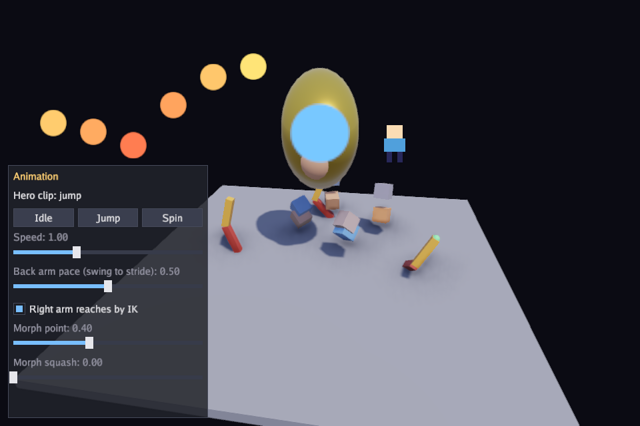
This program shows both halves of animation in one scene. Keyframe clips
from anim drive plain components on the
entity component system: sprite positions, sizes,
rotations and tints in 2D, and transforms in 3D. A flipbook plays frames
from a sprite sheet. A hero sphere crossfades between three clips from
buttons, and a Finished event sends it back to idle when a one-shot
clip ends.
Three robot arms show the skeletal side, played by
gfx.AnimPlayer over a model's node
hierarchy. One plays a clip and logs an animation event, one reaches for
a moving target through two-bone inverse kinematics in its PostPose
hook, and one blends a slow swing into a fast stride by a slider through
a one-dimensional blend space. The model is a glTF document this program
builds in memory, which is the same thing
gltf.Load returns from a file.
The two systems are worth telling apart. The anim clips animate
components of entities and are advanced by a system on the world; the
gfx.AnimPlayer animates a model's skeleton and is advanced by the game.
The animation guide covers both.
Run it:
go run ./examples/animation -seconds 3 -shot out.png
The flags are -seconds N, -shot file.png and -headless to render
without a window.
Components and state
sprite2D and mesh3D are the game's own components saying how to draw
an entity. The animation itself needs neither: a clip writes into
gfx.Sprite and gfx.Transform, which are engine components, and the
drawing reads them.
// Command animation shows the anim package on 2D and 3D entities alike:
// keyframe clips drive sprite positions, sizes, rotations and tints and
// 3D transforms; a flipbook plays sprite-sheet frames; buttons
// crossfade the hero cube between clips, with a Finished event sending
// it back to idle; and three robot arms from a generated glTF model show
// a skeletal clip with an animation event, two-bone IK reaching for a
// moving target, and a 1D blend space mixing a slow swing into a fast
// one by a slider. A sphere above them carries three morph targets
// blended in the vertex shader, driven by two sliders and a sine, which
// costs no upload however often the weights change. Escape quits.
package main

import (
	"flag"
	"fmt"
	"image"
	"image/color"
	"math"
	"os"

	"golang.org/x/image/font/gofont/goregular"

	"github.com/matjam/bunyip/anim"
	"github.com/matjam/bunyip/ecs"
	"github.com/matjam/bunyip/engine"
	"github.com/matjam/bunyip/gfx"
	"github.com/matjam/bunyip/gltf"
	"github.com/matjam/bunyip/input"
	"github.com/matjam/bunyip/lin"
	"github.com/matjam/bunyip/tween"
	"github.com/matjam/bunyip/ui"
)

// Components that say how to draw an entity.
type sprite2D struct{ Tex *gfx.Texture }
type mesh3D struct {
	Mesh *gfx.Mesh
	Mat  gfx.Material
}
The game holds the three hero clips so the buttons can play them, the three skeletal players, and the two queries the drawing walks.
type game struct {
	seconds float64
	shot    string

	font   *gfx.Font
	ui     *ui.Context
	world  *ecs.World
	dot    *gfx.Texture
	walker *gfx.Texture
	cube   *gfx.Mesh
	sphere *gfx.Mesh
	hero   ecs.Entity
	idle   *anim.Clip
	jump   *anim.Clip
	spin   *anim.Clip
	speed  float32
	log    []string
	yaw    float32

	// Three arms of one skeletal model: one swings a clip with an
	// event, one reaches for a target by IK, and one blends the swing
	// into a faster stride by a pace parameter.
	arms   *gfx.Model
	swing  *gfx.AnimPlayer
	reach  *gfx.AnimPlayer
	ikOn   bool
	target lin.Vec3 // the reaching arm's goal, relative to its base
	stride *gfx.AnimPlayer
	blend  *anim.Blend
	pace   float32

	// A sphere with three morph targets, driven straight from sliders and
	// a sine. Up to gfx.MaxGPUMorphTargets open at once blend in the
	// vertex shader, so changing them every frame uploads nothing.
	face  *gfx.Model
	faceW [3]float32

	sprites  *ecs.Query2[gfx.Sprite, sprite2D]
	meshes   *ecs.Query2[gfx.Transform, mesh3D]
	shotDone bool
}
Init: resources and the world
The textures and meshes are created first, then a world with two cached queries. Everything after this point spawns entities into that world.
func (g *game) Init(ctx *engine.Context) error {
	var err error
	if g.font, err = ctx.Gfx.NewFont(goregular.TTF, 15, gfx.FontOptions{}); err != nil {
		return err
	}
	g.ui = ui.New(ctx.Gfx, ui.DarkTheme(g.font))
	if g.dot, err = ctx.Gfx.NewTexture(circle(32), gfx.TextureOptions{Linear: true}); err != nil {
		return err
	}
	if g.walker, err = ctx.Gfx.NewTexture(walkerSheet(), gfx.TextureOptions{}); err != nil {
		return err
	}
	cv, ci := gfx.CubeMesh()
	if g.cube, err = ctx.Gfx.NewMesh(cv, ci); err != nil {
		return err
	}
	sv, si := gfx.SphereMesh(16, 32)
	if g.sphere, err = ctx.Gfx.NewMesh(sv, si); err != nil {
		return err
	}
	g.speed = 1
	w := ecs.NewWorld()
	g.world = w
	g.sprites = w.Query2[gfx.Sprite, sprite2D]()
	g.meshes = w.Query2[gfx.Transform, mesh3D]()
Init: the 2D clips
anim.NewClip takes a name, a mode and any number of tracks.
anim.Loop restarts, anim.PingPong runs back and forth and
anim.Once stops at the end and raises a Finished event.
A track names what it animates and carries the keyframes:
anim.Position2, anim.Size2, anim.Rotation2 and anim.Tint write
into a gfx.Sprite. anim.At(t, v) is a keyframe at a time in seconds,
and anim.AtEased(t, v, tween.OutQuad) eases the segment that ends at
it with a function from tween. Rotations are in
radians and colours are gfx.Color in linear space.
A clip is a value shared by every entity playing it. The six bouncing
dots share one bounce clip and differ only in p.Time, the point each
one starts from, which is the cheapest way to stagger a crowd.
anim.Player{} is the component that plays a clip, and
anim.PlayerOf(w, e) returns a pointer to it. The flipbook is a
different component, anim.Flipbook, holding a sheet, the frames to
play, a rate and whether to loop; it needs no player and no clip.
	// 2D: dots that bounce, pulse and fade, each offset in time.
	bounce := anim.NewClip("bounce", anim.Loop,
		anim.Position2(anim.Vec2s(anim.At(0, lin.V2(0, 0)), anim.AtEased(0.6, lin.V2(0, -120), tween.OutQuad), anim.AtEased(1.2, lin.V2(0, 0), tween.OutBounce))),
		anim.Tint(anim.Colors(anim.At(0, gfx.RGB(255, 120, 80)), anim.At(0.6, gfx.RGB(255, 230, 120)), anim.At(1.2, gfx.RGB(255, 120, 80)))),
	)
	for i := range 6 {
		e := w.SpawnWith(gfx.Sprite{Size: lin.V2(40, 40), Color: gfx.White}, sprite2D{g.dot}, anim.Player{})
		p := anim.PlayerOf(w, e)
		p.Play(bounce)
		p.Time = float32(i) * 0.2
		w.Add(e, offset{lin.V2(60+float32(i)*60, 200)})
	}
	pulse := anim.NewClip("pulse", anim.PingPong,
		anim.Size2(anim.Vec2s(anim.At(0, lin.V2(30, 30)), anim.AtEased(0.8, lin.V2(90, 90), tween.InOutSine))),
		anim.Rotation2(anim.Floats(anim.Num(0, 0), anim.Num(0.8, math.Pi/2))),
	)
	e := w.SpawnWith(gfx.Sprite{Size: lin.V2(30, 30), Color: gfx.RGB(120, 200, 255), Origin: lin.V2(0.5, 0.5)}, sprite2D{g.dot}, anim.Player{}, offset{lin.V2(480, 200)})
	anim.PlayerOf(w, e).Play(pulse)

	// A flipbook walker from a generated four-frame sheet.
	sheet := gfx.NewSheet(g.walker, 16, 16)
	w.SpawnWith(gfx.Sprite{Size: lin.V2(64, 64), Color: gfx.White}, sprite2D{g.walker}, offset{lin.V2(560, 180)},
		anim.Flipbook{Sheet: sheet, Frames: []int{0, 1, 2, 3}, FPS: 8, Loop: true})
Init: the 3D clips and the hero
The same track functions exist for 3D: anim.Position, anim.Rotation
and anim.Scale write into a gfx.Transform. Rotations are quaternions,
so the keyframes are built with lin.AxisAngle and interpolated the
short way round.
The ring of cubes shares one clip per entity built in the loop, each
starting at a different angle and offset in time. The hero has three
clips: idle loops, and jump and spin are anim.Once, so they end
and report it.
The rotation track in idle looks redundant, holding the identity at
both ends. It is there so a crossfade from spin back to idle has a
rotation to blend towards; a clip that does not animate a channel leaves
it wherever the last clip put it.
	// 3D: a ring of cubes orbiting and tumbling, and a hero cube with
	// clips to crossfade between.
	for i := range 8 {
		a := float32(i) / 8 * 2 * math.Pi
		orbit := anim.NewClip("orbit", anim.Loop,
			anim.Position(anim.Vec3s(
				anim.At(0, lin.V3(3*float32(math.Cos(float64(a))), 0, 3*float32(math.Sin(float64(a))))),
				anim.At(2, lin.V3(3*float32(math.Cos(float64(a)+math.Pi)), 1, 3*float32(math.Sin(float64(a)+math.Pi)))),
				anim.At(4, lin.V3(3*float32(math.Cos(float64(a))), 0, 3*float32(math.Sin(float64(a))))),
			)),
			anim.Rotation(anim.Quats(anim.At(0, lin.QuatIdentity()), anim.At(2, lin.AxisAngle(lin.V3(1, 1, 0).Norm(), math.Pi)), anim.At(4, lin.AxisAngle(lin.V3(1, 1, 0).Norm(), 2*math.Pi)))),
		)
		e := w.SpawnWith(gfx.Transform{Scale: lin.V3(0.4, 0.4, 0.4)}, mesh3D{g.cube, gfx.Material{BaseColor: gfx.RGB(uint8(120+15*i), 160, uint8(220-15*i)), Roughness: 0.4}}, anim.Player{})
		p := anim.PlayerOf(w, e)
		p.Play(orbit)
		p.Time = float32(i) * 0.5
	}
	g.idle = anim.NewClip("idle", anim.Loop,
		anim.Position(anim.Vec3s(anim.At(0, lin.V3(0, 0.5, 0)), anim.AtEased(1, lin.V3(0, 0.8, 0), tween.InOutSine), anim.AtEased(2, lin.V3(0, 0.5, 0), tween.InOutSine))),
		anim.Scale(anim.Vec3s(anim.At(0, lin.V3(1, 1, 1)), anim.At(1, lin.V3(1.05, 0.95, 1.05)), anim.At(2, lin.V3(1, 1, 1)))),
		anim.Rotation(anim.Quats(anim.At(0, lin.QuatIdentity()), anim.At(2, lin.QuatIdentity()))),
	)
	g.jump = anim.NewClip("jump", anim.Once,
		anim.Position(anim.Vec3s(anim.At(0, lin.V3(0, 0.5, 0)), anim.AtEased(0.4, lin.V3(0, 3, 0), tween.OutQuad), anim.AtEased(0.8, lin.V3(0, 0.5, 0), tween.InQuad))),
		anim.Scale(anim.Vec3s(anim.At(0, lin.V3(1.3, 0.7, 1.3)), anim.At(0.2, lin.V3(0.8, 1.4, 0.8)), anim.At(0.8, lin.V3(1.2, 0.8, 1.2)), anim.At(1, lin.V3(1, 1, 1)))),
	)
	g.spin = anim.NewClip("spin", anim.Once,
		anim.Rotation(anim.Quats(anim.At(0, lin.QuatIdentity()), anim.At(0.5, lin.AxisAngle(lin.V3(0, 1, 0), math.Pi)), anim.AtEased(1, lin.AxisAngle(lin.V3(0, 1, 0), 2*math.Pi), tween.OutBack))),
		anim.Position(anim.Vec3s(anim.At(0, lin.V3(0, 0.5, 0)), anim.At(1, lin.V3(0, 0.5, 0)))),
	)
	g.hero = w.SpawnWith(gfx.Transform{Position: lin.V3(0, 0.5, 0)}, mesh3D{g.sphere, gfx.Material{BaseColor: gfx.RGB(255, 200, 90), Metallic: 0.6, Roughness: 0.3}}, anim.Player{})
	anim.PlayerOf(w, g.hero).Play(g.idle)
Init: the skeletal arms
ctx.Gfx.LoadModel uploads a glTF document. model.Parts are its
drawable pieces, whose materials the game may replace, and
model.NewAnimPlayer returns one player per animated instance, so three
players over one model is three arms in different poses from one upload.
AddEvent("swing", 1, "hit") marks a time in a clip; OnEvent is called
as playback crosses it, on every loop, which is how a footstep sound or a
hit box is triggered from the animation rather than from a timer.
PostPose runs after the pose is computed and before it is drawn.
anim.SolveTwoBoneIK(p, shoulder, elbow, hand, target, pole) turns three
nodes so the end node reaches a point in model space, with the middle
joint bending towards the pole vector. The node indices come from
model.NodeIndex, looked up once here rather than by name every frame.
anim.NewBlend with a BlendSpace1D mixes clips by a named parameter:
the swing at zero, the stride at one. Between them both clips run at one
shared phase, so the arm neither stutters nor doubles back.
	// Skeletal: the arms come from a glTF document built in memory; a
	// file loads the same way through gltf.Load. The left arm plays the
	// swing clip and logs its "hit" event; the right arm's PostPose
	// solves two-bone IK towards an orbiting target.
	if g.arms, err = ctx.Gfx.LoadModel(armDocument()); err != nil {
		return err
	}
	g.arms.Parts[0].Material = gfx.Material{BaseColor: gfx.RGB(200, 90, 80), Roughness: 0.5}
	g.arms.Parts[1].Material = gfx.Material{BaseColor: gfx.RGB(240, 180, 90), Roughness: 0.5}
	g.swing = g.arms.NewAnimPlayer()
	g.swing.AddEvent("swing", 1, "hit")
	g.swing.OnEvent = func(e gfx.AnimEvent) { g.say(fmt.Sprintf("event %q at %.1fs of %s", e.Name, e.Time, e.Clip)) }
	g.swing.Play("swing", true)
	g.reach = g.arms.NewAnimPlayer()
	g.reach.Play("swing", true)
	g.ikOn = true
	shoulder, elbow, hand := g.arms.NodeIndex("shoulder"), g.arms.NodeIndex("elbow"), g.arms.NodeIndex("hand")
	g.reach.PostPose = func(p *gfx.AnimPlayer) {
		if g.ikOn {
			anim.SolveTwoBoneIK(p, shoulder, elbow, hand, g.target, lin.V3(0, 0.8, 2))
		}
	}
	// The third arm plays a 1D blend space: the two-second swing at pace
	// 0, the one-second stride at pace 1. In between, both clips run at
	// one shared phase, so the arm neither stutters nor doubles back.
	g.stride = g.arms.NewAnimPlayer()
	g.blend = anim.NewBlend(&anim.BlendSpace1D{Parameter: "pace", Clips: []anim.BlendPoint1D{
		{Clip: "swing", At: 0}, {Clip: "stride", At: 1},
	}})
	g.pace = 0.5
Init: the systems
anim.System advances every anim.Player and anim.Flipbook in the
world. The second system reads this step's anim.Finished events and
crossfades the hero back to idle when one of its one-shot clips ends,
which is how a jump returns to a stance without the button knowing what
follows it.
	w.AddSystem("anim", anim.System)
	// When a one-shot clip finishes, fade the hero back to idle.
	w.AddSystem("return", func(w *ecs.World, dt float64) {
		for _, ev := range w.Events[anim.Finished]() {
			if ev.Entity == g.hero {
				anim.PlayerOf(w, g.hero).CrossFade(g.idle, 0.3)
				g.say("finished " + ev.Clip.Name + ", back to idle")
			}
		}
	})
	return nil
}
offset is the game's own component holding a 2D entity's anchor. The
clip animates the sprite's position relative to the origin, and the
drawing adds the anchor, so one clip serves six dots in six places.
// offset is a 2D entity's anchor; the clip's position is relative to it.
type offset struct{ At lin.Vec2 }

func (g *game) say(s string) {
	g.log = append(g.log, s)
	if len(g.log) > 5 {
		g.log = g.log[1:]
	}
}
Shutdown
Every mesh, texture, model and font is destroyed on the goroutine that created it. The world and its entities are ordinary memory and need nothing.
func (g *game) Shutdown(ctx *engine.Context) {
	g.face.Destroy()
	g.arms.Destroy()
	g.cube.Destroy()
	g.sphere.Destroy()
	g.dot.Destroy()
	g.walker.Destroy()
	g.font.Destroy()
}
Update: speeds, the world and the players
ecs.World.Each walks every entity with an anim.Player and writes the speed
multiplier from the slider. g.world.Update(ctx.Delta) runs the systems,
which advances the clips and the flipbook.
The three skeletal players are advanced by hand, because they are not
components: Advance takes seconds, so multiplying by the speed is how
the same slider reaches them. The blend space is set and then advanced
through its player.
The crossfade at frame 30 exists so a timed run has the hero in the middle of a jump when the screenshot is taken.
func (g *game) Update(ctx *engine.Context) error {
	if ctx.Input.KeyPressed(input.KeyEscape) || (g.seconds > 0 && ctx.Time >= g.seconds) {
		ctx.Quit()
	}
	if g.shot != "" && !g.shotDone && (g.seconds == 0 || ctx.Time >= g.seconds/2) {
		ctx.Screenshot(g.shot)
		g.shotDone = true
	}
	if g.seconds > 0 && ctx.Frame == 30 {
		anim.PlayerOf(g.world, g.hero).CrossFade(g.jump, 0.2) // something to see in a screenshot
	}
	g.world.Each(func(e ecs.Entity, p *anim.Player) { p.Speed = g.speed })
	g.world.Update(ctx.Delta)
	t := float32(ctx.Time)
	g.target = lin.V3(0.9*float32(math.Cos(float64(t)*1.3)), 0.9+0.5*float32(math.Sin(float64(t)*0.7)), 0.7*float32(math.Sin(float64(t)*1.3)))
	g.swing.Advance(ctx.Delta * float64(g.speed))
	g.reach.Advance(ctx.Delta * float64(g.speed))
	g.blend.Set("pace", g.pace)
	g.blend.Advance(g.stride, ctx.Delta*float64(g.speed))
	// The snout breathes on its own so a screenshot catches it moving.
	// New weights every update cost nothing: the shader blends them.
	g.faceW[2] = 0.3 + 0.3*float32(math.Sin(float64(t)*1.6))
	if err := g.face.SetMorphWeights(0, g.faceW[:]); err != nil {
		return err
	}
	g.yaw += float32(ctx.Delta) * 0.2
	return nil
}
Draw: the 3D scene
The camera, the light and the ground are set up as in any 3D scene. The
mesh query draws every animated entity with DrawMeshAt, which takes the
transform the clip just wrote.
DrawModelAnimated draws a model with a player's current pose, so the
three arms are three calls with three players and one model. The small
glowing sphere marks where the reaching arm is aiming, drawn at the
target plus that arm's own base position, because the target is in the
arm's model space.
func (g *game) Draw(ctx *engine.Context) error {
	gr := ctx.Gfx
	w := g.world
	gr.SetCamera(gfx.OrbitCamera(lin.V3(0, 0.8, 0), g.yaw, 0.45, 9))
	gr.SetLight(gfx.Light{Direction: lin.V3(-0.4, -1, -0.5), Color: gfx.Color{R: 2.2, G: 2.1, B: 1.9, A: 1},
		Sky: gfx.Sky{Zenith: gfx.Color{R: 0.25, G: 0.3, B: 0.45, A: 1}, Ground: gfx.Color{R: 0.1, G: 0.1, B: 0.08, A: 1}}, Shadows: true, ShadowDistance: 25})
	gr.DrawMesh(g.cube, gfx.Material{BaseColor: gfx.RGB(150, 150, 160), Roughness: 0.9}, lin.Translate(lin.V3(0, -0.6, 0)).Mul(lin.Scale(lin.V3(9, 0.2, 9))))
	g.meshes.Each(func(e ecs.Entity, t *gfx.Transform, m *mesh3D) {
		gr.DrawMeshAt(m.Mesh, m.Mat, *t)
	})
	gr.DrawModelAnimated(g.arms, gfx.At(-2.2, -0.5, 0), g.swing)
	gr.DrawModelAnimated(g.arms, gfx.At(2.2, -0.5, 0), g.reach)
	gr.DrawModelAnimated(g.arms, gfx.At(0, -0.5, -2.4), g.stride)
	gr.DrawMesh(g.sphere, gfx.Material{BaseColor: gfx.RGB(120, 220, 140), Emissive: 0.4},
		lin.Translate(g.target.Add(lin.V3(2.2, -0.5, 0))).Mul(lin.Scale(lin.V3(0.08, 0.08, 0.08))))
Draw: the 2D entities
gr.ScreenSpace() returns sprite drawing to view coordinates, undoing
any 2D camera. Nothing here sets one, so the call states what the sprites
expect rather than changing anything: positions in view units with the
origin at the top left.
The sprite query copies each gfx.Sprite before drawing it, adds the
anchor from the offset component, and fills in UV1 when the clip left
it zero. Copying rather than writing back keeps the anchor out of the
component the clip owns.
	// 2D entities draw at their offset plus the animated position.
	gr.ScreenSpace()
	g.sprites.Each(func(e ecs.Entity, s *gfx.Sprite, d *sprite2D) {
		draw := *s
		if o, ok := w.Get[offset](e); ok {
			draw.Pos = draw.Pos.Add(o.At)
		}
		if draw.UV1 == (lin.Vec2{}) {
			draw.UV1 = lin.V2(1, 1)
		}
		gr.Draw(d.Tex, draw)
	})
Draw: the panel
The buttons call CrossFade(clip, seconds), which blends from the
current pose into the new clip over that time instead of snapping. The
sliders and the checkbox edit the game's own values, which Update then
pushes into the players. The last two sliders are the morph target
weights, which Update hands to the model every frame: with three
targets, well inside gfx.MaxGPUMorphTargets, the blend happens in the
vertex shader. Updated weights travel with the draw; the geometry does
not need to be blended on the CPU or uploaded again.
	u := g.ui
	u.Begin(ctx.Input, func() {
		u.Panel("Animation", ui.Rect{X: 12, Y: ctx.Height - 392, W: 300, H: 380}, func() {
			u.Label("Hero clip: " + anim.PlayerOf(w, g.hero).Clip.Name)
			u.Row(3, func() {
				if u.Button("Idle") {
					anim.PlayerOf(w, g.hero).CrossFade(g.idle, 0.3)
				}
				if u.Button("Jump") {
					anim.PlayerOf(w, g.hero).CrossFade(g.jump, 0.15)
				}
				if u.Button("Spin") {
					anim.PlayerOf(w, g.hero).CrossFade(g.spin, 0.15)
				}
			})
			u.Slider("Speed", &g.speed, 0, 3)
			u.Slider("Back arm pace (swing to stride)", &g.pace, 0, 1)
			u.Checkbox("Right arm reaches by IK", &g.ikOn)
			// Three morph targets, blended in the vertex shader: the
			// sliders move every frame and upload nothing.
			names := g.face.MorphTargets(0)
			for i := range g.faceW[:2] {
				u.Slider("Morph "+names[i], &g.faceW[i], 0, 1)
			}
			for _, l := range g.log {
				u.Label(l)
			}
		})
	})
	return nil
}
The generated art
circle draws the soft dot and walkerSheet the four frames of the
flipbook, four 16 by 16 figures whose legs alternate, laid out in one
row, which is what gfx.NewSheet(tex, 16, 16) cuts up.
func circle(size int) image.Image {
	img := image.NewNRGBA(image.Rect(0, 0, size, size))
	r := float64(size) / 2
	for y := range size {
		for x := range size {
			d := math.Hypot(float64(x)+0.5-r, float64(y)+0.5-r)
			a := math.Max(0, math.Min(1, r-d))
			img.SetNRGBA(x, y, color.NRGBA{255, 255, 255, uint8(255 * a)})
		}
	}
	return img
}
// walkerSheet draws four 16×16 frames of a little figure whose legs
// alternate.
func walkerSheet() image.Image {
	img := image.NewRGBA(image.Rect(0, 0, 64, 16))
	for f := range 4 {
		set := func(x, y int, c color.RGBA) { img.SetRGBA(f*16+x, y, c) }
		for y := 2; y < 7; y++ {
			for x := 5; x < 11; x++ {
				set(x, y, color.RGBA{250, 220, 180, 255})
			}
		}
		for y := 7; y < 12; y++ {
			for x := 4; x < 12; x++ {
				set(x, y, color.RGBA{80, 160, 220, 255})
			}
		}
		stride := []int{0, 1, 0, -1}[f]
		for y := 12; y < 16; y++ {
			for _, x := range []int{5 + stride, 6 + stride, 9 - stride, 10 - stride} {
				set(x, y, color.RGBA{40, 40, 90, 255})
			}
		}
	}
	return img
}
The morph target sphere
faceDocument builds the blend shapes. A morph target is a delta per
vertex over the mesh's rest geometry, and a weight says how much of it
to add; the three here pull the crown to a point, squash the sphere wide
and push a snout out of the front, and any mixture of them is a
position. Normals get deltas too, so the lighting follows the shape.
A file's blend shapes arrive in exactly this form through gltf.Load,
including the sparse accessors Blender writes for them. Three targets is
well inside gfx.MaxGPUMorphTargets, so the model's deltas go into a
storage buffer when it loads and every draw blends them in the vertex
shader. Changing the sliders updates the weights without reuploading the
mesh's vertices or target deltas.
// faceDocument builds a sphere with three morph targets as a glTF
// document in memory: one pulls its crown into a point, one squashes it
// wide and one pushes a snout out of the front. A file's blend shapes
// arrive the same way through gltf.Load.
func faceDocument() *gltf.Document {
	sv, si := gfx.SphereMesh(16, 32)
	prim := gltf.Primitive{Indices: si, Material: -1}
	for _, v := range sv {
		prim.Positions = append(prim.Positions, v.Pos)
		prim.Normals = append(prim.Normals, v.Normal)
		prim.UVs = append(prim.UVs, v.UV)
	}
	// Each target is a delta per vertex, weighted by how much of the
	// shape it belongs to, so the three blend smoothly against each other.
	shape := func(delta func(p lin.Vec3) lin.Vec3) gltf.MorphTarget {
		t := gltf.MorphTarget{Positions: make([]lin.Vec3, len(sv)), Normals: make([]lin.Vec3, len(sv))}
		for i, v := range sv {
			t.Positions[i] = delta(v.Pos)
			// The normal follows the stretch: a rough approximation, which
			// is all a blend shape's normals ever are.
			t.Normals[i] = delta(v.Normal).Mul(0.5)
		}
		return t
	}
	prim.Targets = []gltf.MorphTarget{
		shape(func(p lin.Vec3) lin.Vec3 { return lin.V3(-p.X*0.6, max(p.Y, 0)*1.2, -p.Z*0.6) }),
		shape(func(p lin.Vec3) lin.Vec3 { return lin.V3(p.X*0.5, -p.Y*0.45, p.Z*0.5) }),
		shape(func(p lin.Vec3) lin.Vec3 { return lin.V3(0, 0, max(p.Z, 0)*0.9) }),
	}
	return &gltf.Document{
		Meshes: []gltf.Mesh{{Name: "face", TargetNames: []string{"point", "squash", "snout"},
			Primitives: []gltf.Primitive{prim}}},
		Nodes:     []gltf.Node{{Name: "face", Parent: -1, Rotation: lin.QuatIdentity(), Scale: lin.V3(1, 1, 1), Mesh: 0, Skin: -1}},
		Instances: []gltf.Instance{{Name: "face", Mesh: 0, Node: 0, Skin: -1, World: lin.Identity()}},
	}
}
Building a glTF document in memory
armDocument builds the two-bone arm the three players share. It is
worth reading as a description of what a loaded model actually is: a mesh
with positions, normals and texture coordinates; a node hierarchy with a
parent, children, a local translation, rotation and scale; instances
tying meshes to nodes with their world transforms; and animations, each a
duration and a list of channels writing one path of one node from times
and values.
The rest pose here is both bones straight up, and the clips rotate about
Z by degrees converted with lin.Radians. The swing clip takes two
seconds, stride one, which is what the blend space mixes.
// armDocument builds a two-bone arm as a glTF document in memory: a box
// per bone, nodes shoulder, elbow and hand, a "swing" clip that rocks
// both joints over two seconds and a "stride" clip that rocks them
// wider in one. Straight up is the rest pose.
func armDocument() *gltf.Document {
	cv, ci := gfx.CubeMesh()
	prim := gltf.Primitive{Indices: ci, Material: -1}
	for _, v := range cv {
		prim.Positions = append(prim.Positions, lin.V3(v.Pos.X*0.18, (v.Pos.Y+0.5)*0.8, v.Pos.Z*0.18))
		prim.Normals = append(prim.Normals, v.Normal)
		prim.UVs = append(prim.UVs, v.UV)
	}
	id, one := lin.QuatIdentity(), lin.V3(1, 1, 1)
	doc := &gltf.Document{
		Meshes: []gltf.Mesh{{Name: "bone", Primitives: []gltf.Primitive{prim}}},
		Nodes: []gltf.Node{
			{Name: "shoulder", Parent: -1, Children: []int{1}, Rotation: id, Scale: one, Mesh: 0, Skin: -1},
			{Name: "elbow", Parent: 0, Children: []int{2}, Translation: lin.V3(0, 0.8, 0), Rotation: id, Scale: one, Mesh: 0, Skin: -1},
			{Name: "hand", Parent: 1, Translation: lin.V3(0, 0.8, 0), Rotation: id, Scale: one, Mesh: -1, Skin: -1},
		},
	}
	doc.Instances = []gltf.Instance{
		{Name: "shoulder", Mesh: 0, Node: 0, Skin: -1, World: doc.Nodes[0].Local()},
		{Name: "elbow", Mesh: 0, Node: 1, Skin: -1, World: doc.Nodes[0].Local().Mul(doc.Nodes[1].Local())},
	}
	aboutZ := func(deg float32) lin.Vec4 {
		q := lin.AxisAngle(lin.V3(0, 0, 1), lin.Radians(deg))
		return lin.V4(q.X, q.Y, q.Z, q.W)
	}
	doc.Animations = []gltf.Animation{
		{Name: "swing", Duration: 2, Channels: []gltf.Channel{
			{Node: 0, Path: gltf.PathRotation, Times: []float32{0, 1, 2}, Values: []lin.Vec4{aboutZ(-35), aboutZ(35), aboutZ(-35)}},
			{Node: 1, Path: gltf.PathRotation, Times: []float32{0, 1, 2}, Values: []lin.Vec4{aboutZ(20), aboutZ(-50), aboutZ(20)}},
		}},
		{Name: "stride", Duration: 1, Channels: []gltf.Channel{
			{Node: 0, Path: gltf.PathRotation, Times: []float32{0, 0.5, 1}, Values: []lin.Vec4{aboutZ(-70), aboutZ(60), aboutZ(-70)}},
			{Node: 1, Path: gltf.PathRotation, Times: []float32{0, 0.5, 1}, Values: []lin.Vec4{aboutZ(45), aboutZ(-90), aboutZ(45)}},
		}},
	}
	return doc
}
main
func main() {
	seconds := flag.Float64("seconds", 0, "exit after this many seconds")
	shot := flag.String("shot", "", "write a screenshot to this PNG")
	headless := flag.Bool("headless", false, "render without a window, for screenshots")
	flag.Parse()
	err := engine.Run(engine.Config{Title: "Bunyip animation", Width: 960, Height: 640, Resizable: true, Headless: *headless},
		&game{seconds: *seconds, shot: *shot})
	if err != nil {
		fmt.Fprintln(os.Stderr, "animation:", err)
		os.Exit(1)
	}
}
What to try
- Add an
anim.Tinttrack to the 2D sprite'spulseclip inInitand animate its colour alongside its size.Tinttargetsgfx.Sprite; the 3D hero would need a custom property track for its material. - Change the pole vector passed to
SolveTwoBoneIKinInitand see the elbow swing to the other side. - Add a third point to the blend space in
Initand give the slider another clip to reach. - Change the flipbook's
FPSinInitto alter its walk rate. The speed slider changesanim.Playerand the skeletal players; the flipbook still advances on the world's unscaled delta. - Add an event to the
strideclip inInitand log it, then blend the pace and watch when the event still fires.