Example examples/materials
Materials
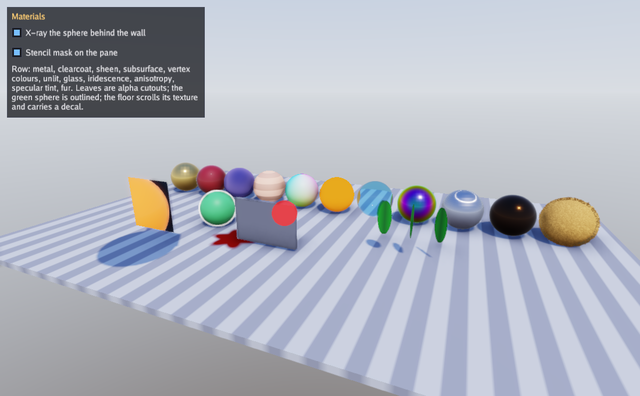
Eleven spheres in a row show eleven surfaces: brushed metal, car paint with a clearcoat, velvet with sheen, skin with subsurface scattering shaped by a thickness map, a mesh coloured per vertex, an unlit sphere, refracting glass that absorbs colour over distance, a thin film whose hue turns with the angle, a brushed metal whose highlight is stretched along the surface, a dark surface with a warm specular tint, and a ball of fur made of shells. Around them are alpha-cutout leaves casting cutout shadows, a floor scrolling its texture through a UV transform with a decal projected onto it, an outlined sphere, a sphere behind a wall showing through with an x-ray tint, and a glowing orb drawn only inside a stencil mask.
Everything here is gfx.Material, one plain value passed to a draw call. There is no material object to create or destroy, so a program can build one per frame, which is what the row does. The textures a material refers to are GPU resources and are created once.
Lighting is a procedural sky, or a panorama with -env, which also shows
how an OpenEXR or Radiance file differs from a PNG. Read
the 3D graphics guide for the renderer and
the physics3d walkthrough for the same material fields
used on five hundred cubes.
Run it:
go run ./examples/materials -seconds 3 -shot out.png
The flags are -seconds N, -shot file.png and -env file.exr for a
panorama, which may also be a Radiance .hdr, a PNG or a JPEG. Dragging
orbits, the wheel zooms and Escape quits.
Package and state
The game holds four meshes, five textures, the optional environment, the camera's three numbers and the two switches the panel offers.
// Command materials shows every material feature on a row of spheres and
// a few props: clearcoat, sheen, subsurface, iridescence, anisotropy, a
// specular tint, fur, alpha cutout, unlit, vertex colours, a scrolling
// texture transform, occlusion, an outline and an x-ray tint through a
// wall, a stencil mask, a projected decal, all under image-based
// lighting from a sky or a panorama (-env file.png, .hdr or .exr). Drag
// to orbit, scroll to zoom, Escape quits.
package main

import (
	"flag"
	"fmt"
	"image"
	"image/color"
	_ "image/jpeg"
	_ "image/png"
	"math"
	"os"
	"path/filepath"
	"strings"

	"golang.org/x/image/font/gofont/goregular"

	"github.com/matjam/bunyip/engine"
	"github.com/matjam/bunyip/gfx"
	"github.com/matjam/bunyip/input"
	"github.com/matjam/bunyip/lin"
	"github.com/matjam/bunyip/ui"
)

type game struct {
	seconds float64
	shot    string
	envPath string

	font     *gfx.Font
	ui       *ui.Context
	sphere   *gfx.Mesh
	cube     *gfx.Mesh
	quad     *gfx.Mesh
	colored  *gfx.Mesh
	env      *gfx.Environment
	stripes  *gfx.Texture
	leaf     *gfx.Texture
	splat    *gfx.Texture
	thick    *gfx.Texture
	fur      *gfx.Texture
	yaw      float32
	pitch    float32
	dist     float32
	lastX    float32
	lastY    float32
	dragging bool
	shotDone bool
	xray     bool
	mask     bool
}
Init: meshes and textures
The spheres and the cube come from the built-in generators. The vertex
coloured sphere is the same vertex slice with a Color written into each
vertex before a second upload: gfx.Vertex carries an optional colour
that the shader multiplies into the base colour, which is why the
material for it sets only a roughness.
The texture options matter here. Repeat: true makes the floor's stripes
tile under a UV transform that scales past one. Linear: true asks for
smooth sampling. Data: true on the thickness map says the texels are
numbers rather than colours, so they are uploaded without the sRGB
conversion a colour texture gets.
func (g *game) Init(ctx *engine.Context) error {
	var err error
	if g.font, err = ctx.Gfx.NewFont(goregular.TTF, 14, gfx.FontOptions{}); err != nil {
		return err
	}
	g.ui = ui.New(ctx.Gfx, ui.DarkTheme(g.font))
	sv, si := gfx.SphereMesh(32, 64)
	if g.sphere, err = ctx.Gfx.NewMesh(sv, si); err != nil {
		return err
	}
	cv, ci := gfx.CubeMesh()
	if g.cube, err = ctx.Gfx.NewMesh(cv, ci); err != nil {
		return err
	}
	qv, qi := quadMesh()
	if g.quad, err = ctx.Gfx.NewMesh(qv, qi); err != nil {
		return err
	}
	// A sphere with a colour per vertex, blending around the equator.
	for i := range sv {
		a := math.Atan2(float64(sv[i].Pos.Z), float64(sv[i].Pos.X))
		sv[i].Color = gfx.Color{R: 0.5 + 0.5*float32(math.Cos(a)), G: 0.5 + 0.5*float32(math.Sin(a)), B: 0.5 + 0.5*sv[i].Pos.Y, A: 1}
	}
	if g.colored, err = ctx.Gfx.NewMesh(sv, si); err != nil {
		return err
	}
	if g.stripes, err = ctx.Gfx.NewTexture(stripes(64), gfx.TextureOptions{Linear: true, Repeat: true}); err != nil {
		return err
	}
	if g.leaf, err = ctx.Gfx.NewTexture(leafShape(128), gfx.TextureOptions{Linear: true}); err != nil {
		return err
	}
	if g.splat, err = ctx.Gfx.NewTexture(splat(128), gfx.TextureOptions{Linear: true}); err != nil {
		return err
	}
	if g.thick, err = ctx.Gfx.NewTexture(thickness(64), gfx.TextureOptions{Linear: true, Data: true}); err != nil {
		return err
	}
	if g.fur, err = ctx.Gfx.NewTexture(strands(128), gfx.TextureOptions{Linear: true, Data: true, Repeat: true}); err != nil {
		return err
	}
	if g.envPath != "" {
		if g.env, err = loadEnvironment(ctx.Gfx, g.envPath); err != nil {
			return err
		}
	}
	g.yaw, g.pitch, g.dist = 0.4, 0.3, 14
	g.xray, g.mask = true, true
	return nil
}
loadEnvironment reads whichever kind of panorama it is given.
gfx.DecodePanorama sniffs the format: an OpenEXR file, a Radiance
.hdr file, or an ordinary image. The first two carry values above one,
so a sun in the panorama stays a sun and needs no help; an sRGB image
cannot, so the extension decides whether to add an Intensity to make up
some of the range it lost.
// loadEnvironment reads a panorama in whichever format it is in.
// DecodePanorama keeps the full range of an OpenEXR or Radiance file, so
// a sun in it stays a sun, and converts a PNG or JPEG from sRGB, which
// needs an intensity to make up some of the range it cannot carry.
func loadEnvironment(gr *gfx.Graphics, path string) (*gfx.Environment, error) {
	data, err := os.ReadFile(path)
	if err != nil {
		return nil, err
	}
	img, err := gfx.DecodePanorama(data)
	if err != nil {
		return nil, err
	}
	opts := gfx.EnvironmentOptions{}
	if ext := strings.ToLower(filepath.Ext(path)); ext != ".hdr" && ext != ".exr" {
		opts.Intensity = 1.5
	}
	return gr.NewEnvironmentHDR(img, opts)
}
Shutdown
The loops destroy each texture and mesh in turn. The environment is optional, so it is checked first.
func (g *game) Shutdown(ctx *engine.Context) {
	if g.env != nil {
		g.env.Destroy()
	}
	for _, t := range []*gfx.Texture{g.fur, g.thick, g.splat, g.leaf, g.stripes} {
		t.Destroy()
	}
	for _, m := range []*gfx.Mesh{g.colored, g.quad, g.cube, g.sphere} {
		m.Destroy()
	}
	g.font.Destroy()
}
Update: the orbit camera
The camera is driven by the pointer's motion between updates, clamped so
the pitch stays away from the poles and the distance inside a range.
g.ui.WantsMouse keeps a drag on the panel from turning the camera.
func (g *game) Update(ctx *engine.Context) error {
	in := ctx.Input
	if in.KeyPressed(input.KeyEscape) || (g.seconds > 0 && ctx.Time >= g.seconds) {
		ctx.Quit()
	}
	if g.shot != "" && !g.shotDone && (g.seconds == 0 || ctx.Time >= g.seconds/2) {
		ctx.Screenshot(g.shot)
		g.shotDone = true
	}
	x, y := in.Mouse()
	if in.MousePressed(input.MouseLeft) && !g.ui.WantsMouse() {
		g.dragging = true
	}
	if in.MouseReleased(input.MouseLeft) {
		g.dragging = false
	}
	if g.dragging {
		g.yaw += (x - g.lastX) * 0.01
		g.pitch = lin.Clamp(g.pitch+(y-g.lastY)*0.01, 0.05, 1.4)
	}
	g.lastX, g.lastY = x, y
	if _, dy := in.Scroll(); dy != 0 {
		g.dist = lin.Clamp(g.dist-float32(dy)*0.5, 4, 30)
	}
	return nil
}
Draw: the light, the floor and the decal
The light carries the sky, the shadow settings and the environment
together. Environment: g.env is nil unless -env was given, and a nil
environment leaves the procedural sky in place, which is the usual
zero-value rule.
The floor is a flattened cube with a UVTransform, an affine transform
applied to texture coordinates before sampling:
lin.Translate2(t*0.05, 0).Mul(lin.Scale2(6, 6)) tiles the stripes six
times and scrolls them sideways with time. The transform is part of the
material, so nothing about the mesh changes.
DrawDecal projects a texture onto whatever geometry lies inside a box.
The matrix maps the unit cube into the world, the texture is projected
along the box's Y axis with its X and Z spanning the image, and it fades
on surfaces facing away. It is how a game puts a scorch mark or a
footprint on geometry it does not own.
func (g *game) Draw(ctx *engine.Context) error {
	gr := ctx.Gfx
	t := float32(ctx.Time)
	gr.SetCamera(gfx.OrbitCamera(lin.V3(0, 0.8, 0), g.yaw, g.pitch, g.dist))
	// A procedural sky lights the scene unless a panorama was given.
	gr.SetLight(gfx.Light{Direction: lin.V3(-0.4, -1, -0.5), Color: gfx.Color{R: 2.2, G: 2.1, B: 2, A: 1},
		Sky:     gfx.Sky{Zenith: gfx.RGB(80, 130, 220), Horizon: gfx.RGB(210, 220, 235), Ground: gfx.RGB(90, 80, 70)},
		Shadows: true, ShadowDistance: 30, Environment: g.env, Background: true})
	// The floor, with a scrolling stripe texture and a decal on it.
	gr.DrawMesh(g.cube, gfx.Material{Texture: g.stripes, Roughness: 0.8, UVTransform: lin.Translate2(t*0.05, 0).Mul(lin.Scale2(6, 6))},
		lin.Translate(lin.V3(0, -0.5, 0)).Mul(lin.Scale(lin.V3(22, 0.2, 14))))
	gr.DrawDecal(g.splat, lin.Translate(lin.V3(-2.5, -0.3, 2.5)).Mul(lin.Rotate(t*0.3, lin.V3(0, 1, 0))).Mul(lin.Scale(lin.V3(2, 1, 2))), gfx.RGB(120, 20, 20))
Draw: the row of spheres
Each entry is a name and a material. Metallic: 1 makes the base colour
a reflection tint. Clearcoat adds a smooth layer over a rough one.
Sheen is the soft edge light of cloth. Subsurface lets light through
thin parts, shaped by ThicknessTexture, whose bands make the light show
through in stripes. The vertex coloured sphere sets no base colour, so
white multiplies the per-vertex colours. Unlit: true draws the base
colour as it is, ignoring every light, which is what a user interface
element or a stylised object wants. The glass sets Transmission with an
IOR and a Thickness, and AttenuationColor over
AttenuationDistance is what white light becomes after that far inside
the volume.
The last four are the layered features that came later. Iridescence
puts a thin film over the surface, IridescenceThickness nanometres
thick, whose interference leaves a different hue at every angle.
Anisotropy stretches the highlight along the surface, which is what
tells brushed metal from polished. SpecularColor tints what a
dielectric reflects, so a dark surface can still throw a warm highlight.
Shells draws the sphere sixteen more times, each further out along its
normals, with FurTexture deciding how far each strand reaches and
UVTransform tiling that mask into strands.
The loop draws them along X with one matrix each.
	// The row of spheres: each shows one feature.
	row := []struct {
		name string
		mat  gfx.Material
		mesh *gfx.Mesh
	}{
		{"metal", gfx.Material{BaseColor: gfx.RGB(240, 200, 120), Metallic: 1, Roughness: 0.15}, g.sphere},
		{"clearcoat", gfx.Material{BaseColor: gfx.RGB(150, 20, 30), Roughness: 0.6, Clearcoat: 1, ClearcoatRoughness: 0.05}, g.sphere},
		{"sheen", gfx.Material{BaseColor: gfx.RGB(40, 30, 90), Roughness: 0.9, Sheen: gfx.RGB(200, 180, 255), SheenRoughness: 0.4}, g.sphere},
		{"subsurface", gfx.Material{BaseColor: gfx.RGB(240, 180, 150), Roughness: 0.7, Subsurface: 1, ThicknessTexture: g.thick}, g.sphere},
		{"vertex colours", gfx.Material{Roughness: 0.5}, g.colored},
		{"unlit", gfx.Material{BaseColor: gfx.RGB(255, 140, 40), Unlit: true}, g.sphere},
		{"glass", gfx.Material{Roughness: 0.05, Transmission: 1, IOR: 1.5, Thickness: 0.8,
			AttenuationColor: gfx.RGB(120, 200, 255), AttenuationDistance: 1}, g.sphere},
		{"iridescence", gfx.Material{BaseColor: gfx.RGB(140, 140, 150), Metallic: 1, Roughness: 0.2,
			Iridescence: 1, IridescenceThickness: 480}, g.sphere},
		{"anisotropy", gfx.Material{BaseColor: gfx.RGB(200, 200, 210), Metallic: 1, Roughness: 0.35, Anisotropy: 0.9}, g.sphere},
		{"specular tint", gfx.Material{BaseColor: gfx.RGB(20, 20, 22), Roughness: 0.2, SpecularColor: gfx.RGB(255, 170, 90)}, g.sphere},
		{"fur", gfx.Material{BaseColor: gfx.RGB(190, 140, 70), Roughness: 0.9, Shells: 16, ShellLength: 0.22,
			FurTexture: g.fur, UVTransform: lin.Scale2(8, 4)}, g.sphere},
	}
	for i, r := range row {
		x := float32(i)*1.8 - 9
		gr.DrawMesh(r.mesh, r.mat, lin.Translate(lin.V3(x, 0.4, -2)).Mul(lin.Scale(lin.V3(0.8, 0.8, 0.8))))
	}
Draw: cutouts, outlines and x-ray
AlphaCutoff: 0.5 discards fragments below that alpha in both the lit
pass and the shadow pass, so a leaf casts a leaf-shaped shadow rather
than a rectangle. DoubleSided: true keeps the back faces, lit with a
flipped normal, because a flat quad seen from behind would otherwise
disappear.
Outline with an OutlineColor draws a line that many pixels wide
around the mesh's silhouette, for selection rings and cartoon edges.
XRay tints the parts of the mesh hidden behind other geometry, which is
the usual way to show a selected unit through a wall. Setting it on a
copy of the material leaves the original alone.
	// Alpha cutout leaves, double-sided, casting cutout shadows.
	for i := range 3 {
		gr.DrawMesh(g.quad, gfx.Material{Texture: g.leaf, AlphaCutoff: 0.5, DoubleSided: true, Roughness: 0.8},
			lin.Translate(lin.V3(3+float32(i)*0.9, 0.9, 1.5)).Mul(lin.Rotate(t*0.5+float32(i), lin.V3(0, 1, 0))).Mul(lin.Scale(lin.V3(0.8, 1.2, 1))))
	}
	// An outlined sphere, and one behind a wall showing through with x-ray.
	gr.DrawMesh(g.sphere, gfx.Material{BaseColor: gfx.RGB(90, 200, 120), Roughness: 0.5, Outline: 3, OutlineColor: gfx.RGB(255, 255, 255)},
		lin.Translate(lin.V3(-4, 0.3, 1.5)).Mul(lin.Scale(lin.V3(0.7, 0.7, 0.7))))
	wall := gfx.Material{BaseColor: gfx.RGB(120, 120, 130), Roughness: 0.9}
	gr.DrawMesh(g.cube, wall, lin.Translate(lin.V3(-1, 0.5, 2.6)).Mul(lin.Scale(lin.V3(2.4, 1.6, 0.15))))
	hidden := gfx.Material{BaseColor: gfx.RGB(255, 80, 80), Roughness: 0.4}
	if g.xray {
		hidden.XRay = gfx.RGBA(255, 60, 60, 160)
	}
	gr.DrawMesh(g.sphere, hidden, lin.Translate(lin.V3(-1, 0.4, 1.2)).Mul(lin.Scale(lin.V3(0.5, 0.5, 0.5))))
Draw: the stencil mask
The pane and the orb are one material each. The pane writes 1 into the
stencil buffer where it draws (StencilWrite: gfx.StencilReplace with a
StencilRef of 1) and the orb draws only where the buffer already holds
1 (Stencil: gfx.StencilEqual), so the orb appears inside the pane's
shape and nowhere else. That is the whole of a portal, a cutaway or a
magic window.
The orb is queued first here on purpose: a material that writes the stencil buffer is drawn before one that does not, whatever order the game queued them in, so a mask never depends on the sort. The orb sits in front of the pane, since it still has to pass the depth test.
	// A stencil mask: the pane marks the buffer where it draws and the
	// sphere in front of it is drawn only where the mark is, which is how
	// a portal or a cutaway is built. Materials that write the stencil
	// buffer draw first, so the two can be queued either way round.
	pane := gfx.Material{BaseColor: gfx.RGB(25, 35, 55), Roughness: 0.3}
	orb := gfx.Material{BaseColor: gfx.RGB(255, 120, 40), Roughness: 0.3, Emissive: 0.8}
	if g.mask {
		pane.StencilWrite, pane.StencilRef = gfx.StencilReplace, 1
		orb.Stencil, orb.StencilRef = gfx.StencilEqual, 1
	}
	gr.DrawMesh(g.sphere, orb, lin.Translate(lin.V3(-4.6, 1.2, 5.2)).Mul(lin.Scale(lin.V3(1.3, 1.3, 1.3))))
	gr.DrawMesh(g.quad, pane, lin.Translate(lin.V3(-4.6, 1.2, 4.2)).Mul(lin.Scale(lin.V3(1.8, 1.8, 1))))
Draw: the panel
Two checkboxes and a caption. u.Checkbox takes a pointer to the bool it
edits, which is the immediate-mode form throughout
ui.
	u := g.ui
	u.Begin(ctx.Input, func() {
		u.Panel("Materials", ui.Rect{X: 12, Y: 12, W: 340, H: 190}, func() {
			u.Checkbox("X-ray the sphere behind the wall", &g.xray)
			u.Checkbox("Stencil mask on the pane", &g.mask)
			u.Label("Row: metal, clearcoat, sheen, subsurface, vertex colours, unlit, glass, iridescence, anisotropy, specular tint, fur. Leaves are alpha cutouts; the green sphere is outlined; the floor scrolls its texture and carries a decal.")
		})
	})
	return nil
}
The generated meshes and textures
quadMesh is a unit square facing positive Z, with texture coordinates
whose V runs downwards, which is the convention the image loaders use.
// quadMesh is a unit square in the x-y plane facing +z.
func quadMesh() ([]gfx.Vertex, []uint32) {
	n := lin.V3(0, 0, 1)
	return []gfx.Vertex{
		{Pos: lin.V3(-0.5, -0.5, 0), Normal: n, UV: lin.V2(0, 1)},
		{Pos: lin.V3(0.5, -0.5, 0), Normal: n, UV: lin.V2(1, 1)},
		{Pos: lin.V3(0.5, 0.5, 0), Normal: n, UV: lin.V2(1, 0)},
		{Pos: lin.V3(-0.5, 0.5, 0), Normal: n, UV: lin.V2(0, 0)},
	}, []uint32{0, 1, 2, 0, 2, 3}
}
The five textures are generated so the example needs no asset files.
stripes is a tiling pattern for the floor, leafShape a leaf on a
transparent background for the cutouts, splat a soft-edged blob with
alpha for the decal, thickness a banded greyscale read as data rather
than colour, and strands the fur mask.
func stripes(size int) image.Image {
	img := image.NewRGBA(image.Rect(0, 0, size, size))
	for y := range size {
		for x := range size {
			c := color.RGBA{200, 200, 205, 255}
			if (x/8)%2 == 0 {
				c = color.RGBA{150, 150, 160, 255}
			}
			img.SetRGBA(x, y, c)
		}
	}
	return img
}
// leafShape is a green leaf on a transparent background.
func leafShape(size int) image.Image {
	img := image.NewRGBA(image.Rect(0, 0, size, size))
	for y := range size {
		for x := range size {
			u, v := float64(x)/float64(size)*2-1, float64(y)/float64(size)*2-1
			inside := u*u/0.36+v*v <= 1 && math.Abs(u) > 0.03 || (math.Abs(u) <= 0.03 && v > -1)
			if inside {
				g := uint8(110 + 80*math.Abs(u))
				img.SetRGBA(x, y, color.RGBA{30, g, 40, 255})
			}
		}
	}
	return img
}
// splat is a soft-edged blob with alpha.
func splat(size int) image.Image {
	img := image.NewRGBA(image.Rect(0, 0, size, size))
	for y := range size {
		for x := range size {
			u, v := float64(x)/float64(size)*2-1, float64(y)/float64(size)*2-1
			r := math.Hypot(u, v) + 0.15*math.Sin(6*math.Atan2(v, u))
			a := math.Max(0, math.Min(1, (0.9-r)*4))
			img.SetRGBA(x, y, color.RGBA{uint8(255 * a), uint8(255 * a), uint8(255 * a), uint8(255 * a)})
		}
	}
	return img
}
// thickness is thin (dark) in bands so light shows through them.
func thickness(size int) image.Image {
	img := image.NewRGBA(image.Rect(0, 0, size, size))
	for y := range size {
		for x := range size {
			v := uint8(255)
			if (y/8)%2 == 0 {
				v = 40
			}
			img.SetRGBA(x, y, color.RGBA{v, v, v, 255})
		}
	}
	return img
}
strands is read by every shell of the fur material: a shell keeps the
texels whose value is above its own height, so the low texels stop at the
first shell and the high ones reach the last, which is what makes strands
of different lengths out of one image.
// strands is the fur mask: each texel is how far out the strand at that
// point reaches, so a shell keeps the texels above its own height and
// the fur thins towards its tips. The pattern is a hash of the cell the
// texel falls in, which is enough to read as fur.
func strands(size int) image.Image {
	img := image.NewRGBA(image.Rect(0, 0, size, size))
	const cells = 40
	for y := range size {
		for x := range size {
			cx, cy := x*cells/size, y*cells/size
			h := uint32(cx*374761393 + cy*668265263)
			h = (h ^ (h >> 13)) * 1274126177
			v := uint8(h >> 24)
			img.SetRGBA(x, y, color.RGBA{v, v, v, 255})
		}
	}
	return img
}
main
func main() {
	seconds := flag.Float64("seconds", 0, "exit after this many seconds")
	shot := flag.String("shot", "", "write a screenshot to this PNG")
	env := flag.String("env", "", "panorama for lighting: .exr, .hdr, .png or .jpg")
	flag.Parse()
	err := engine.Run(engine.Config{Title: "Bunyip materials", Width: 1100, Height: 680, Resizable: true},
		&game{seconds: *seconds, shot: *shot, envPath: *env})
	if err != nil {
		fmt.Fprintln(os.Stderr, "materials:", err)
		os.Exit(1)
	}
}
What to try
- Set
AttenuationDistanceon the glass sphere inDrawto 0.1 and watch the absorption swallow the colour. - Give the leaves
AlphaCutoffof 0 inDrawand see the shadows become rectangles. - Change the
UVTransformon the floor inDrawto rotate instead of scroll, withlin.Rotate2. - Put a
NormalTextureon the metal sphere inDrawand see roughness and normals interact. - Pass
-envan OpenEXR or Radiance file and compare it with the same panorama exported as a PNG, whichloadEnvironmenttreats differently. - Raise
Shellson the fur sphere to 32 and lowerShellLength, then dropFurTextureto see what the strand mask is doing. - Turn
IridescenceThicknessfrom 200 up to 800 and watch the hue walk around the sphere. - Set the pane's
StencilWritetogfx.StencilKeepinDrawand the orb comes back whole, which is what the panel's checkbox does.