Example examples/physics-lab
Physics lab
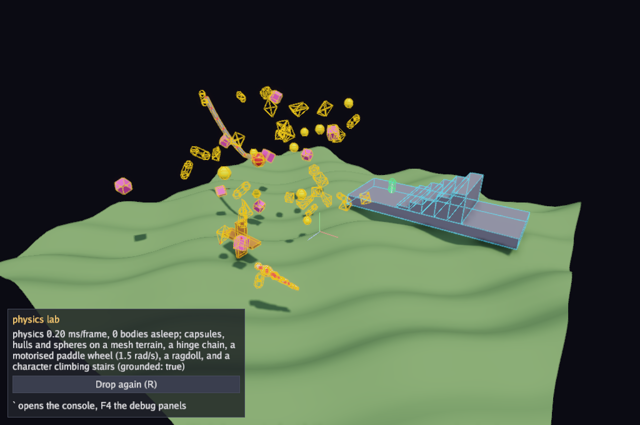
This example puts the 3D physics package through most of what it can do in one scene. Forty-eight bodies with five different shapes tumble onto a heightfield mesh collider, a chain of seven hinge joints hangs from a point in the sky with a heavy ball on the end, a paddle wheel turns under a hinge motor, a ragdoll drops in and lands in a heap, and a character controller walks back and forth over a staircase. Every collider is drawn as a wire outline over the solid meshes, sleeping bodies turn grey, and this frame's contacts draw their normals.
The packages are phys for bodies, shapes, joints, the ragdoll and the character controller, ecs because physics components live on entities and the solver is a system, gfx for the meshes and the debug lines, and ui for the readout. The guide is Physics.
Run it with:
go run ./examples/physics-lab -seconds 3 -shot out.png
-ragdoll=false leaves the ragdoll out. Drag to orbit, the scroll wheel
zooms, R drops the bodies again, Escape quits. The backquote key opens
the debug console and F4 its panels, which is where the world can be
inspected, paused and poked at while it runs.
The terrain
terrainHeight is the ground's shape, and heightfield samples it into
three things at once: render vertices with normals and texture
coordinates, the plain positions the physics mesh shape needs, and the
shared index buffer. Building both from one loop is what guarantees that
what is drawn and what is collided against are the same surface.
The normals are computed from finite differences: the height a small
distance either side in each axis gives the slope, and lin.V3(nx, 2*d, nz).Norm() turns the two slopes into a normal.
// terrainSize is the half extent of the heightfield; terrainCells its
// resolution along each side.
const (
	terrainSize  = 20
	terrainCells = 40
)

// terrainHeight is the rolling ground the bodies land on.
func terrainHeight(x, z float32) float32 {
	return 1.2*float32(math.Sin(float64(x)*0.35)*math.Cos(float64(z)*0.3)) + 0.4*float32(math.Sin(float64(x+z)*0.9))
}

// heightfield builds the terrain as render vertices plus the positions
// and indices the physics mesh shares.
func heightfield() ([]gfx.Vertex, []lin.Vec3, []uint32) {
	n := terrainCells + 1
	verts := make([]gfx.Vertex, 0, n*n)
	pts := make([]lin.Vec3, 0, n*n)
	for j := range n {
		for i := range n {
			x := -terrainSize + 2*terrainSize*float32(i)/terrainCells
			z := -terrainSize + 2*terrainSize*float32(j)/terrainCells
			y := terrainHeight(x, z)
			const d = 0.1
			nx := terrainHeight(x-d, z) - terrainHeight(x+d, z)
			nz := terrainHeight(x, z-d) - terrainHeight(x, z+d)
			normal := lin.V3(nx, 2*d, nz).Norm()
			p := lin.V3(x, y, z)
			verts = append(verts, gfx.Vertex{Pos: p, Normal: normal, UV: lin.V2(float32(i)/4, float32(j)/4)})
			pts = append(pts, p)
		}
	}
	var idx []uint32
	for j := range terrainCells {
		for i := range terrainCells {
			a := uint32(j*n + i)
			b := a + uint32(n)
			idx = append(idx, a, b, a+1, a+1, b, b+1)
		}
	}
	return verts, pts, idx
}
Convex hulls and the marker components
A phys.ConvexHull is a set of points; the collision code builds what it
needs from them, so a hull is described rather than constructed. The
octahedron is six points on the axes and the wedge is six points making
a doorstop. Convex pairs are resolved with GJK and EPA, while boxes keep
a dedicated path.
The three marker types are empty structs used to tell groups of entities
apart in Draw. debris carries a colour, which is the general case: a
marker component can hold whatever the game needs.
// octahedron is a convex hull with six points.
func octahedron(r float32) phys.ConvexHull {
	return phys.ConvexHull{Points: []lin.Vec3{{X: r}, {X: -r}, {Y: r}, {Y: -r}, {Z: r}, {Z: -r}}}
}

// wedge is a convex hull shaped like a doorstop.
func wedge(w, h, d float32) phys.ConvexHull {
	return phys.ConvexHull{Points: []lin.Vec3{
		{X: -w, Y: -h, Z: -d}, {X: w, Y: -h, Z: -d}, {X: w, Y: -h, Z: d}, {X: -w, Y: -h, Z: d},
		{X: -w, Y: h, Z: -d}, {X: -w, Y: h, Z: d},
	}}
}

// debris marks a body dropped by the lab, with its colour.
type debris struct{ Color gfx.Color }

// link marks one link of the hinge chain.
type link struct{}

// paddle marks the motorised wheel.
type paddle struct{}
The game type
Two cached queries: everything with a transform, a body and a collider, and everything marked as debris. The rest is the meshes used to draw the shapes, the ragdoll, the character controller and its state, this frame's contacts, and the camera.
type game struct {
	seconds float64
	shot    string
	ragdoll bool

	font      *gfx.Font
	ui        *ui.Context
	world     *ecs.World
	bodies    *ecs.Query3[gfx.Transform, phys.Body3, phys.Collider3]
	debris    *ecs.Query2[gfx.Transform, debris]
	terrain   *gfx.Mesh
	cube      *gfx.Mesh
	sphere    *gfx.Mesh
	cylinder  *gfx.Mesh
	doll      *phys.Ragdoll3
	wheel     ecs.Entity
	random    *rng.Rand
	hero      ecs.Entity
	ctrl      phys.CharacterController3
	heroDir   float32
	heroTimer float64
	torque    float32
	contacts  []phys.Collision3
	yaw       float32
	pitch     float32
	dist      float32
	lastX     float32
	lastY     float32
	dragging  bool
	shotDone  bool
}
Init: the static world, the chain and the wheel
phys.Settings3 is a resource: gravity, the substep count, the solver
iterations and how long a body must be still before it sleeps. Raising
Substeps and Iterations makes stacks steadier at the cost of time.
A collider with no body is static. The terrain is one such entity with
phys.NewMeshShape(pts, idx), sharing the arrays the render mesh was
built from. The staircase is a slab plus five boxes of increasing half
height, which is a simple way to get steps whose tops rise evenly.
The chain is seven boxes, each joined to the previous with a
phys.HingeJoint3. A joint is itself an entity with a joint component,
naming the two bodies, an anchor on each in that body's local space, and
an axis on each. The first link's A is ecs.None, which means the
world, and its AnchorA is a world position. After the first, the
anchor moves to the end of the previous link. Damping is set on the
bodies so the chain settles rather than swinging forever.
The links use phys.Layers{Layer: 2, Mask: 1}, so they collide with
layer 1 (the terrain and the debris) but not with each other, which
keeps a chain of touching boxes from fighting itself.
The paddle wheel is one body with a phys.Compound3 shape of two
crossed boxes, on a hinge whose A is the world and which has
MotorSpeed and MaxMotorTorque set, so the joint drives it.
The last four calls wire the scene into the
debug console, which main turns on with
Config.Console. Console.Attach("lab", g.world) hands it the world:
from then on the console's entity panel lists the bodies with their
components, and its physics panel shows the solver's settings, the
contact, body and joint counts, and a pause. Console.Float binds
wheel.torque to the field the next section reads, so the motor's
strength can be changed while the wheel is turning, and
Console.Register adds a drop command that does what R does. Every
console method is safe on a nil console, so none of this needs guarding
when Config.Console is off.
func (g *game) Init(ctx *engine.Context) error {
	var err error
	if g.font, err = ctx.Gfx.NewFont(goregular.TTF, 15, gfx.FontOptions{}); err != nil {
		return err
	}
	g.ui = ui.New(ctx.Gfx, ui.DarkTheme(g.font))
	cv, ci := gfx.CubeMesh()
	if g.cube, err = ctx.Gfx.NewMesh(cv, ci); err != nil {
		return err
	}
	sv, si := gfx.SphereMesh(12, 18)
	if g.sphere, err = ctx.Gfx.NewMesh(sv, si); err != nil {
		return err
	}
	yv, yi := gfx.CylinderMesh(18)
	if g.cylinder, err = ctx.Gfx.NewMesh(yv, yi); err != nil {
		return err
	}
	tv, pts, idx := heightfield()
	if g.terrain, err = ctx.Gfx.NewMesh(tv, idx); err != nil {
		return err
	}
	g.random = rng.New(5)
	g.yaw, g.pitch, g.dist = 0.6, 0.45, 34
	g.heroDir = 1

	w := ecs.NewWorld()
	g.world = w
	g.bodies = w.Query3[gfx.Transform, phys.Body3, phys.Collider3]()
	g.debris = w.Query2[gfx.Transform, debris]()
	w.SetResource(phys.Settings3{Gravity: lin.V3(0, -9.8, 0), Substeps: 4, Iterations: 8, SleepTime: 0.5})
	// The terrain is a static mesh collider sharing the render mesh's data.
	w.SpawnWith(gfx.Transform{}, phys.Collider3{Shape: phys.NewMeshShape(pts, idx)})
	// A staircase for the character, on a flat slab so the steps line up.
	w.SpawnWith(gfx.At(8, 1.5, -8), phys.Collider3{Shape: phys.Box3{Half: lin.V3(8, 0.5, 3)}})
	for i := range 5 {
		w.SpawnWith(gfx.At(6+float32(i)*1.2, 2+0.15+0.3*float32(i), -8), phys.Collider3{Shape: phys.Box3{Half: lin.V3(0.6, 0.15+0.3*float32(i), 3)}})
	}
	g.ctrl = phys.CharacterController3{Radius: 0.35, HalfHeight: 0.45, StepHeight: 0.45, MaxSlope: 50}
	g.hero = w.SpawnWith(gfx.At(1, 3.5, -8))
	// A chain of hinged links hanging from a point in the sky with a ball on the end.
	prev := ecs.None
	anchor := lin.V3(-9, 12, 4)
	for i := range 7 {
		body := phys.Dynamic3(1)
		body.LinearDamping, body.AngularDamping = 0.5, 0.5
		e := w.SpawnWith(gfx.At(-9+0.5+float32(i), 12, 4), body,
			phys.Collider3{Shape: phys.Box3{Half: lin.V3(0.5, 0.12, 0.12)}, Layers: phys.Layers{Layer: 2, Mask: 1}}, link{})
		w.SpawnWith(phys.HingeJoint3{A: prev, AnchorA: anchor, B: e, AnchorB: lin.V3(-0.5, 0, 0), AxisA: lin.V3(0, 0, 1), AxisB: lin.V3(0, 0, 1)})
		anchor = lin.V3(0.5, 0, 0)
		prev = e
	}
	ball := phys.Dynamic3(3)
	ball.LinearDamping = 0.2
	b := w.SpawnWith(gfx.At(-1, 12, 4), ball, phys.Collider3{Shape: phys.Sphere{Radius: 0.6}, Layers: phys.Layers{Layer: 2, Mask: 1}}, link{})
	w.SpawnWith(phys.HingeJoint3{A: prev, AnchorA: lin.V3(0.5, 0, 0), B: b, AnchorB: lin.V3(-0.6, 0, 0), AxisA: lin.V3(0, 0, 1), AxisB: lin.V3(0, 0, 1)})
	// A paddle wheel on a world hinge, turned by the hinge's motor; it
	// bats the debris that lands in it.
	wheelAt := lin.V3(-2, 2.4, 8)
	wheel := phys.Dynamic3(8)
	wheel.AngularDamping = 0.2
	g.wheel = w.SpawnWith(gfx.Transform{Position: wheelAt}, wheel, phys.Collider3{Shape: phys.Compound3{Parts: []phys.Part3{
		{Shape: phys.Box3{Half: lin.V3(1.6, 0.12, 0.5)}},
		{Shape: phys.Box3{Half: lin.V3(0.12, 1.6, 0.5)}},
	}}}, paddle{})
	w.SpawnWith(phys.HingeJoint3{A: ecs.None, AnchorA: wheelAt, B: g.wheel, AxisA: lin.V3(0, 0, 1), AxisB: lin.V3(0, 0, 1), MotorSpeed: 1.5, MaxMotorTorque: 400})
	w.AddSystem("physics", phys.System3)
	g.drop()
	// The console gets the world, so its entity and physics panels can
	// list the bodies, pause the simulation and edit the solver
	// settings, plus a variable and a command of the lab's own.
	g.torque = 400
	ctx.Console.Attach("lab", g.world)
	ctx.Console.Float("wheel.torque", &g.torque, "the paddle wheel's motor torque")
	ctx.Console.Register("drop", "drop: throw the debris in again", func([]string) (string, error) {
		g.drop()
		return "dropped", nil
	})
	return nil
}
phys.Dynamic3(mass) returns a body with sensible defaults for that
mass, and gfx.At(x, y, z) is a transform at a position. phys.System3
is the solver, registered like any other system and run by
world.Update.
Dropping the bodies
drop clears whatever is there and respawns. The debris query is walked
to despawn the previous batch, which is safe: a query walks its rows
last to first, so the entity being visited may be despawned in the
callback. The ragdoll has its own Despawn, since it owns several
entities and the joints between them.
phys.NewRagdoll3 builds a ragdoll from a RagdollSpec of a position,
a rotation and a height. Tipping it 0.7 radians about one axis and 0.4
about another means it lands in a heap rather than on its feet.
The forty-eight bodies cycle through five shapes: a capsule, the
octahedron hull, the wedge hull, a box and a sphere. The spheres get
CCD = true, continuous collision detection, because a small fast
sphere is the shape most likely to pass through the terrain in one step.
Each gets a random spin through AngVel and a random orientation.
step is the only place the world is advanced, and it exists so there
is one. Before each step it copies g.torque into the wheel's hinge,
which is what makes the console variable take effect on the running
simulation: a joint is a component like any other, so changing it is a
matter of finding it and writing the field. Update calls step on the
normal path and again on the path where the console is open, so the
scene keeps simulating while a command is being typed.
// drop respawns the tumbling bodies above the terrain, and a ragdoll
// twice life size in front of the camera, tipped over so it lands in a
// heap.
func (g *game) drop() {
	w := g.world
	g.debris.Each(func(e ecs.Entity, _ *gfx.Transform, _ *debris) { w.Despawn(e) })
	if g.doll != nil {
		g.doll.Despawn(w)
		g.doll = nil
	}
	if g.ragdoll {
		tilt := lin.AxisAngle(lin.V3(1, 0, 0), 0.7).Mul(lin.AxisAngle(lin.V3(0, 0, 1), 0.4))
		g.doll = phys.NewRagdoll3(w, phys.RagdollSpec{Position: lin.V3(5, 6, 10), Rotation: tilt, Height: 3.6})
	}
	palette := []gfx.Color{gfx.RGB(240, 140, 30), gfx.RGB(60, 190, 80), gfx.RGB(50, 110, 240), gfx.RGB(240, 100, 180), gfx.RGB(240, 220, 60)}
	for i := range 48 {
		x := g.random.Between(-12, 4)
		z := g.random.Between(-4, 12)
		y := 6 + float32(i%6)*2 + g.random.Between(0, 1)
		body := phys.Dynamic3(1)
		body.Friction, body.Restitution = 0.6, 0.1
		body.AngVel = lin.V3(g.random.Between(-2, 2), g.random.Between(-2, 2), g.random.Between(-2, 2))
		var shape phys.Shape3
		switch i % 5 {
		case 0:
			shape = phys.Capsule{Radius: 0.3, HalfHeight: 0.45}
		case 1:
			shape = octahedron(0.7)
		case 2:
			shape = wedge(0.6, 0.35, 0.5)
		case 3:
			shape = phys.Box3{Half: lin.V3(0.4, 0.4, 0.4)}
		default:
			shape = phys.Sphere{Radius: 0.4}
			body.CCD = true
		}
		w.SpawnWith(
			gfx.Transform{Position: lin.V3(x, y, z), Rotation: lin.AxisAngle(lin.V3(g.random.Float(), g.random.Float(), g.random.Float()).Norm(), g.random.Float()*3)},
			body, phys.Collider3{Shape: shape}, debris{Color: palette[i%len(palette)]},
		)
	}
}

// step advances the simulation, giving the paddle wheel's motor
// whatever torque the console's wheel.torque variable holds.
func (g *game) step(dt float64) {
	g.world.Each(func(_ ecs.Entity, j *phys.HingeJoint3) {
		if j.B == g.wheel {
			j.MaxMotorTorque = g.torque
		}
	})
	g.world.Update(dt)
}

func (g *game) Shutdown(ctx *engine.Context) {
	g.terrain.Destroy()
	g.cube.Destroy()
	g.sphere.Destroy()
	g.cylinder.Destroy()
	g.font.Destroy()
}
Update: the character and the step
The camera drag is guarded by g.ui.WantsMouse() so dragging inside the
panel does not orbit.
The character walks with ctrl.Move(world, entity, velocity, dt). The
velocity has a downward component so the controller stays on the ground
and can walk down steps; the controller resolves the slide, the step up
and the ground contact itself, and reports Grounded and
GroundNormal. A timer flips the direction every five seconds, so the
character paces the staircase without input.
g.world.Events[phys.Collision3]() returns this update's contact
events. They are copied into g.contacts with append(g.contacts[:0], ...), retaining a separate snapshot for Draw. World events remain
available after an update and are cleared at the start of the next one.
func (g *game) Update(ctx *engine.Context) error {
	in := ctx.Input
	if ctx.Console.Open() {
		// The console has the keyboard and the pointer while it is open;
		// the simulation keeps running behind it.
		g.step(ctx.Delta)
		return nil
	}
	if in.KeyPressed(input.KeyEscape) || (g.seconds > 0 && ctx.Time >= g.seconds) {
		ctx.Quit()
	}
	if g.shot != "" && !g.shotDone && (g.seconds == 0 || ctx.Time >= g.seconds/2) {
		ctx.Screenshot(g.shot)
		g.shotDone = true
	}
	if in.KeyPressed(input.KeyR) {
		g.drop()
	}
	x, y := in.Mouse()
	if in.MousePressed(input.MouseLeft) && !g.ui.WantsMouse() {
		g.dragging = true
	}
	if in.MouseReleased(input.MouseLeft) {
		g.dragging = false
	}
	if g.dragging {
		g.yaw += (x - g.lastX) * 0.01
		g.pitch = lin.Clamp(g.pitch+(y-g.lastY)*0.01, 0.05, 1.5)
	}
	g.lastX, g.lastY = x, y
	_, dy := in.Scroll()
	g.dist = lin.Clamp(g.dist-float32(dy)*2, 8, 120)
	// The character walks the staircase one way, then the other, on a timer.
	g.heroTimer += ctx.Delta
	if g.heroTimer > 5 {
		g.heroTimer, g.heroDir = 0, -g.heroDir
	}
	step := ctx.Profile("physics")
	g.ctrl.Move(g.world, g.hero, lin.V3(2.5*g.heroDir, -6, 0), float32(ctx.Delta))
	g.step(ctx.Delta)
	step.End()
	g.contacts = append(g.contacts[:0], g.world.Events[phys.Collision3]()...)
	return nil
}
The profile scope around the character move and the world update is what the panel reads back as milliseconds per frame.
Outlining a shape
The lab used to carry its own wireShape helper, a type switch that
drew each collider as lines. That work now lives in the physics package
as phys.DrawShape3, so the example calls it instead of keeping a copy:
a sphere is drawn as three rings, a box as its edges, a capsule as two
spheres and the lines joining them, a hull as an edge between every pair
of its points, and a compound recurses into its parts, composing each
part's offset and rotation with the body's. A mesh shape is skipped,
since a terrain mesh is drawn as a mesh already.
phys.DrawColliders3 is the whole-world version of the same thing: it
walks every collider in a world and shades each one by whether its body
is static, awake or asleep, then draws the contact normals. The lab does
not use it, because it colours the debris by its own palette and by
whether the body is touching anything this frame, which the next section
covers.
Draw: solids, wires and the ragdoll
The main walk is over everything with a transform, a body and a
collider. Its colour is orange, or grey when b.Asleep() reports the
body has been still long enough to be taken out of the simulation. The
marker components then decide what solid mesh to draw over the wire: a
debris body draws in its own colour, a chain link draws as metal, and
the paddle's compound parts each draw as a box at their own offset.
Every body gets its collider outlined at the end.
A ragdoll is a set of capsule bodies joined together, so each one is drawn as a cylinder between two spheres, which is what a capsule looks like.
func (g *game) Draw(ctx *engine.Context) error {
	gr := ctx.Gfx
	w := g.world
	gr.SetCamera(gfx.OrbitCamera(lin.V3(0, 2, 0), g.yaw, g.pitch, g.dist))
	gr.SetLight(gfx.Light{Direction: lin.V3(-0.5, -1, -0.3), Color: gfx.Color{R: 2.4, G: 2.3, B: 2.1, A: 1},
		Sky: gfx.Sky{Zenith: gfx.Color{R: 0.3, G: 0.35, B: 0.5, A: 1}, Ground: gfx.Color{R: 0.15, G: 0.12, B: 0.1, A: 1}}, Shadows: true, ShadowDistance: 60})
	gr.DrawMesh(g.terrain, gfx.Material{BaseColor: gfx.RGB(110, 140, 90), Roughness: 0.9}, lin.Identity())
	// Solid meshes for the debris, chain and stairs; wire outlines over all colliders.
	g.bodies.Each(func(e ecs.Entity, t *gfx.Transform, b *phys.Body3, c *phys.Collider3) {
		col := gfx.RGB(255, 170, 40)
		if b.Asleep() {
			col = gfx.RGB(150, 150, 160)
		}
		if d, ok := w.Get[debris](e); ok {
			mat := gfx.Material{BaseColor: d.Color, Roughness: 0.6}
			switch sh := c.Shape.(type) {
			case phys.Sphere:
				gr.DrawMesh(g.sphere, mat, lin.TRS(t.Position, t.Rotation, lin.V3(sh.Radius, sh.Radius, sh.Radius)))
			case phys.Box3:
				gr.DrawMesh(g.cube, mat, lin.TRS(t.Position, t.Rotation, sh.Half.Mul(2)))
			}
		}
		if _, ok := w.Get[link](e); ok {
			if sh, ok := c.Shape.(phys.Box3); ok {
				gr.DrawMesh(g.cube, gfx.Material{BaseColor: gfx.RGB(200, 200, 210), Metallic: 1, Roughness: 0.3}, lin.TRS(t.Position, t.Rotation, sh.Half.Mul(2)))
			}
			if sh, ok := c.Shape.(phys.Sphere); ok {
				gr.DrawMesh(g.sphere, gfx.Material{BaseColor: gfx.RGB(220, 60, 60), Roughness: 0.4}, lin.TRS(t.Position, t.Rotation, lin.V3(sh.Radius, sh.Radius, sh.Radius)))
			}
		}
		if _, ok := w.Get[paddle](e); ok {
			if sh, ok := c.Shape.(phys.Compound3); ok {
				for _, p := range sh.Parts {
					if box, ok := p.Shape.(phys.Box3); ok {
						gr.DrawMesh(g.cube, gfx.Material{BaseColor: gfx.RGB(180, 120, 60), Roughness: 0.7}, lin.TRS(t.Position.Add(t.Rotation.Rotate(p.Offset)), t.Rotation, box.Half.Mul(2)))
					}
				}
			}
		}
		phys.DrawShape3(gr, c.Shape, *t, col)
	})
	// The ragdoll's capsules as a cylinder with a sphere at each end.
	if g.doll != nil {
		skin := gfx.Material{BaseColor: gfx.RGB(230, 180, 140), Roughness: 0.8}
		for _, e := range g.doll.Entities() {
			t, ok := w.Get[gfx.Transform](e)
			if !ok {
				continue
			}
			c, ok := w.Get[phys.Collider3](e)
			if !ok {
				continue
			}
			if cap, ok := c.Shape.(phys.Capsule); ok {
				rot := t.Rotation
				if rot == (lin.Quat{}) {
					rot = lin.QuatIdentity()
				}
				r := lin.V3(cap.Radius, cap.Radius, cap.Radius)
				up := rot.Rotate(lin.V3(0, cap.HalfHeight, 0))
				gr.DrawMesh(g.sphere, skin, lin.TRS(t.Position.Add(up), rot, r))
				gr.DrawMesh(g.sphere, skin, lin.TRS(t.Position.Sub(up), rot, r))
				if cap.HalfHeight > 0 {
					gr.DrawMesh(g.cylinder, skin, lin.TRS(t.Position, rot, lin.V3(cap.Radius, cap.HalfHeight, cap.Radius)))
				}
			}
		}
	}
The static bodies, the joints, the character and the contacts
World.Each2 walks entities with a transform and a collider, and skips
anything that also has a body, which leaves the static geometry: the
staircase. The terrain is not drawn here because its shape is a mesh
rather than a box.
drawJoint is a closure used for both joint types. It resolves each
anchor into world space through the body's transform, treating
ecs.None as a world-space anchor, and draws a line between them with a
small sphere at the second. World.Each is then called once per joint
component type.
The character draws as a green capsule, red when it is not on the
ground, with a line along GroundNormal from its feet when it is. The
contacts saved in Update draw as short red lines along each contact
normal.
	w.Each2(func(e ecs.Entity, t *gfx.Transform, c *phys.Collider3) {
		if w.Has[phys.Body3](e) {
			return
		}
		if sh, ok := c.Shape.(phys.Box3); ok {
			gr.DrawMesh(g.cube, gfx.Material{BaseColor: gfx.RGB(120, 120, 130), Roughness: 0.9}, lin.TRS(t.Position, t.Rotation, sh.Half.Mul(2)))
			phys.DrawShape3(gr, c.Shape, *t, gfx.RGB(90, 200, 255))
		}
	})
	// Joint anchors as short lines between the bodies they join.
	drawJoint := func(ea, eb ecs.Entity, anchorA, anchorB lin.Vec3) {
		var a lin.Vec3
		if ea == ecs.None {
			a = anchorA
		} else if ta, ok := w.Get[gfx.Transform](ea); ok {
			a = ta.Position.Add(ta.Rotation.Rotate(anchorA))
		}
		if tb, ok := w.Get[gfx.Transform](eb); ok {
			b := tb.Position.Add(tb.Rotation.Rotate(anchorB))
			gr.DrawLine3D(a, b, gfx.RGB(255, 255, 255))
			gr.DrawWireSphere(b, 0.08, gfx.RGB(255, 80, 80))
		}
	}
	w.Each(func(e ecs.Entity, j *phys.HingeJoint3) { drawJoint(j.A, j.B, j.AnchorA, j.AnchorB) })
	w.Each(func(e ecs.Entity, j *phys.BallJoint3) { drawJoint(j.A, j.B, j.AnchorA, j.AnchorB) })
	// The character: a green capsule with its ground normal.
	if ht, ok := w.Get[gfx.Transform](g.hero); ok {
		col := gfx.RGB(80, 255, 120)
		if !g.ctrl.Grounded {
			col = gfx.RGB(255, 80, 80)
		}
		phys.DrawShape3(gr, phys.Capsule{Radius: g.ctrl.Radius, HalfHeight: g.ctrl.HalfHeight}, *ht, col)
		if g.ctrl.Grounded {
			foot := ht.Position.Sub(lin.V3(0, g.ctrl.HalfHeight+g.ctrl.Radius, 0))
			gr.DrawLine3D(foot, foot.Add(g.ctrl.GroundNormal), gfx.RGB(255, 255, 255))
		}
	}
	// Contacts from this frame's collision events.
	for _, c := range g.contacts {
		gr.DrawLine3D(c.Point, c.Point.Add(c.Normal.Mul(0.5)), gfx.RGB(255, 60, 60))
	}
	gr.DrawAxes(lin.Identity(), 2)
The panel
The readout is built inside u.Begin and u.Panel, both closures. It
reads the first profile scope from ctx.Stats.Scopes, which is the
physics scope opened in Update, counts the sleeping bodies by walking
the query again, and reads the wheel's angular velocity about the hinge
axis so the motor can be seen working. u.Button returns true on the
frame a mouse press is released inside it, or it is activated by keyboard.
	u := g.ui
	u.Begin(ctx.Input, func() {
		u.Panel("physics lab", ui.Rect{X: 12, Y: ctx.Height - 186, W: 380, H: 174}, func() {
			ms := 0.0
			if len(ctx.Stats.Scopes) > 0 {
				ms = ctx.Stats.Scopes[0].MS
			}
			asleep := 0
			g.bodies.Each(func(_ ecs.Entity, _ *gfx.Transform, b *phys.Body3, _ *phys.Collider3) {
				if b.Asleep() {
					asleep++
				}
			})
			var spin float32
			if wb, ok := w.Get[phys.Body3](g.wheel); ok {
				spin = wb.AngVel.Z
			}
			u.Label(fmt.Sprintf("physics %.2f ms/frame, %d bodies asleep; capsules, hulls and spheres on a mesh terrain, a hinge chain, a motorised paddle wheel (%.1f rad/s), a ragdoll, and a character climbing stairs (grounded: %v)", ms, asleep, spin, g.ctrl.Grounded))
			if u.Button("Drop again (R)") {
				g.drop()
			}
			u.Label("` opens the console, F4 the debug panels")
		})
	})
	// The engine draws the console above the lab after this returns.
	return nil
}
main
func main() {
	seconds := flag.Float64("seconds", 0, "exit after this many seconds")
	shot := flag.String("shot", "", "write a screenshot to this PNG")
	ragdoll := flag.Bool("ragdoll", true, "drop a ragdoll with the debris")
	flag.Parse()
	err := engine.Run(engine.Config{Title: "Bunyip physics lab", Width: 1024, Height: 680, Resizable: true, Console: true},
		&game{seconds: *seconds, shot: *shot, ragdoll: *ragdoll})
	if err != nil {
		fmt.Fprintln(os.Stderr, "physics-lab:", err)
		os.Exit(1)
	}
}
What to try
- Lower
SubstepsandIterationsinInitto 1 and 2 and watch the chain stretch and the stack jitter; raise them and watch the frame time in the panel. - Set
SleepTimeinInitto 0.05 and see how much sooner the debris turns grey, and what that does to a body a paddle is about to hit. - Give the hinge in
InitMotorSpeed: -4and a largerMaxMotorTorque, and watch the wheel throw the debris. - Open the console with the backquote key and type
set wheel.torque 40, thenset wheel.torque 4000, without restarting. Then rundrop, and open the panels with F4 to watch the body count and the contacts while the debris settles. - Add a
phys.BallJoint3inInitbetween two of the dropped bodies;drawJointinDrawalready handles that type. - Steer the character in
Updatefrom the keyboard instead of the timer, passing the direction toctrl.Move, and try walking it up the terrain untilMaxSloperefuses.