Example examples/shaders
Shaders
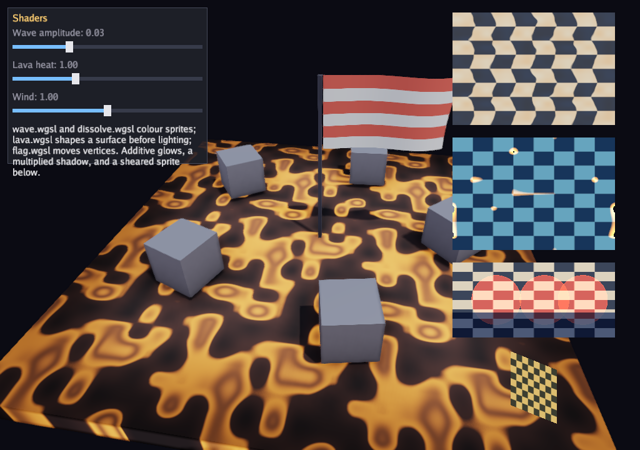
This example is four shaders written by the game rather than the engine. Two of them colour sprites in the 2D stream: a wave that ripples the texture coordinates and a dissolve that burns a sprite away along a noise image. The other two run on meshes under the engine's own lighting: a lava surface that writes albedo, roughness and emissive before the light is applied, and a flag whose vertex hook displaces the cloth in the lit pass and the shadow pass alike. Sliders drive their uniforms while the program runs.
This example precompiles its shaders. bunyip-shader composes each .wgsl
with Bunyip's bindings and entry points, then compiles it to SPIR-V using
gogpu/naga, a compiler written in Go. No external compiler executable or
native compiler library is required. The .spv output is embedded in the
binary. Games can also compile source at runtime with Graphics.CompileShader
and Graphics.CompileMeshShader; this example uses NewShader and NewMeshShader in
gfx, Shader.SetUniforms and Shader.SetImage,
Graphics.Shaded for the 2D case and Material.Shader for the mesh
case. The guide is Shaders.
Run it with:
CGO_ENABLED=0 go run ./examples/shaders -seconds 3 -shot out.png
The flags are -seconds N and -shot file.png. The three sliders set
the wave amplitude, the lava heat and the wind strength; Escape quits.
After editing a .wgsl, run CGO_ENABLED=0 go generate ./examples/shaders/ to
rebuild the SPIR-V.
Generate directives and embedded SPIR-V
The four go:generate lines are the build step. -kind mesh selects
the mesh prelude, which is what decides whether the file supplies
fragment or surface, vertex and finish. The default kind is the
2D one.
Each .spv is embedded with go:embed. Generate a game's SPIR-V before
building the example that embeds it. The compiler command imports the
engine's existing shaders, but does not import this example, so a new game
shader can be compiled before adding its go:embed declaration.
//go:generate go run ../../cmd/bunyip-shader -o wave.spv wave.wgsl
//go:generate go run ../../cmd/bunyip-shader -o dissolve.spv dissolve.wgsl
//go:generate go run ../../cmd/bunyip-shader -kind mesh -o lava.spv lava.wgsl
//go:generate go run ../../cmd/bunyip-shader -kind mesh -o flag.spv flag.wgsl

var (
	//go:embed wave.spv
	waveSPV []byte
	//go:embed dissolve.spv
	dissolveSPV []byte
	//go:embed lava.spv
	lavaSPV []byte
	//go:embed flag.spv
	flagSPV []byte
)
The game type and the cloth mesh
The game holds four shaders, two textures, two meshes and the three slider values.
clothMesh builds a subdivided quad in the x-y plane with u running
along x, which is what lets the flag shader pin the edge at u = 0 and
wave the rest. The subdivision matters: a vertex shader can only move
vertices that exist, so a quad of two triangles would not ripple.
type game struct {
	seconds float64
	shot    string

	font      *gfx.Font
	ui        *ui.Context
	checker   *gfx.Texture
	noise     *gfx.Texture
	wave      *gfx.Shader
	dissolve  *gfx.Shader
	lava      *gfx.Shader
	flag      *gfx.Shader
	cube      *gfx.Mesh
	cloth     *gfx.Mesh
	amplitude float32
	heat      float32
	wind      float32
	shotDone  bool
}

// clothMesh is a subdivided quad in the x-y plane, 2 by 1.2 units, with
// u running along x so the flag's vertex hook can pin one edge.
func clothMesh(nx, ny int) ([]gfx.Vertex, []uint32) {
	var verts []gfx.Vertex
	var idx []uint32
	for j := 0; j <= ny; j++ {
		for i := 0; i <= nx; i++ {
			u, v := float32(i)/float32(nx), float32(j)/float32(ny)
			verts = append(verts, gfx.Vertex{Pos: lin.V3(u*2, 1.2-v*1.2, 0), Normal: lin.V3(0, 0, 1), UV: lin.V2(u, v)})
		}
	}
	stride := uint32(nx + 1)
	for j := 0; j < ny; j++ {
		for i := 0; i < nx; i++ {
			a := uint32(j)*stride + uint32(i)
			idx = append(idx, a, a+stride, a+1, a+1, a+stride, a+stride+1)
		}
	}
	return verts, idx
}
Init: loading precompiled shaders
NewShader takes 2D SPIR-V and NewMeshShader takes mesh SPIR-V; the
two pipelines differ, so the constructor picks which one the module is
built for.
SetImage(0, tex) binds an extra texture the shader reads as image0.
A shader has four such slots, separate from the material's own textures.
The noise texture is created with Data: true, which uploads the bytes
as they are rather than treating them as sRGB colour: a shader reading a
noise value wants the number, not a colour conversion. Repeat: true
lets the shaders sample it with coordinates outside the unit square.
func (g *game) Init(ctx *engine.Context) error {
	var err error
	if g.font, err = ctx.Gfx.NewFont(goregular.TTF, 15, gfx.FontOptions{}); err != nil {
		return err
	}
	g.ui = ui.New(ctx.Gfx, ui.DarkTheme(g.font))
	if g.checker, err = ctx.Gfx.NewTexture(checker(128), gfx.TextureOptions{Linear: true}); err != nil {
		return err
	}
	if g.noise, err = ctx.Gfx.NewTexture(noise(256, 7), gfx.TextureOptions{Linear: true, Data: true, Repeat: true}); err != nil {
		return err
	}
	if g.wave, err = ctx.Gfx.NewShader(waveSPV); err != nil {
		return err
	}
	if g.dissolve, err = ctx.Gfx.NewShader(dissolveSPV); err != nil {
		return err
	}
	if g.lava, err = ctx.Gfx.NewMeshShader(lavaSPV); err != nil {
		return err
	}
	if g.flag, err = ctx.Gfx.NewMeshShader(flagSPV); err != nil {
		return err
	}
	g.wave.SetImage(0, g.noise)
	g.dissolve.SetImage(0, g.noise)
	g.lava.SetImage(0, g.noise)
	cv, ci := gfx.CubeMesh()
	if g.cube, err = ctx.Gfx.NewMesh(cv, ci); err != nil {
		return err
	}
	fv, fi := clothMesh(40, 24)
	if g.cloth, err = ctx.Gfx.NewMesh(fv, fi); err != nil {
		return err
	}
	g.amplitude, g.heat, g.wind = 0.03, 1, 1
	return nil
}

func (g *game) Shutdown(ctx *engine.Context) {
	g.cloth.Destroy()
	g.flag.Destroy()
	g.cube.Destroy()
	g.lava.Destroy()
	g.dissolve.Destroy()
	g.wave.Destroy()
	g.noise.Destroy()
	g.checker.Destroy()
	g.font.Destroy()
}
A Shader is a GPU resource with Destroy, like a texture or a mesh.
Update
func (g *game) Update(ctx *engine.Context) error {
	if ctx.Input.KeyPressed(input.KeyEscape) || (g.seconds > 0 && ctx.Time >= g.seconds) {
		ctx.Quit()
	}
	if g.shot != "" && !g.shotDone && (g.seconds == 0 || ctx.Time >= g.seconds/2) {
		ctx.Screenshot(g.shot)
		g.shotDone = true
	}
	return nil
}
Draw: the mesh shaders
SetUniforms packs exported struct fields into the engine's std140-compatible
uniform layout and returns an error for unsupported types or oversized blocks.
The Go struct must match the shader's Params field order and types. The
examples use adjacent f32 fields, so their layouts match directly. Arrays and
nested structs need the explicit WGSL layout described in the
shader guide; packing does not reflect the
shader declaration. Each call passes an anonymous Go struct beside its draw.
A mesh shader is attached through Material.Shader. The lava slab is a
cube scaled flat with no base colour or texture, because the shader
writes those itself. The plain cubes around it use the standard material
path in the same frame, so both pipelines are in one scene.
The flag is drawn with DoubleSided: true, since a rippling cloth shows
both faces. Its vertex hook runs in the shadow pass as well, so the
shadow it casts ripples with it. Meshes whose shader has a vertex hook
are skipped by the frustum culling, because the bind-pose bounds no
longer describe where the geometry ends up.
func (g *game) Draw(ctx *engine.Context) error {
	gr := ctx.Gfx
	t := float32(ctx.Time)
	// The 3D scene: a lava slab with plain cubes on it.
	gr.SetCamera(gfx.Camera{Position: lin.V3(6*float32(math.Sin(float64(t)*0.2)), 4.5, 6*float32(math.Cos(float64(t)*0.2))), Target: lin.V3(0, 0, 0)})
	gr.SetLight(gfx.Light{Direction: lin.V3(-0.4, -1, -0.3), Color: gfx.Color{R: 1.5, G: 1.4, B: 1.3, A: 1},
		Sky: gfx.Sky{Zenith: gfx.Color{R: 0.25, G: 0.3, B: 0.4, A: 1}, Ground: gfx.Color{R: 0.1, G: 0.05, B: 0.03, A: 1}}, Shadows: true, ShadowDistance: 20})
	if err := g.lava.SetUniforms(struct{ Heat float32 }{g.heat}); err != nil {
		return err
	}
	gr.DrawMesh(g.cube, gfx.Material{Shader: g.lava}, lin.Translate(lin.V3(0, -0.5, 0)).Mul(lin.Scale(lin.V3(8, 0.4, 8))))
	for i := range 5 {
		a := float64(i) * 2 * math.Pi / 5
		gr.DrawMesh(g.cube, gfx.Material{BaseColor: gfx.RGB(200, 200, 210), Roughness: 0.4, Metallic: 0.6},
			lin.Translate(lin.V3(2.5*float32(math.Cos(a)), 0.2, 2.5*float32(math.Sin(a)))).Mul(lin.Rotate(t+float32(i), lin.V3(0, 1, 0))).Mul(lin.Scale(lin.V3(0.8, 0.8, 0.8))))
	}
	// A flag on a pole: the vertex hook ripples the cloth and its shadow.
	if err := g.flag.SetUniforms(struct{ Strength float32 }{g.wind}); err != nil {
		return err
	}
	gr.DrawMesh(g.cube, gfx.Material{BaseColor: gfx.RGB(90, 90, 100), Roughness: 0.5}, lin.Translate(lin.V3(0, 1.2, 0)).Mul(lin.Scale(lin.V3(0.06, 3.2, 0.06))))
	gr.DrawMesh(g.cloth, gfx.Material{Shader: g.flag, DoubleSided: true}, lin.Translate(lin.V3(0.05, 1.6, 0)).Mul(lin.Rotate(t*0.2, lin.V3(0, 1, 0))))
Draw: the 2D shaders, blends and transforms
Shaded(shader, body) applies a 2D shader to everything the closure
draws, and restores the previous state at the end. It is the same
closure form as Blended and Transformed, which appear below it.
Sprites drawn under a shader still go into the ordinary 2D stream, so
compatible draws can batch together. Texture, blend and clip changes can
also break a batch, even when the shader stays the same.
The dissolve's progress is driven from ctx.Time through a cosine, so
it burns away and back without any state on the game.
	// 2D: the wave shader over a checker, then the dissolve.
	if err := g.wave.SetUniforms(struct{ Amplitude, Frequency float32 }{g.amplitude, 24}); err != nil {
		return err
	}
	gr.Shaded(g.wave, func() {
		gr.Draw(g.checker, gfx.Sprite{Pos: lin.V2(ctx.Width-300, 20), Size: lin.V2(260, 180)})
	})
	progress := float32(0.5 - 0.5*math.Cos(float64(t)*0.8))
	if err := g.dissolve.SetUniforms(struct{ Progress, Edge float32 }{progress, 0.08}); err != nil {
		return err
	}
	gr.Shaded(g.dissolve, func() {
		gr.Draw(g.checker, gfx.Sprite{Pos: lin.V2(ctx.Width-300, 220), Size: lin.V2(260, 180), Color: gfx.RGB(120, 200, 255)})
	})
	// Blend modes: additive glows and a multiplied shadow over the checker.
	gr.Draw(g.checker, gfx.Sprite{Pos: lin.V2(ctx.Width-300, 420), Size: lin.V2(260, 120)})
	gr.Blended(gfx.BlendAdd, func() {
		for i := range 3 {
			x := ctx.Width - 260 + float32(i)*90 + 30*float32(math.Sin(float64(t)*2+float64(i)))
			gr.FillCircle(x, 480, 40, gfx.RGBA(255, 90, 30, 160))
		}
	})
	gr.Blended(gfx.BlendMultiply, func() {
		gr.FillRect(ctx.Width-300, 500, 260, 40, gfx.RGB(90, 110, 160))
	})
	// The transform stack: a sheared, rotating sprite.
	gr.Transformed(lin.Translate2(ctx.Width-170, 620).Mul(lin.Rotate2(t*0.5)).Mul(lin.Shear2(0.4, 0)), func() {
		gr.Draw(g.checker, gfx.Sprite{Pos: lin.V2(-40, -40), Size: lin.V2(80, 80), Color: gfx.RGB(255, 230, 150)})
	})

	u := g.ui
	u.Begin(ctx.Input, func() {
		u.Panel("Shaders", ui.Rect{X: 12, Y: 12, W: 320, H: 250}, func() {
			u.Slider("Wave amplitude", &g.amplitude, 0, 0.1)
			u.Slider("Lava heat", &g.heat, 0, 3)
			u.Slider("Wind", &g.wind, 0, 2)
			u.Label("wave.wgsl and dissolve.wgsl colour sprites; lava.wgsl shapes a surface before lighting; flag.wgsl moves vertices. Additive glows, a multiplied shadow, and a sheared sprite below.")
		})
	})
	return nil
}
The sliders write straight into the game's fields through pointers, and
the next frame's SetUniforms picks the values up, which is the whole
loop between the interface and the shaders.
wave.wgsl
A 2D shader supplies fn fragment(uv: vec2f, color: vec4f) -> vec4f,
returning a premultiplied colour. @group(1) @binding(0) var<uniform>
declares the block that SetUniforms fills. tex and texSampler read
the sprite's texture; image0 and image0Sampler read the first extra
image. time() is the elapsed time supplied by the prelude.
This one samples the noise, scrolls it, uses it to modulate a sine offset applied to the horizontal texture coordinate, and tints the result. Rippling the coordinate rather than the colour is what makes the image itself wobble.
struct Params { amplitude: f32, frequency: f32, };
@group(1) @binding(0) var<uniform> u: Params;

fn fragment(inputUV: vec2f, color: vec4f) -> vec4f {
    var uv = inputUV;
    let n = textureSample(image0, image0Sampler, uv * 2.0 + vec2f(time() * 0.1, 0.0)).r;
    uv.x += sin(uv.y * u.frequency + time() * 3.0) * u.amplitude * n;
    let c = textureSample(tex, texSampler, uv) * color;
    return c * vec4f(1.0, 0.85 + 0.15 * n, 0.7 + 0.3 * n, 1.0);
}
dissolve.wgsl
The dissolve compares the noise value at each texel with a threshold
that rises with progress. Below the threshold the fragment is
discarded by returning a fully transparent colour; just above it, a
glowing edge is added, whose width is the edge uniform. Multiplying
the glow by c.a keeps it inside the sprite's own shape.
struct Params { progress: f32, edge: f32, };
@group(1) @binding(0) var<uniform> u: Params;

fn fragment(uv: vec2f, color: vec4f) -> vec4f {
    let c = textureSample(tex, texSampler, uv) * color;
    let n = textureSample(image0, image0Sampler, uv).r;
    let cut = u.progress * (1.0 + u.edge);
    if n < cut - u.edge { return vec4f(0.0); }
    let glow = 1.0 - clamp((n - (cut - u.edge)) / u.edge, 0.0, 1.0);
    let fire = vec3f(1.0, 0.5, 0.1) * glow * 2.0 * c.a;
    return vec4f(c.rgb + fire, c.a);
}
lava.wgsl
A mesh shader supplies fn surface(input: Surface) -> Surface, which
runs before lighting. Copy the input to a mutable var, adjust material
properties such as albedo, roughness, metallic, normal and emissive, then
return the modified surface. Shadows, point lights and fog still apply.
Mesh uniform blocks use @group(4) @binding(0). The sampleImage0
helper samples the first extra image using its filtering and repeat settings.
s.worldPos positions the pattern in the world rather than on the
surface, so the cracks do not stretch with the cube's scale.
s.emissive += adds to whatever the material set instead of replacing
it.
The optional fn finish(lit: vec4f, s: Surface) -> vec4f hook runs after the lighting
and can adjust the lit colour, which is used here to fade the slab's
edges towards black.
struct Params { heat: f32, };
@group(4) @binding(0) var<uniform> u: Params;

fn surface(input: Surface) -> Surface {
    var s = input;
    let p = s.worldPos.xz * 1.5 + vec2f(time() * 0.05, 0.0);
    let n = sampleImage0(p * 0.25).r;
    let crack = smoothstep(0.45, 0.55, n);
    let pulse = 0.6 + 0.4 * sin(time() * 2.0 + n * 12.0);
    s.albedo = mix(vec3f(0.05, 0.04, 0.04), vec3f(0.2, 0.1, 0.08), n);
    s.roughness = mix(0.95, 0.4, crack);
    s.emissive += vec3f(1.0, 0.35, 0.05) * crack * pulse * u.heat;
    return s;
}

fn finish(lit: vec4f, s: Surface) -> vec4f {
    let rim = smoothstep(0.0, 0.5, 1.0 - abs(s.uv.x - 0.5) * 2.0) * smoothstep(0.0, 0.5, 1.0 - abs(s.uv.y - 0.5) * 2.0);
    return vec4f(lit.rgb * mix(0.3, 1.0, rim), lit.a);
}
flag.wgsl
fn vertex(input: VertexData) -> VertexData returns the modified vertex
before the model matrix is applied, in object
space, and in both the lit pass and the shadow pass, which is what makes
the flag's shadow match the flag. The displacement is scaled by v.uv.x
so the edge at u = 0 stays pinned to the pole.
The normal is recomputed from the slope of the same wave, because moving
a vertex without moving its normal leaves the lighting flat. surface
then stripes the cloth from the vertical texture coordinate.
struct Params { strength: f32, };
@group(4) @binding(0) var<uniform> u: Params;

fn vertex(input: VertexData) -> VertexData {
    var v = input;
    let free = v.uv.x;
    let wave = sin(v.uv.x * 6.0 - time() * 4.0) + 0.5 * sin(v.uv.y * 4.0 - time() * 6.0);
    v.position.z += wave * 0.15 * free * u.strength;
    let slope = cos(v.uv.x * 6.0 - time() * 4.0) * 6.0 * 0.15 * free * u.strength;
    v.normal = normalize(vec3f(-slope * 0.5, 0.0, 1.0));
    return v;
}

fn surface(input: Surface) -> Surface {
    var s = input;
    let band = step(0.5, fract(s.uv.y * 3.0));
    s.albedo = mix(vec3f(0.9, 0.2, 0.15), vec3f(0.95, 0.95, 0.9), band);
    s.roughness = 0.8;
    return s;
}
The generated textures and main
checker is a two-tone board and noise is smooth value noise on an 8
by 8 grid, interpolated with a smoothstep and wrapped with a modulo so
it tiles. The noise is the input to three of the four shaders, which is
why it is worth generating rather than shipping.
// checker makes a two-tone checkerboard.
func checker(size int) image.Image {
	img := image.NewRGBA(image.Rect(0, 0, size, size))
	for y := range size {
		for x := range size {
			c := color.RGBA{60, 70, 90, 255}
			if (x/16+y/16)%2 == 0 {
				c = color.RGBA{220, 210, 190, 255}
			}
			img.SetRGBA(x, y, c)
		}
	}
	return img
}

// noise makes smooth value noise, tiling.
func noise(size int, seed uint64) image.Image {
	const cells = 8
	random := rng.New(seed)
	grid := make([]float64, cells*cells)
	for i := range grid {
		grid[i] = float64(random.Float())
	}
	at := func(x, y int) float64 { return grid[(y%cells)*cells+x%cells] }
	img := image.NewRGBA(image.Rect(0, 0, size, size))
	for y := range size {
		for x := range size {
			fx, fy := float64(x)/float64(size)*cells, float64(y)/float64(size)*cells
			ix, iy := int(fx), int(fy)
			tx, ty := fx-float64(ix), fy-float64(iy)
			tx, ty = tx*tx*(3-2*tx), ty*ty*(3-2*ty)
			v := (at(ix, iy)*(1-tx)+at(ix+1, iy)*tx)*(1-ty) + (at(ix, iy+1)*(1-tx)+at(ix+1, iy+1)*tx)*ty
			b := uint8(v * 255)
			img.SetRGBA(x, y, color.RGBA{b, b, b, 255})
		}
	}
	return img
}

func main() {
	seconds := flag.Float64("seconds", 0, "exit after this many seconds")
	shot := flag.String("shot", "", "write a screenshot to this PNG")
	flag.Parse()
	err := engine.Run(engine.Config{Title: "Bunyip shaders", Width: 1024, Height: 720},
		&game{seconds: *seconds, shot: *shot})
	if err != nil {
		fmt.Fprintln(os.Stderr, "shaders:", err)
		os.Exit(1)
	}
}
What to try
- Change a constant in
lava.wgsl, runCGO_ENABLED=0 go generate ./examples/shaders/, and run the program again; that is the whole edit cycle. - Add
speed: f32to theParamsstruct inwave.wgsland to the struct passed toSetUniformsinDraw, and give it a slider. - Write a
finishhook inflag.wgslthat darkens the cloth towards its free edge, and see it apply after the lighting. - Bind a second image with
SetImage(1, ...)inInitand sample it withtextureSample(image1, image1Sampler, uv)indissolve.wgslfor a different burn pattern. - Reduce
clothMesh(40, 24)inInittoclothMesh(4, 3)to see how much the vertex hook depends on the subdivision.