Example examples/lighting
Lighting
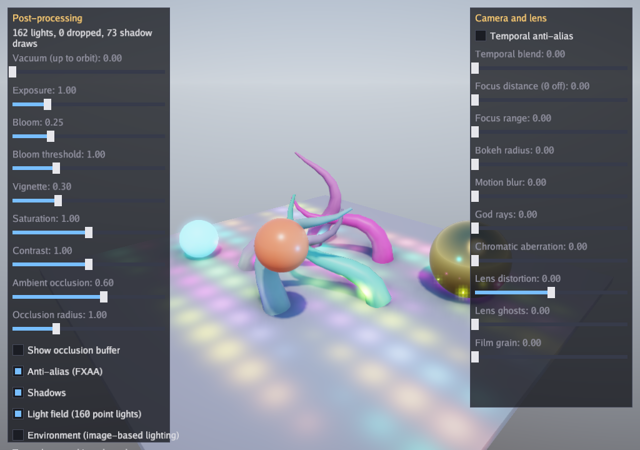
This is the renderer playground. Five tentacles are skinned meshes bent by joint matrices this program computes on the CPU every frame, lit by a directional sun with cascaded shadows, by two orbiting lamps that cast shadows of their own from cube maps, and by a field of 160 small point lights over the floor, against a procedural sky whose air thins as a slider climbs to orbit. A panel puts every post-processing setting on a slider: exposure, bloom and its threshold, vignette, saturation, contrast, ambient occlusion and its radius, and FXAA, and counts the frame's lights and shadow draws. A second panel holds the settings that read the depth buffer or the velocity buffer: temporal anti-aliasing and its blend, depth of field, motion blur, god rays, and the lens effects (chromatic aberration, distortion, ghosts and film grain). A sphere orbits the scene and reports the transform it had last frame, so temporal anti-aliasing and motion blur have motion information to work on.
With -model it loads a glTF file instead and plays its animation clips,
which is the shortest path from a file exported by a modelling tool to
something moving on the screen. With -env it loads an equirectangular
panorama and lights the scene from it.
The engine areas are the 3D half of gfx and gltf for loading. Read the 3D graphics guide for cameras, lights, shadows and post-processing, and the animation guide for clips and players.
Run it:
go run ./examples/lighting -seconds 3 -shot out.png
The flags are -seconds N and -shot file.png, -model file.glb to
load a glTF model, -env panorama.png to light from a panorama, and
-vacuum 0..1 to start with thin air. Dragging turns the camera, Space
cycles a model's clips and Escape quits.
Package and state
The first two constants describe the tentacle: ten joints of 0.4 metres each. 3D distances have no fixed unit, but the lighting and the shadow distances are tuned for metres, so a scene is easiest to reason about in them. The other two size the field of small point lights over the floor, which is far past what one array of lights could hold: the renderer sorts a frame's lights into a grid of clusters over the view, so a light with a short range costs only the part of the view it reaches.
The game holds three meshes, an optional loaded model and its animation
player, the post-processing settings as one value, and the slider state.
prevT remembers what time the last frame drew at, which is what the
moving sphere needs to say where it was.
// Command lighting is the renderer playground: a skinned mesh bent by
// joint matrices computed each frame, cascaded shadows, two lamps that
// cast their own shadows over a field of 160 small point lights, and
// every post-processing setting on a slider (exposure, bloom, vignette,
// saturation, contrast, ambient occlusion, FXAA, temporal anti-aliasing,
// depth of field, motion blur, god rays and the lens effects). A sphere
// orbits the scene and reports where it was last frame, so the velocity
// buffer has something in it. With -model it loads a glTF file and plays
// its animation clips (Space cycles them).
package main

import (
	"flag"
	"fmt"
	"image"
	_ "image/jpeg"
	_ "image/png"
	"math"
	"os"

	"golang.org/x/image/font/gofont/goregular"

	"github.com/matjam/bunyip/engine"
	"github.com/matjam/bunyip/gfx"
	"github.com/matjam/bunyip/gltf"
	"github.com/matjam/bunyip/input"
	"github.com/matjam/bunyip/lin"
	"github.com/matjam/bunyip/ui"
)

const (
	segments = 10  // joints along each tentacle
	segLen   = 0.4 // metres per joint
	// fieldLights is how many small point lights cover the floor. They
	// are far past what a fixed array would hold: the renderer sorts a
	// frame's lights into clusters over the view, so each one costs the
	// part of the view its range reaches.
	fieldLights = 160
	fieldCols   = 16 // lights across the field
)

type game struct {
	seconds   float64
	shot      string
	modelPath string

	font     *gfx.Font
	ui       *ui.Context
	floor    *gfx.Mesh
	sphere   *gfx.Mesh
	tentacle *gfx.Mesh
	model    *gfx.Model
	player   *gfx.AnimPlayer
	clip     int
	post     gfx.PostSettings
	shadows  bool
	field    bool // draw the field of small point lights
	env      *gfx.Environment
	vacuum   float32
	useEnv   bool
	envPath  string
	yaw      float32
	prevT    float32 // the time the last frame drew at, for the moving sphere
	shotDone bool
}
Init: meshes, model and environment
gfx.CubeMesh and gfx.SphereMesh return vertices and indices for the
built-in shapes, which NewMesh uploads. The tentacle is built by this
program and uploaded with NewSkinnedMesh, which takes
gfx.SkinVertex values carrying joint indices and weights as well as
position, normal and texture coordinates.
gltf.Load parses a .gltf or .glb file into a document, and
LoadModel turns that into a gfx.Model with its meshes, materials,
skeleton and clips on the GPU. model.NewAnimPlayer returns a player,
and PlayIndex(0, true) starts the first clip looping.
NewEnvironment takes an equirectangular panorama and prefilters it into
the cube maps image-based lighting needs. Intensity scales it. The
result is a GPU resource like any other, destroyed in Shutdown.
gfx.DefaultPost() returns the post-processing settings the graphics
context already starts with, and the panel edits that copy. A program
takes the defaults and changes the fields it wants rather than building a
PostSettings from nothing: the fields are absolute values rather than
adjustments, so a zero Exposure renders black.
func (g *game) Init(ctx *engine.Context) error {
	var err error
	if g.font, err = ctx.Gfx.NewFont(goregular.TTF, 15, gfx.FontOptions{}); err != nil {
		return err
	}
	g.ui = ui.New(ctx.Gfx, ui.DarkTheme(g.font))
	cv, ci := gfx.CubeMesh()
	if g.floor, err = ctx.Gfx.NewMesh(cv, ci); err != nil {
		return err
	}
	sv, si := gfx.SphereMesh(20, 40)
	if g.sphere, err = ctx.Gfx.NewMesh(sv, si); err != nil {
		return err
	}
	verts, idx := tentacleMesh()
	if g.tentacle, err = ctx.Gfx.NewSkinnedMesh(verts, idx); err != nil {
		return err
	}
	if g.modelPath != "" {
		doc, err := gltf.Load(g.modelPath)
		if err != nil {
			return err
		}
		if g.model, err = ctx.Gfx.LoadModel(doc); err != nil {
			return err
		}
		g.player = g.model.NewAnimPlayer()
		if clips := g.model.Clips(); len(clips) > 0 {
			g.player.PlayIndex(0, true)
			ctx.Log.Info("lighting: clips", "names", clips)
		}
	}
	// An environment for image-based lighting: a panorama when given,
	// otherwise a graded sky.
	if g.envPath != "" {
		f, err := os.Open(g.envPath)
		if err != nil {
			return err
		}
		pano, _, err := image.Decode(f)
		f.Close()
		if err != nil {
			return fmt.Errorf("decode %s: %w", g.envPath, err)
		}
		if g.env, err = ctx.Gfx.NewEnvironment(pano, gfx.EnvironmentOptions{Intensity: 1.5}); err != nil {
			return err
		}
	}
	g.useEnv = g.env != nil
	g.post = gfx.DefaultPost()
	g.post.Vignette = 0.3
	g.shadows = true
	g.field = true
	g.yaw = 0.7
	return nil
}
Shutdown
Every GPU resource is destroyed, and the optional ones are checked for
nil first. Shutdown runs before the graphics context is destroyed;
resource destruction handles any necessary synchronization with GPU work.
func (g *game) Shutdown(ctx *engine.Context) {
	if g.env != nil {
		g.env.Destroy()
	}
	if g.model != nil {
		g.model.Destroy()
	}
	g.tentacle.Destroy()
	g.sphere.Destroy()
	g.floor.Destroy()
	g.font.Destroy()
}
Update: the clip and the camera
player.Advance(ctx.Delta) moves the animation on by the fixed step;
the pose it computes is used when the model is drawn. Space cycles
through the model's clips by index.
The camera's yaw is driven by the pointer while the left button is down
and turns on its own otherwise, so an unattended run still shows the
scene from several angles. g.ui.WantsMouse keeps a drag on the panel
from turning the camera.
func (g *game) Update(ctx *engine.Context) error {
	in := ctx.Input
	if in.KeyPressed(input.KeyEscape) || (g.seconds > 0 && ctx.Time >= g.seconds) {
		ctx.Quit()
	}
	if g.shot != "" && !g.shotDone && (g.seconds == 0 || ctx.Time >= g.seconds/2) {
		ctx.Screenshot(g.shot)
		g.shotDone = true
	}
	if g.player != nil {
		if in.KeyPressed(input.KeySpace) && len(g.model.Clips()) > 0 {
			g.clip = (g.clip + 1) % len(g.model.Clips())
			g.player.PlayIndex(g.clip, true)
		}
		g.player.Advance(ctx.Delta)
	}
	if in.MouseDown(input.MouseLeft) && !g.ui.WantsMouse() {
		dx, _ := in.MouseDelta()
		g.yaw += float32(dx) * 0.01
	} else {
		g.yaw += float32(ctx.Delta) * 0.15
	}
	return nil
}
Draw: the frame's lighting
SetPost and SetCamera are frame state. gfx.OrbitCamera builds a
camera from a target, a yaw, a pitch and a distance, all in radians and
world units.
gfx.Light is the frame's directional light. Its Color is above one
because the values are linear and the renderer tone maps afterwards, so a
bright sun is a colour brighter than white rather than a separate
intensity field. Sky is the procedural sky: a zenith, a horizon and a
ground colour, a Vacuum from zero to one that thins the air until the
sky is black and the stars show, and Stars for their brightness.
Background: true draws the sky behind the scene as well as lighting
from it. Shadows with a ShadowDistance turns on the cascaded shadow
maps out to that distance.
Setting light.Environment replaces the procedural sky with the
prefiltered panorama, which then both lights the scene and is drawn
behind it.
AddPointLight adds a light for this frame only, with a position, a
colour and a radius. There is no light object to keep, in the same way
there is no sprite object: lights are queued per frame like everything
else. AddPoint takes a gfx.PointLight value instead, which is the
form that can ask for Shadows: the two orbiting lamps each render the
six faces of a cube shadow map, so they throw the tentacles' shadows in
every direction. A frame gives cube maps to the first four point lights
that ask (gfx.MaxPointShadows).
Then the field: 160 more point lights over the floor, each with a range
of about a metre. A frame keeps 1024 of them (gfx.MaxLights) and sorts
them into clusters over the view, and a fragment is lit by its own
cluster's lights alone, so the field costs the pools of light it draws
rather than 160 lights on every pixel.
func (g *game) Draw(ctx *engine.Context) error {
	gr := ctx.Gfx
	gr.SetPost(g.post)
	gr.SetCamera(gfx.OrbitCamera(lin.V3(0, 1.5, 0), g.yaw, 0.35, 11))
	// The procedural sky: its air thins as the vacuum slider climbs to
	// orbit, the sky goes black and the stars come out, and the sun and
	// ground light stay.
	light := gfx.Light{Direction: lin.V3(-0.5, -1, -0.4), Color: gfx.Color{R: 2.5, G: 2.3, B: 2, A: 1},
		Sky:        gfx.Sky{Zenith: gfx.RGB(70, 120, 210), Horizon: gfx.RGB(200, 215, 235), Ground: gfx.RGB(80, 70, 60), Vacuum: g.vacuum, Stars: 1},
		Background: true, Shadows: g.shadows, ShadowDistance: 30}
	if g.useEnv && g.env != nil {
		// Image-based lighting: the panorama replaces the sky and is
		// drawn behind the scene.
		light.Environment = g.env
	}
	gr.SetLight(light)
	t := float32(ctx.Time)
	// Two lamps orbiting over the floor. A point light with Shadows set
	// renders the six faces of a cube map, so it throws the tentacles'
	// shadows in every direction; a frame gets four of them.
	for i := range 2 {
		a := t*0.7 + float32(i)*3.1
		gr.AddPoint(gfx.PointLight{
			Position: lin.V3(4*float32(math.Cos(float64(a))), 2.2, 4*float32(math.Sin(float64(a)))),
			Color:    gfx.Color{R: 4 * float32(i%2), G: 2.5, B: 5 * float32((i+1)%2), A: 1},
			Range:    9, Shadows: g.shadows,
		})
	}
	// A field of small lights over the floor, more than any fixed array
	// would hold. Each one has a short range, so the cluster grid gives
	// it only the handful of clusters it reaches.
	if g.field {
		for i := range fieldLights {
			x := float32(i%fieldCols)*0.85 - 6.4
			z := float32(i/fieldCols)*0.85 - 3.8
			pulse := 0.5 + 0.5*float32(math.Sin(float64(t*2+float32(i)*0.7)))
			hue := float32(i) * 0.21
			gr.AddPointLight(lin.V3(x, 0.35, z), gfx.Color{
				R: 2 * pulse * (0.5 + 0.5*float32(math.Sin(float64(hue)))),
				G: 2 * pulse * (0.5 + 0.5*float32(math.Sin(float64(hue+2.1)))),
				B: 2 * pulse * (0.5 + 0.5*float32(math.Sin(float64(hue+4.2)))),
				A: 1}, 1.1)
		}
	}
Draw: the meshes
DrawMesh takes a mesh, a material and a model matrix, so the floor is a
cube scaled flat and the spheres are translated into place. DrawModelAnimated
draws a loaded model with the pose its player currently holds, and
gfx.At is the short form of a transform at a position.
DrawSkinned takes the joint matrices as its last argument. There is no
skeleton object involved: a skinned mesh plus a slice of matrices is
enough, which is what lets this program animate the tentacles with
arithmetic instead of an animation system.
DrawMeshMoved is DrawMesh for something that moved: the second matrix
is the one the mesh was drawn with last frame. That difference is what
the velocity buffer carries, and it is what temporal anti-aliasing needs
to reproject a moving object rather than average it in place, and what
motion blur needs to smear it the way it went. Immediate-mode drawing has
no identity across frames to look a previous transform up by, so the
program keeps prevT and asks orbitAt for both.
	gr.DrawMesh(g.floor, gfx.Material{BaseColor: gfx.RGB(150, 150, 160), Roughness: 0.9}, lin.Translate(lin.V3(0, -0.1, 0)).Mul(lin.Scale(lin.V3(12, 0.2, 12))))
	gr.DrawMesh(g.sphere, gfx.Material{BaseColor: gfx.RGB(230, 200, 120), Metallic: 1, Roughness: 0.2}, lin.Translate(lin.V3(3.5, 1, -2)))
	gr.DrawMesh(g.sphere, gfx.Material{BaseColor: gfx.RGB(90, 200, 255), Emissive: 2.5}, lin.Translate(lin.V3(-3.5, 0.6, 2)).Mul(lin.Scale(lin.V3(0.6, 0.6, 0.6))))
	// A sphere on a fast orbit, drawn with the transform it had last
	// frame as well as this one. That difference is what goes into the
	// velocity buffer, so temporal anti-aliasing reprojects the sphere
	// instead of smearing it and motion blur streaks it the right way.
	gr.DrawMeshMoved(g.sphere, gfx.Material{BaseColor: gfx.RGB(255, 130, 90), Roughness: 0.35},
		orbitAt(t), orbitAt(g.prevT))
	g.prevT = t
	if g.model != nil {
		gr.DrawModelAnimated(g.model, gfx.At(0, 0, 0), g.player)
	} else {
		// Five tentacles, each bent by joint matrices built on the CPU.
		for i := range 5 {
			base := lin.V3(2.2*float32(math.Cos(float64(i)*1.2566)), 0, 2.2*float32(math.Sin(float64(i)*1.2566)))
			joints := tentacleJoints(t + float32(i)*0.9)
			hue := gfx.RGB(uint8(120+25*i), uint8(90+30*(4-i)), 180)
			gr.DrawSkinned(g.tentacle, gfx.Material{BaseColor: hue, Roughness: 0.5}, lin.Translate(base), joints)
		}
	}
Draw: the panel
Each slider is bound to a field of the settings value by pointer, so
moving one edits g.post directly and the next frame's SetPost picks
it up. The FXAA checkbox reads and writes an inverted local, because the
field is named for its zero value: NoAntiAlias false means
anti-aliasing is on, which keeps the zero PostSettings sensible.
The label at the top reads the last finished frame's gfx.FrameStats:
how many lights the frame kept, how many it refused past MaxLights,
and how many mesh instances went into the shadow maps, which is what the
two shadowed lamps and the sun's cascades cost. Turning the light field
off leaves the lamps and the sun, which is the comparison the counter
makes readable.
	u := g.ui
	u.Begin(ctx.Input, func() {
		u.Panel("Post-processing", ui.Rect{X: 12, Y: 12, W: 260, H: 696}, func() {
			// Lights counts the point and spot lights the frame kept and
			// LightsDropped what it refused past gfx.MaxLights.
			s := gr.Stats()
			u.Label(fmt.Sprintf("%d lights, %d dropped, %d shadow draws", s.Lights, s.LightsDropped, s.ShadowDraws))
			u.Slider("Vacuum (up to orbit)", &g.vacuum, 0, 1)
			u.Slider("Exposure", &g.post.Exposure, 0.1, 4)
			u.Slider("Bloom", &g.post.Bloom, 0, 1)
			u.Slider("Bloom threshold", &g.post.BloomThreshold, 0.2, 3)
			u.Slider("Vignette", &g.post.Vignette, 0, 1)
			u.Slider("Saturation", &g.post.Saturation, 0, 2)
			u.Slider("Contrast", &g.post.Contrast, 0.5, 1.5)
			u.Slider("Ambient occlusion", &g.post.AmbientOcclusion, 0, 1)
			u.Slider("Occlusion radius", &g.post.OcclusionRadius, 0.2, 3)
			u.Checkbox("Show occlusion buffer", &g.post.ShowOcclusion)
			fxaa := !g.post.NoAntiAlias
			if u.Checkbox("Anti-alias (FXAA)", &fxaa) {
				g.post.NoAntiAlias = !fxaa
			}
			u.Checkbox("Shadows", &g.shadows)
			u.Checkbox("Light field (160 point lights)", &g.field)
			u.Checkbox("Environment (image-based lighting)", &g.useEnv)
			if g.model != nil {
				u.Label(fmt.Sprintf("Clip %d/%d, Space cycles", g.clip+1, len(g.model.Clips())))
			} else {
				u.Label("Tentacles are skinned meshes; pass -model file.glb to animate a glTF.")
			}
		})
		// The second panel is everything that needs the depth buffer or
		// the velocity buffer, plus the lens. Each slider's zero is off.
		u.Panel("Camera and lens", ui.Rect{X: 752, Y: 12, W: 260, H: 640}, func() {
			u.Checkbox("Temporal anti-alias", &g.post.TemporalAA)
			u.Slider("Temporal blend", &g.post.TemporalBlend, 0.02, 0.5)
			u.Slider("Focus distance (0 off)", &g.post.FocusDistance, 0, 25)
			u.Slider("Focus range", &g.post.FocusRange, 0.2, 10)
			u.Slider("Bokeh radius", &g.post.BokehRadius, 1, 40)
			u.Slider("Motion blur", &g.post.MotionBlur, 0, 1)
			u.Slider("God rays", &g.post.GodRays, 0, 2)
			u.Slider("Chromatic aberration", &g.post.Aberration, 0, 6)
			u.Slider("Lens distortion", &g.post.Distortion, -1, 1)
			u.Slider("Lens ghosts", &g.post.Ghosts, 0, 1)
			u.Slider("Film grain", &g.post.Grain, 0, 0.2)
		})
	})
	return nil
}
The moving sphere's transform
orbitAt is a pure function of time, which is what makes the previous
frame's transform available at all: the program stores one float rather
than a matrix, and asks for the transform twice. Turning Temporal anti-alias on and watching this sphere is the quickest way to see the
difference the velocity buffer makes, and turning Motion blur up
streaks it along its orbit.
// orbitAt is the moving sphere's transform at a moment in time. Draw
// calls it twice, for now and for the previous frame.
func orbitAt(t float32) lin.Mat4 {
	a := float64(t) * 1.3
	return lin.Translate(lin.V3(3.2*float32(math.Cos(a)), 2.2, 3.2*float32(math.Sin(a)))).
		Mul(lin.Scale(lin.V3(0.55, 0.55, 0.55)))
}
Building the skinned mesh
tentacleMesh builds a tapered tube. Each ring of vertices belongs
entirely to one joint, Joints: [4]uint8{j0} with Weights: [4]float32{1},
which is the simplest skinning there is: no blending between joints, so
the tube creases at the ring rather than bending smoothly. A mesh
exported from a modelling tool spreads the weights over up to four joints
instead.
The index loop stitches each ring to the next with two triangles per side.
// tentacleMesh builds a tapered tube whose rings belong to successive
// joints.
func tentacleMesh() ([]gfx.SkinVertex, []uint32) {
	const sides = 12
	var verts []gfx.SkinVertex
	var idx []uint32
	for k := 0; k <= segments; k++ {
		y := float32(k) * segLen
		radius := 0.35 * (1 - float32(k)/float32(segments+1))
		j0 := uint8(min(k, segments-1))
		for s := range sides {
			a := float64(s) / sides * 2 * math.Pi
			nx, nz := float32(math.Cos(a)), float32(math.Sin(a))
			verts = append(verts, gfx.SkinVertex{
				Pos: lin.V3(nx*radius, y, nz*radius), Normal: lin.V3(nx, 0, nz),
				UV:     lin.V2(float32(s)/sides, float32(k)/segments),
				Joints: [4]uint8{j0}, Weights: [4]float32{1},
			})
		}
	}
	for k := range segments {
		for s := range sides {
			a := uint32(k*sides + s)
			b := uint32(k*sides + (s+1)%sides)
			c, d := a+sides, b+sides
			idx = append(idx, a, c, b, b, c, d)
		}
	}
	return verts, idx
}
Computing the joint matrices
A skinning matrix is the joint's animated world transform times the
inverse of its rest transform, which is what this function builds. The
loop walks down the chain: each joint's local transform is a bend about
two axes, offset a segment along Y from its parent, and global
accumulates the chain. The inverse bind matrix here is exact because the
rest pose is known to be a straight line up the Y axis, so it is a
translation back down it.
A game normally gets these matrices from gfx.AnimPlayer or from anim rather than writing them; this program computes them to show what the renderer is actually given.
// tentacleJoints returns the skinning matrix for each joint: the joint's
// animated world transform times the inverse of its rest transform.
func tentacleJoints(t float32) []lin.Mat4 {
	joints := make([]lin.Mat4, segments)
	global := lin.Identity()
	for i := range segments {
		bend := 0.35 * float32(math.Sin(float64(t*1.5+float32(i)*0.5)))
		local := lin.Rotate(bend, lin.V3(0, 0, 1)).Mul(lin.Rotate(bend*0.6, lin.V3(1, 0, 0)))
		if i > 0 {
			local = lin.Translate(lin.V3(0, segLen, 0)).Mul(local)
		}
		global = global.Mul(local)
		inverseBind := lin.Translate(lin.V3(0, -float32(i)*segLen, 0))
		joints[i] = global.Mul(inverseBind)
	}
	return joints
}
main
func main() {
	seconds := flag.Float64("seconds", 0, "exit after this many seconds")
	shot := flag.String("shot", "", "write a screenshot to this PNG")
	model := flag.String("model", "", "glTF file with animation clips to play")
	env := flag.String("env", "", "equirectangular panorama (PNG or JPEG) to light the scene with")
	vacuum := flag.Float64("vacuum", 0, "how thin the air starts: 0 on the ground, 1 in orbit")
	flag.Parse()
	err := engine.Run(engine.Config{Title: "Bunyip lighting", Width: 1024, Height: 720, Resizable: true},
		&game{seconds: *seconds, shot: *shot, modelPath: *model, envPath: *env, vacuum: float32(*vacuum)})
	if err != nil {
		fmt.Fprintln(os.Stderr, "lighting:", err)
		os.Exit(1)
	}
}
What to try
- Drag the vacuum slider from zero to one and watch the sky in
Drawdrain to black while the sun and the ground light stay. - Set
Bloom thresholdlow andBloomhigh and see the emissive sphere inDrawbleed. - Give the tentacle's vertices two joints and weights that sum to one in
tentacleMesh, and watch the creases at the rings smooth out. - Change the bend in
tentacleJointsto a function of the joint index only and see the shape freeze into a static curve. - Pass
-enva panorama and toggle the environment checkbox inDrawto compare image-based lighting with the procedural sky.