Example examples/viewer
Model viewer
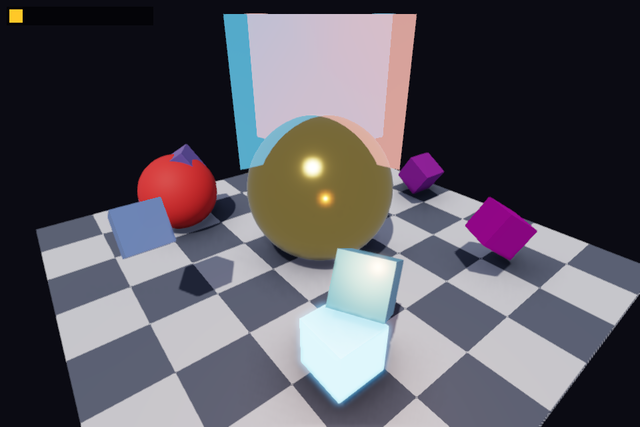
This is the shortest useful 3D program in the repository. It builds a camera from a yaw, a pitch and a distance, sets one directional light and one moving point light, and draws either a scene made from generated meshes or a glTF model given on the command line. It is the example to copy when a model needs looking at, and the one to read first for the 3D half of gfx.
It covers CubeMesh and SphereMesh, NewMesh, DrawMesh with a
Material, SetCamera, SetLight, AddPointLight, the ambient
occlusion settings on Post, model loading through
gltf and LoadModel, and a 2D overlay drawn on top
of the 3D scene in the same frame. The 3D graphics
guide covers the same ground in prose.
Run it with:
go run ./examples/viewer -seconds 3 -shot out.png
-model file.gltf (or .glb) loads a model instead of the generated
scene and frames the camera on its bounds. -noao disables ambient
occlusion, -noshadow disables shadows and -showao displays the
occlusion buffer instead of the shaded image, which is how an occlusion
problem is diagnosed. -sorted composites the translucent panes by
sorting them instead of order-independently, which is the comparison
that shows what the order-independent pass is for. Drag with the left
mouse button to orbit, scroll to zoom, Escape to quit.
The viewer type
The state is the flags, the GPU resources, and the camera as three
numbers plus a centre point. Keeping a camera as yaw, pitch and distance
rather than as a matrix is what makes the mouse handling in Update
three lines long. lastX and lastY hold the previous pointer position
so a drag can be turned into a delta.
type viewer struct {
	modelPath string
	seconds   float64
	shot      string
	noAO      bool
	noShadow  bool
	showAO    bool
	sorted    bool

	model    *gfx.Model
	cube     *gfx.Mesh
	sphere   *gfx.Mesh
	pane     *gfx.Mesh
	checker  *gfx.Texture
	yaw      float32
	pitch    float32
	distance float32
	center   lin.Vec3
	dragging bool
	lastX    float32
	lastY    float32
	shotDone bool
}
Init: meshes, and a model if one was named
gfx.CubeMesh and gfx.SphereMesh return vertices and indices, which
NewMesh uploads. SphereMesh(24, 48) is twenty-four stacks by
forty-eight slices; a lower pair gives a coarser ball. Splitting mesh
generation from mesh upload lets the same vertices be edited, shared
with the physics package, or flat-shaded before they reach the GPU.
When -model is given, gltf.Load parses the file and
ctx.Gfx.LoadModel turns it into a gfx.Model, which carries its parts,
their materials and the bounds of the whole thing. The camera is framed
from those bounds: the centre is the midpoint of Min and Max, and
the distance is the diagonal times 1.2, so any model fills the view
whatever units it was authored in.
func (v *viewer) Init(ctx *engine.Context) error {
	var err error
	if v.checker, err = ctx.Gfx.NewTexture(checkerImage(64, 8), gfx.TextureOptions{}); err != nil {
		return err
	}
	cv, ci := gfx.CubeMesh()
	if v.cube, err = ctx.Gfx.NewMesh(cv, ci); err != nil {
		return err
	}
	sv, si := gfx.SphereMesh(24, 48)
	if v.sphere, err = ctx.Gfx.NewMesh(sv, si); err != nil {
		return err
	}
	pv, pi := gfx.PlaneMesh(1)
	if v.pane, err = ctx.Gfx.NewMesh(pv, pi); err != nil {
		return err
	}
	v.yaw, v.pitch, v.distance = 0.6, 0.5, 8
	if v.modelPath != "" {
		doc, err := gltf.Load(v.modelPath)
		if err != nil {
			return err
		}
		if v.model, err = ctx.Gfx.LoadModel(doc); err != nil {
			return err
		}
		v.center = v.model.Min.Add(v.model.Max).Mul(0.5)
		v.distance = v.model.Max.Sub(v.model.Min).Len() * 1.2
		ctx.Log.Info("viewer: model loaded", "parts", len(v.model.Parts), "min", v.model.Min, "max", v.model.Max)
	}
	return nil
}

func (v *viewer) Shutdown(ctx *engine.Context) {
	if v.model != nil {
		v.model.Destroy()
	}
	v.cube.Destroy()
	v.sphere.Destroy()
	v.pane.Destroy()
	v.checker.Destroy()
}
Shutdown destroys everything, guarding the model because it is only
created when a path was given.
Update: orbiting and zooming
MousePressed and MouseReleased are edges, so dragging is set on
the frame the button goes down and cleared on the frame it comes up.
While dragging, the pointer delta scales into yaw and pitch, and the
pitch is clamped to just under a right angle so the camera never passes
over the pole and flips.
The zoom multiplies the distance by 0.9 to the power of the scroll amount, which makes each notch a constant ratio rather than a constant distance. A ratio is what a zoom wants: it feels the same close in and far out.
The last two lines spin the generated scene slowly when no model is loaded, so a screenshot taken partway through a headless run shows the scene from an angle rather than head on.
func (v *viewer) Update(ctx *engine.Context) error {
	in := ctx.Input
	if in.KeyPressed(input.KeyEscape) || (v.seconds > 0 && ctx.Time >= v.seconds) {
		ctx.Quit()
	}
	if v.shot != "" && !v.shotDone && (v.seconds == 0 || ctx.Time >= v.seconds/2) {
		ctx.Screenshot(v.shot)
		v.shotDone = true
	}
	x, y := in.Mouse()
	if in.MousePressed(input.MouseLeft) {
		v.dragging = true
	}
	if in.MouseReleased(input.MouseLeft) {
		v.dragging = false
	}
	if v.dragging && in.MouseDown(input.MouseLeft) {
		v.yaw += (x - v.lastX) * 0.01
		v.pitch = lin.Clamp(v.pitch+(y-v.lastY)*0.01, -1.5, 1.5)
	}
	v.lastX, v.lastY = x, y
	_, dy := in.Scroll()
	v.distance = lin.Clamp(v.distance*float32(math.Pow(0.9, float64(dy))), 0.5, 500)
	if v.model == nil {
		v.yaw += float32(ctx.Delta) * 0.3 // idle spin so a screenshot shows motion
	}
	return nil
}
Draw: camera, lights and post-processing
g.Post() returns the current settings, the copy is edited and
SetPost puts it back, which is the pattern for every settings struct in
the engine: read, change one field, write. OrderIndependent composites
translucent draws without sorting them, which the crossed panes below
show, and the occlusion fields are only touched when a flag asked for
it; ShowOcclusion displays the occlusion buffer in place of the shaded
image.
The eye position is spherical coordinates around center: pitch lifts
it, yaw turns it, distance scales it. gfx.Camera takes a position and
a target, and its zero fields are defaults, so the field of view is 60
degrees and the near and far planes are the engine's.
SetLight sets the one directional light and the ambient term. The
colour components are above 1 because lighting is computed in linear
high dynamic range and tone mapped at the end, so a bright sun is
written as a number greater than white. Shadows turns on the shadow
atlas pass and ShadowDistance is how far from the camera shadows are
cast, in world units; a smaller distance gives sharper shadows near the
camera. AddPointLight adds a light for this frame only, with a
position, a colour and a radius, so it is called every frame rather than
set once.
The 2D calls at the end draw over the 3D scene without any state change, because both go into the same frame and the 2D stream composites last.
func (v *viewer) Draw(ctx *engine.Context) error {
	g := ctx.Gfx
	p := g.Post()
	// Translucent surfaces are composited without sorting unless -sorted
	// asks for the old path, which is what the crossed panes below show.
	p.OrderIndependent = !v.sorted
	if v.noAO || v.showAO {
		p.AmbientOcclusion = 0
		if v.showAO {
			p.AmbientOcclusion, p.ShowOcclusion = 1, true
		}
	}
	g.SetPost(p)
	eye := v.center.Add(lin.V3(
		v.distance*float32(math.Cos(float64(v.pitch))*math.Sin(float64(v.yaw))),
		v.distance*float32(math.Sin(float64(v.pitch))),
		v.distance*float32(math.Cos(float64(v.pitch))*math.Cos(float64(v.yaw)))))
	g.SetCamera(gfx.Camera{Position: eye, Target: v.center})
	g.SetLight(gfx.Light{Direction: lin.V3(-0.4, -1, -0.6), Color: gfx.Color{R: 2.2, G: 2.1, B: 1.9, A: 1},
		Ambient: gfx.Color{R: 0.18, G: 0.2, B: 0.25, A: 1}, Shadows: !v.noShadow, ShadowDistance: 40})
	g.AddPointLight(lin.V3(4*float32(math.Sin(float64(ctx.Time))), 1.5, 4*float32(math.Cos(float64(ctx.Time)))), gfx.Color{R: 4, G: 1.5, B: 0.5, A: 1}, 8)
	if v.model != nil {
		g.DrawModel(v.model, lin.Identity())
	} else {
		v.drawScene(g, float32(ctx.Time))
	}
	// A 2D overlay proves sprites composite over the 3D scene.
	g.FillRect(10, 10, 220, 28, gfx.RGBA(0, 0, 0, 160))
	g.FillRect(14, 14, 20, 20, gfx.RGB(255, 200, 40))
	return nil
}
The generated scene
Each DrawMesh takes a mesh, a material and a model matrix. The
matrices are built with lin.Translate, lin.Scale and lin.TRS,
which composes a translation, a rotation quaternion and a scale in one
call. Multiplying a translation by a scale gives an object scaled about
its own origin and then moved, which is why the ground is a cube
flattened to a slab.
The materials show what the physically based model does with a few
numbers. Metallic: 1 with a low roughness gives polished metal that
takes its colour from reflections. A plain BaseColor with a high
roughness gives a matt dielectric. Emissive: 3 makes a surface a light
source in the image, which the bloom pass in post-processing picks up.
Zero values remain defaults throughout: an unset Roughness is 0.6 and
an unset BaseColor is white, which is why the ground only names a
texture.
func (v *viewer) drawScene(g *gfx.Graphics, t float32) {
	g.DrawMesh(v.cube, gfx.Material{Texture: v.checker, Roughness: 0.8}, lin.Translate(lin.V3(0, -1, 0)).Mul(lin.Scale(lin.V3(10, 0.2, 10))))
	// A polished metal sphere, a rough dielectric one, and an emissive cube that blooms.
	g.DrawMesh(v.sphere, gfx.Material{BaseColor: gfx.RGB(230, 200, 120), Metallic: 1, Roughness: 0.15}, lin.Translate(lin.V3(0, 0.6, 0)).Mul(lin.Scale(lin.V3(1.5, 1.5, 1.5))))
	g.DrawMesh(v.sphere, gfx.Material{BaseColor: gfx.RGB(220, 60, 60), Roughness: 0.7}, lin.Translate(lin.V3(-3, 0, 2)).Mul(lin.Scale(lin.V3(0.9, 0.9, 0.9))))
	g.DrawMesh(v.cube, gfx.Material{BaseColor: gfx.RGB(120, 200, 255), Emissive: 3}, lin.Translate(lin.V3(3, 0, 2)).Mul(lin.Scale(lin.V3(0.8, 0.8, 0.8))))
	// Two translucent panes crossing above the sphere, the pair turned
	// with the camera so both stay side-on to it. Each is nearer than the
	// other on its own side of the crossing, which one order for the whole
	// draw cannot show: with PostSettings.OrderIndependent each side shows
	// the pane in front of it, and with -sorted one pane covers both.
	upright := lin.Rotate(-math.Pi/2, lin.V3(1, 0, 0))
	for i, c := range []gfx.Color{{R: 0.15, G: 0.6, B: 1, A: 0.5}, {R: 1, G: 0.4, B: 0.35, A: 0.5}} {
		turn := lin.Rotate(v.yaw+lin.Radians(35-70*float32(i)), lin.V3(0, 1, 0))
		place := lin.Translate(lin.V3(0, 2.6, 0)).Mul(turn).Mul(upright).Mul(lin.Scale(lin.V3(3.4, 1, 2.4)))
		g.DrawMesh(v.pane, gfx.Material{BaseColor: c, Blend: true, DoubleSided: true, Roughness: 0.25}, place)
	}
	for i := range 6 {
		a := float32(i)*math.Pi/3 + t*0.5
		pos := lin.V3(3.5*float32(math.Cos(float64(a))), 0.5+0.5*float32(math.Sin(float64(t+float32(i)))), 3.5*float32(math.Sin(float64(a))))
		rot := lin.AxisAngle(lin.V3(0, 1, 0), a).Mul(lin.AxisAngle(lin.V3(1, 0, 0), t))
		shade := uint8(90 + 25*i)
		g.DrawMesh(v.cube, gfx.Material{BaseColor: gfx.RGB(shade, 255-shade, 200), Metallic: float32(i) / 5, Roughness: 0.3 + 0.1*float32(i)}, lin.TRS(pos, rot, lin.V3(0.7, 0.7, 0.7)))
	}
}
The ring of six cubes sweeps metallic from 0 to 1 and roughness from 0.3 to 0.8 across its members, so one screenshot shows what those two parameters do.
The two panes are the transparency comparison. Sorting orders whole
draws, so whichever pane sorts second covers the other over the entire
crossing, which is right on one side and wrong on the other. The
order-independent pass accumulates every translucent fragment with a
weight that favours the nearer one and resolves them in a single pass.
This approximates the overlap without whole-pane sorting; weighted
blending does not guarantee exact front-to-back transparency.
Run the example twice, once with -sorted, and the overlap tells the two
apart.
The checker texture and main
func checkerImage(size, cell int) image.Image {
	img := image.NewRGBA(image.Rect(0, 0, size, size))
	for y := range size {
		for x := range size {
			c := color.RGBA{200, 200, 210, 255}
			if (x/cell+y/cell)%2 == 1 {
				c = color.RGBA{90, 95, 110, 255}
			}
			img.SetRGBA(x, y, c)
		}
	}
	return img
}

func main() {
	modelPath := flag.String("model", "", "glTF (.gltf or .glb) file to show")
	seconds := flag.Float64("seconds", 0, "exit after this many seconds")
	shot := flag.String("shot", "", "write a screenshot to this PNG")
	noAO := flag.Bool("noao", false, "disable ambient occlusion")
	noShadow := flag.Bool("noshadow", false, "disable shadows")
	showAO := flag.Bool("showao", false, "display the ambient occlusion buffer")
	sorted := flag.Bool("sorted", false, "composite translucent draws by sorting them, not order-independently")
	flag.Parse()
	err := engine.Run(engine.Config{Title: "Bunyip viewer", Width: 960, Height: 640, Resizable: true},
		&viewer{modelPath: *modelPath, seconds: *seconds, shot: *shot, noAO: *noAO, noShadow: *noShadow, showAO: *showAO, sorted: *sorted})
	if err != nil {
		fmt.Fprintln(os.Stderr, "viewer:", err)
		os.Exit(1)
	}
}
What to try
- Run with
-showaoand then-noaoand compare the contact shadows in the corners of the scenedrawScenedraws. - Add a second
AddPointLightinDrawon the opposite side of the scene, in a different colour, and watch both move. - Change
SphereMesh(24, 48)inInittoSphereMesh(6, 8)to see the facets, then wrap it ingfx.FlatShadedfor hard edges. - Load a model with
-modeland turn the idle spin inUpdateback on for models as well, so a screenshot shows the far side. - Give the ground material in
drawSceneaMetallicof 1 and watch the checker texture stop reading as a colour.