Example examples/sprites
Sprites
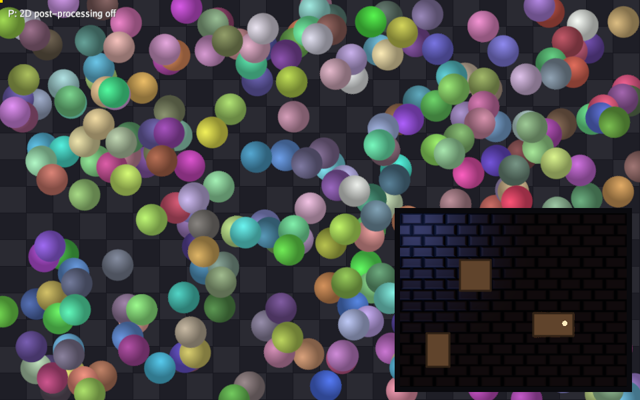
This is the smallest complete game in the repository, with one extra
panel bolted on. It generates a texture at start-up, gives three hundred
sprites a position, a velocity, a tint and a spin, moves them in Update
and draws them in Draw. In the bottom-right corner it also draws a lit
room: a tiled brick floor with a normal map, a lamp circling above it, a
fixed blue light in the corner, and three crates registered as shadow
casters so the lamp throws their shadows across the bricks. P runs the
whole frame through the post pass, which a 2D game gets with
PostSettings.Post2D: bloom over the brighter sprites, a vignette,
a little chromatic aberration at the edges and film grain.
It exercises 2D drawing from gfx: NewTexture,
Draw with a Sprite, FillRect for the checkered background, and
SetLights2D, AddOccluder2D and DrawLit for the lit panel. It also
shows the parts of input and
engine a game needs early: keyboard edges, the
mouse position, the mouse delta while the cursor is captured, a gamepad,
fullscreen, and Screenshot. The guides for this material are
2D graphics and
Input.
Run it with:
go run ./examples/sprites -seconds 3 -shot out.png
-seconds N quits after N seconds and -shot file.png writes a
screenshot halfway through, which is how the example test drives every
program here. -fullscreen starts full screen and -capture starts
with the cursor captured; F and C toggle them at run time. -post
starts with the post pass on and P toggles it.
The two types
ball is the per-sprite state. Positions and velocities are
lin.Vec2 in view units, the coordinate space Draw works in, with the
origin at the top-left corner and Y increasing downwards. tint is a
gfx.Color in linear space, and spin is in radians per second,
because every angle in the engine is radians.
game holds the flags parsed in main plus the textures and the
sprites. There are three textures: the disc every sprite draws, the
brick floor's colour, and the floor's normal map. shotTaken exists so
the screenshot is written once rather than on every update after the
halfway mark, and post is the toggle P flips.
post2D is the settings value that toggle installs. A frame with no 3D
draws in it takes a direct path to the screen and skips the post pass
entirely, which is what a 2D game usually wants; Post2D is the field
that sends it through the composite instead, and the rest of the value
picks the effects that work without a depth buffer. Exposure and tone
mapping are skipped in that mode, so the colours the program drew come
back unchanged when nothing else is turned on.
type ball struct {
	pos, vel lin.Vec2
	tint     gfx.Color
	spin     float32
}

type game struct {
	seconds    float64
	shot       string
	fullscreen bool
	capture    bool
	tex        *gfx.Texture
	floor      *gfx.Texture
	floorNorm  *gfx.Texture
	balls      []ball
	post       bool // run the 2D frame through the post pass
	shotTaken  bool
}

// post2D is the grade P turns on. Post2D is what lets a frame with no 3D
// draws in it reach the composite at all; the rest are the settings that
// work without a depth buffer. Saturation and Contrast are 1 because
// their zero would drain the colour out of the frame.
func post2D() gfx.PostSettings {
	return gfx.PostSettings{
		Post2D: true, NoAntiAlias: true, Exposure: 1, Saturation: 1.1, Contrast: 1,
		Bloom: 0.3, BloomThreshold: 0.9, Vignette: 0.3, Aberration: 0.6, Grain: 0.03,
	}
}
The lit room
The room is fixed geometry, so it is constants rather than state. brick
is the floor texture's size in pixels, and the floor is drawn one sprite
wide with UVs that run past 1, so the 64-pixel texture tiles across the
340 by 260 room instead of stretching over it.
crates are the shadow casters, each {x, y, w, h} in view units. The
same three rectangles are drawn as boxes and handed to AddOccluder2D
as polygons, so what blocks the light is exactly what is on screen.
// The lit panel: a floor a few bricks across with three crates on it.
const (
	roomX, roomY = 600, 320
	roomW, roomH = 340, 260
	brick        = 64 // the floor texture's size, tiled over the room
)

// crates are the shadow casters, in view units.
var crates = [][4]float32{
	{roomX + 90, roomY + 70, 46, 46},
	{roomX + 200, roomY + 150, 60, 34},
	{roomX + 40, roomY + 180, 34, 50},
}
Init: the textures and the sprites
Init runs once with a live context, which is where GPU resources are
created. NewTexture takes any image.Image and a TextureOptions
whose zero value is nearest-neighbour sampling with mipmaps; Linear: true asks for smooth sampling, which suits a round disc that is
rotated. Translucent texels are premultiplied in linear light during
upload, so the anti-aliased edge of the disc composites correctly.
The floor takes two more textures from brickImages. Both set Repeat: true, which is what lets the sprite's UVs run past 1 and tile. The
normal map also sets Data: true: a normal map is not colour, so it
must not go through the sRGB path that premultiplies and encodes a
colour texture. Data uploads the bytes exactly as they were painted,
which is what DrawLit expects to decode as a direction.
The sprites are seeded from a fixed rand.NewPCG(1, 2), so every run
looks the same and a screenshot can be compared between builds.
ctx.Width and ctx.Height are the view size in the same units the
sprites are positioned in. gfx.RGB converts sRGB bytes to a linear
gfx.Color, which is what makes the tints look like the numbers
suggest.
Device loss does not rerun Init. A game must implement engine.Recoverer
and rebuild its GPU resources in Recover to opt into recovery; this
example does not, so device loss ends the run with an error.
func (g *game) Init(ctx *engine.Context) error {
	if g.fullscreen {
		ctx.SetFullscreen(true)
	}
	if g.capture {
		ctx.SetCursorCaptured(true)
	}
	var err error
	if g.tex, err = ctx.Gfx.NewTexture(discImage(48), gfx.TextureOptions{Linear: true}); err != nil {
		return err
	}
	colour, normal := brickImages(brick)
	if g.floor, err = ctx.Gfx.NewTexture(colour, gfx.TextureOptions{Linear: true, Repeat: true}); err != nil {
		return err
	}
	// A normal map is not colour, so it uploads as data: the shader wants
	// the bytes as they were painted.
	if g.floorNorm, err = ctx.Gfx.NewTexture(normal, gfx.TextureOptions{Linear: true, Repeat: true, Data: true}); err != nil {
		return err
	}
	rng := rand.New(rand.NewPCG(1, 2))
	for range 300 {
		g.balls = append(g.balls, ball{
			pos:  lin.V2(rng.Float32()*ctx.Width, rng.Float32()*ctx.Height),
			vel:  lin.V2(rng.Float32()*400-200, rng.Float32()*400-200),
			tint: gfx.RGB(uint8(80+rng.IntN(175)), uint8(80+rng.IntN(175)), uint8(80+rng.IntN(175))),
			spin: rng.Float32()*4 - 2,
		})
	}
	return nil
}
The renderer releases all three textures when the game closes, including
if a later upload in Init fails. A game can call Destroy to release a
resource earlier, from the same goroutine that created it, for example
when unloading a level.
Update: input and motion
Update runs at a fixed step, Config.FixedStep, and ctx.Delta is
that step rather than the wall-clock time since the last frame. It may
run more than once between two Draw calls, or not at all, so all
simulation belongs here and nothing here should depend on the frame
rate.
KeyPressed reports key-down edges, including OS repeats. A held key can
therefore retrigger these toggles; use KeyRepeated to exclude repeat
updates when a toggle should react only to an initial press.
SetFullscreen and SetCursorCaptured are read back
through Fullscreen() and CursorCaptured() so F and C flip the
current state. While the cursor is captured the pointer stays put and
MouseDelta reports its movement, which is the input a first-person
camera uses. Gamepad(0) returns the first pad, whose Connected
field is false when nothing is plugged in, so the call is always safe.
The motion is a velocity step with a bounce: a sprite that has passed an edge has its velocity component negated and is clamped back inside, so it cannot be knocked outside the view by a large step.
func (g *game) Update(ctx *engine.Context) error {
	if ctx.Input.KeyPressed(input.KeyEscape) || (g.seconds > 0 && ctx.Time >= g.seconds) {
		ctx.Quit()
	}
	if ctx.Input.KeyPressed(input.KeyF) {
		ctx.SetFullscreen(!ctx.Fullscreen())
	}
	if ctx.Input.KeyPressed(input.KeyC) {
		ctx.SetCursorCaptured(!ctx.CursorCaptured())
	}
	if ctx.Input.KeyPressed(input.KeyP) {
		g.post = !g.post
	}
	if dx, dy := ctx.Input.MouseDelta(); ctx.CursorCaptured() && (dx != 0 || dy != 0) {
		ctx.Log.Info("sprites: captured mouse", "dx", dx, "dy", dy)
	}
	if pad := ctx.Input.Gamepad(0); pad.Connected && (pad.Pressed(input.ButtonA) || pad.Axis(input.AxisLeftX) != 0) {
		ctx.Log.Info("sprites: gamepad", "name", pad.Name, "leftX", pad.Axis(input.AxisLeftX), "a", pad.Down(input.ButtonA))
	}
	if g.shot != "" && !g.shotTaken && (g.seconds == 0 || ctx.Time >= g.seconds/2) {
		ctx.Screenshot(g.shot)
		g.shotTaken = true
	}
	dt := float32(ctx.Delta)
	for i := range g.balls {
		b := &g.balls[i]
		b.pos = b.pos.Add(b.vel.Mul(dt))
		if b.pos.X < 0 || b.pos.X > ctx.Width {
			b.vel.X = -b.vel.X
			b.pos.X = lin.Clamp(b.pos.X, 0, ctx.Width)
		}
		if b.pos.Y < 0 || b.pos.Y > ctx.Height {
			b.vel.Y = -b.vel.Y
			b.pos.Y = lin.Clamp(b.pos.Y, 0, ctx.Height)
		}
	}
	return nil
}
Note the loop takes b := &g.balls[i] rather than ranging over values:
the elements are updated in place.
Draw: the grid and the sprites
Draw runs once per frame and only queues work. Everything in one layer
is drawn in call order, so the background grid comes first, then the
mouse marker, then the sprites, then the lit room. Nothing is submitted
until the frame ends, and the 2D calls merge into as few draws as their
texture, shader, blend and clip allow, which is why a few hundred
sprites of one texture cost little.
Sprite is a struct of options whose zero value is a sensible sprite:
Size defaults to the texture size, Color defaults to white and
Origin defaults to the top-left corner. Here Origin: lin.V2(0.5, 0.5) moves the anchor to the middle so Rotation spins the disc about
its centre. The rotation is spin * ctx.Time, so it comes from the
elapsed time rather than being accumulated, and stays exact.
SetPost is called every frame, like everything else here. It is a
replacement rather than an adjustment, so the P toggle is one branch: the
posted value or a plain one.
func (g *game) Draw(ctx *engine.Context) error {
	// Post settings are replaced every frame, like everything else drawn
	// here. With Post2D off the frame goes straight to the screen.
	if g.post {
		ctx.Gfx.SetPost(post2D())
	} else {
		ctx.Gfx.SetPost(gfx.PostSettings{NoAntiAlias: true})
	}
	const cell = 40
	for y := float32(0); y < ctx.Height; y += cell {
		for x := float32(0); x < ctx.Width; x += cell {
			shade := uint8(30 + 12*(int(x/cell+y/cell)%2))
			ctx.Gfx.FillRect(x, y, cell-1, cell-1, gfx.RGB(shade, shade, shade+8))
		}
	}
	mx, my := ctx.Input.Mouse()
	ctx.Gfx.FillRect(float32(mx)-4, float32(my)-4, 8, 8, gfx.RGB(255, 220, 0))
	for _, b := range g.balls {
		ctx.Gfx.Draw(g.tex, gfx.Sprite{
			Pos: b.pos, Size: lin.V2(48, 48), Origin: lin.V2(0.5, 0.5),
			Color: b.tint, Rotation: b.spin * float32(ctx.Time),
		})
	}
	g.drawLitRoom(ctx)
	ctx.Gfx.SetLayer(20)
	ctx.Gfx.Debugf(12, 12, "P: 2D post-processing %s", onOff(g.post))
	return nil
}

// onOff names a toggle for the overlay.
func onOff(b bool) string {
	if b {
		return "on"
	}
	return "off"
}
Reading the mouse in Draw is safe: input edges are latched for the
whole frame while Draw runs, so an interface built here sees every
press even on a frame that ran no update.
Debugf draws through the engine's built-in font, so a program can put a
value on screen without loading one. It goes on layer 20, above the lit
panel, and with Post2D on it goes through the composite with everything
else: the overlay picks up the vignette and the grain too, because there
is one image and one grade.
The lit room: lights, occluders and shadows
drawLitRoom is the whole 2D lighting feature in thirty lines. Three
calls do the work.
SetLayer(10) puts everything that follows above the bouncing sprites,
and the last line puts the layer back to 0 so the next frame starts
where it expects to. Layers order draws across calls; within one layer
the order is call order.
SetLights2D sets the ambient colour and up to eight point lights for
the frame. Light2D's zero values are defaults: Height 40, Radius
300, Color white. Height is how far above the sprite plane the light
sits, which decides how steeply it rakes across the floor's normal map.
The lamp's position is a slow Lissajous figure of ctx.Time, so it
drifts over the crates rather than orbiting them exactly; the blue light
in the corner never moves.
Shadows: true on the lamp is what makes the crates block it. The blue
light leaves Shadows unset, so it lights the floor flatly, and the
difference between the two is visible in the same frame: the warm light
has hard-edged wedges behind the crates and the blue one does not.
Softness is the width of the shadow's soft edge in view units at the
shadowed point, 8 by default; 5 here gives a slightly crisper edge.
AddOccluder2D takes a closed polygon in the same units as sprite
positions. Each crate contributes its four corners, clockwise. Two points
would make a single wall segment instead. Lights and occluders are both
cleared at the start of every frame, so they are set every frame like
the drawing itself, and every DrawLit sprite in the frame sees the same
set: it does not matter that the occluders are added before the floor is
drawn.
Under the hood each shadowed light gets a polar shadow map built on the CPU: 512 directions around the light, each holding the distance to the nearest occluder edge, uploaded as one row of a small texture that the lit shader reads along the direction from the light to the fragment. The cost is the occluder edges times the shadowed lights, and only edges inside a light's radius are visited, so a few hundred edges are free. Add the walls near the player rather than the whole level.
DrawLit draws the floor lit by those lights through the normal map.
UV1: lin.V2(roomW/brick, roomH/brick) sends the UVs past 1, which the
Repeat: true textures tile rather than clamp, so the room is a little
over five bricks across and four down.
// drawLitRoom draws the lit panel: the lamp circles the room, the crates
// block it, and the floor picks up the light through its normal map. The
// lights and the occluders are set every frame, like the drawing itself.
func (g *game) drawLitRoom(ctx *engine.Context) {
	gr := ctx.Gfx
	gr.SetLayer(10) // over the bouncing sprites
	lamp := lin.V2(
		roomX+roomW/2+90*float32(math.Cos(ctx.Time*0.7)),
		roomY+roomH/2+55*float32(math.Sin(ctx.Time*0.9)),
	)
	gr.SetLights2D(gfx.RGB(26, 26, 34),
		gfx.Light2D{Pos: lamp, Height: 26, Radius: 300, Color: gfx.RGB(255, 198, 130), Shadows: true, Softness: 5},
		gfx.Light2D{Pos: lin.V2(roomX+24, roomY+24), Height: 40, Radius: 190, Color: gfx.RGB(90, 130, 255)},
	)
	for _, c := range crates {
		gr.AddOccluder2D(
			lin.V2(c[0], c[1]), lin.V2(c[0]+c[2], c[1]),
			lin.V2(c[0]+c[2], c[1]+c[3]), lin.V2(c[0], c[1]+c[3]),
		)
	}
	gr.FillRect(roomX-8, roomY-8, roomW+16, roomH+16, gfx.RGB(10, 10, 14))
	gr.DrawLit(g.floor, g.floorNorm, gfx.Sprite{
		Pos: lin.V2(roomX, roomY), Size: lin.V2(roomW, roomH),
		UV1: lin.V2(roomW/brick, roomH/brick), // the floor tiles, so the UVs run past 1
	})
	for _, c := range crates {
		gr.FillRect(c[0], c[1], c[2], c[3], gfx.RGB(96, 68, 44))
		gr.StrokeRect(c[0], c[1], c[2], c[3], 2, gfx.RGB(48, 34, 22))
	}
	gr.FillCircle(lamp.X, lamp.Y, 4, gfx.RGB(255, 236, 190))
	gr.SetLayer(0)
}
The crates themselves are plain FillRect calls. Nothing about being an
occluder draws anything; the polygon handed to AddOccluder2D and the
rectangle drawn on screen are two separate statements that happen to
agree.
The texture image
The disc is drawn into an image.RGBA by hand. The alpha is the
distance from the centre clamped into the last pixel of the radius,
which gives one pixel of anti-aliasing at the edge, and light adds a
highlight offset towards the top-left. The texel is written
premultiplied, which is what image.RGBA expects; the engine converts
it to linear premultiplied form during upload.
// discImage draws an anti-aliased disc with a highlight.
func discImage(size int) image.Image {
	img := image.NewRGBA(image.Rect(0, 0, size, size))
	r := float64(size) / 2
	for y := range size {
		for x := range size {
			dx, dy := float64(x)+0.5-r, float64(y)+0.5-r
			d := math.Sqrt(dx*dx+dy*dy) / r
			a := lin.Clamp(float32((1-d)*r), 0, 1)
			light := 0.6 + 0.4*math.Max(0, 1-math.Hypot(dx+r*0.3, dy+r*0.3)/r)
			v := uint8(255 * light * float64(a))
			img.SetRGBA(x, y, color.RGBA{v, v, v, uint8(255 * a)})
		}
	}
	return img
}
The brick floor and its normal map
brickImages returns two images the same size: what the floor looks like
and which way it faces.
Both come from one height function, which is the surface at a point:
flat across a brick, dropping into the mortar around it. It lays two
bricks across the tile and four courses down, offsets every other course
by half a brick, and uses smoothstep so the drop into the mortar is a
ramp rather than a step. Because the pattern is computed modulo the tile
size, the two images tile seamlessly, which is what lets the room repeat
them.
The colour image is that height shaded: brick where the surface is high, grey mortar where it is low.
The normal map is the slope of the same function, by central
differences: the surface normal is (-dh/dx, -dh/dy, 1) normalised, and
each component is written biased into a byte, so a flat surface is the
familiar (128, 128, 255). That is tangent space, which is what
DrawLit decodes. The *2 on the derivatives exaggerates the slope, so
the mortar catches the lamp more strongly than a literal height field
would.
// brickImages draws the floor: a colour texture of bricks with mortar
// between them, and the matching tangent-space normal map, where the
// mortar dips and the bricks are domed. Both tile, so the room repeats
// them rather than stretching one across it.
func brickImages(size int) (*image.RGBA, *image.RGBA) {
	colour := image.NewRGBA(image.Rect(0, 0, size, size))
	normal := image.NewRGBA(image.Rect(0, 0, size, size))
	// height is the surface at a point: flat across a brick, dropping
	// into the mortar around it.
	height := func(x, y int) float64 {
		bx := float64((x%size+size)%size) / float64(size) * 2 // two bricks across
		by := float64((y%size+size)%size) / float64(size) * 4 // four courses down
		row := math.Floor(by)
		bx += 0.5 * math.Mod(row, 2) // every other course is offset half a brick
		u := math.Abs(math.Mod(bx, 1)-0.5) * 2
		v := math.Abs(math.Mod(by, 1)-0.5) * 2
		edge := math.Max(u, v)
		return 1 - smoothstep(0.7, 1, edge)
	}
	for y := range size {
		for x := range size {
			h := height(x, y)
			// The normal comes from the slope, by central differences.
			dx := height(x+1, y) - height(x-1, y)
			dy := height(x, y+1) - height(x, y-1)
			nx, ny, nz := -dx*2, -dy*2, 1.0
			l := math.Sqrt(nx*nx + ny*ny + nz*nz)
			normal.SetRGBA(x, y, color.RGBA{
				R: uint8((nx/l*0.5 + 0.5) * 255), G: uint8((ny/l*0.5 + 0.5) * 255),
				B: uint8((nz/l*0.5 + 0.5) * 255), A: 255,
			})
			shade := 0.55 + 0.45*h
			tint := color.RGBA{R: uint8(190 * shade), G: uint8(150 * shade), B: uint8(130 * shade), A: 255}
			if h < 0.5 {
				tint = color.RGBA{R: uint8(120 * shade), G: uint8(116 * shade), B: uint8(110 * shade), A: 255}
			}
			colour.SetRGBA(x, y, tint)
		}
	}
	return colour, normal
}

func smoothstep(a, b, x float64) float64 {
	t := math.Min(math.Max((x-a)/(b-a), 0), 1)
	return t * t * (3 - 2*t)
}
main
main parses the flags and calls engine.Run with a Config and the
game value. Config's zero values are defaults, so only the title,
size and resizability are given here. The examples leave
Config.Validation off so that a run measures the engine rather than
the validation layer. To turn the Vulkan validation layers on, set
BUNYIP_VALIDATION=1 in the environment.
func main() {
	seconds := flag.Float64("seconds", 0, "exit after this many seconds")
	shot := flag.String("shot", "", "write a screenshot to this PNG")
	fullscreen := flag.Bool("fullscreen", false, "start full screen (F toggles)")
	capture := flag.Bool("capture", false, "start with the cursor captured (C toggles)")
	post := flag.Bool("post", false, "start with 2D post-processing on (P toggles)")
	flag.Parse()
	err := engine.Run(engine.Config{Title: "Bunyip sprites", Width: 960, Height: 600, Resizable: true},
		&game{seconds: *seconds, shot: *shot, fullscreen: *fullscreen, capture: *capture, post: *post})
	if err != nil {
		fmt.Fprintln(os.Stderr, "sprites:", err)
		os.Exit(1)
	}
}
What to try
- Raise the sprite count in
Initfrom 300 to 30000 and press F3 to watch the frame time and the draw count; they stay one draw call. - Turn
Shadowsoff on the lamp indrawLitRoomand back on, and watch what the crates stop doing. Then setShadows: trueon the blue light as well and see two sets of shadows cross. - Change
Softnesson the lamp from 5 to 40 and back to 0, which is the 8-unit default, and watch the shadow edges spread. - Raise the lamp's
Heightfrom 26 to 200. The floor flattens out: the light arrives nearly straight down, so the normal map has almost nothing to catch. - Add a fourth crate to
crates. Nothing else changes: the same slice is drawn and registered as an occluder. - Give
balla scale field, set it inInitand use it forSizeinDraw, so the sprites vary in size as well as colour. - Add gravity in
Updateby adding tob.vel.Yeach step and losing energy on the bounce. - Make the sprites follow the pointer: read
ctx.Input.Mouse()inUpdateand steer each velocity towards it.