Example examples/inputs
Inputs
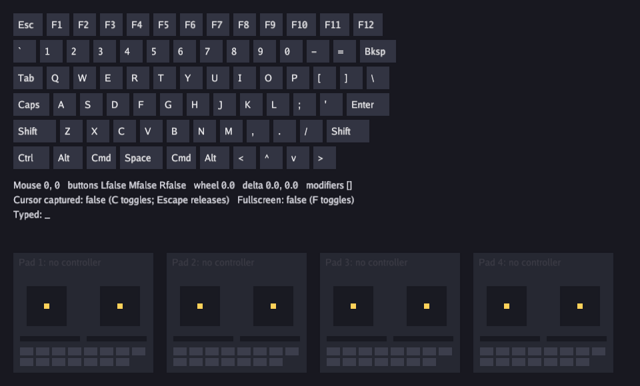
This program draws the whole of input on one screen. A keyboard lights up as keys are held, a line of text reports the mouse position, buttons, wheel, relative motion and modifiers, another reports what has been typed including an in-progress IME composition, and four panels show the sticks, triggers and buttons of any connected gamepads.
It is the program to read when a key does not do what a game expects.
Key codes name physical positions rather than letters: input.KeyA is
the key where A sits on a US QWERTY keyboard whatever the layout prints
on it, which is what a game wants for WASD movement and what
in.Chars() does not give. Typed text comes from Chars, which is the
layout's own output and the only correct source for a text field. Read
the input guide for action maps and rebinding,
which this example deliberately leaves out to show the raw state.
The window controls used here, the title, the size floor, the cursor shape, cursor capture and fullscreen, are on engine.Context rather than in the input package; the window guide covers them.
Run it:
go run ./examples/inputs -seconds 3 -shot out.png
The flags are -seconds N and -shot file.png. There is no -headless
flag; set BUNYIP_HEADLESS=1 to run it without a window. C captures the
cursor, Escape releases it and then quits, F toggles fullscreen, and
Ctrl+V or Cmd+V pastes.
Package and state
The game holds the font, the last forty typed runes, the accumulated
wheel travel, and a smoothed mouse delta. Nothing here is input state:
the engine keeps that, and a frame reads it from ctx.Input.
// Command inputs visualises everything the input package reports: keys
// held, mouse buttons, wheel, position, relative motion while the cursor
// is captured (C toggles, Escape releases), fullscreen (F), typed text
// with IME composition, and up to four gamepads with sticks, triggers
// and buttons.
package main

import (
	"flag"
	"fmt"
	"os"
	"strings"

	"golang.org/x/image/font/gofont/goregular"

	"github.com/matjam/bunyip/engine"
	"github.com/matjam/bunyip/gfx"
	"github.com/matjam/bunyip/input"
)

type game struct {
	seconds float64
	shot    string

	font     *gfx.Font
	typed    []rune
	scroll   float32
	deltaX   float32
	deltaY   float32
	shotDone bool
}
The keyboard layout
The drawing needs a picture of a keyboard, which the input package does not provide because a key code is a position rather than a layout. These two tables are this program's own: the rows to draw, and the names to print on the keys whose name is not derived from the code.
var keyRows = [][]input.Key{
	{input.KeyEscape, input.KeyF1, input.KeyF2, input.KeyF3, input.KeyF4, input.KeyF5, input.KeyF6, input.KeyF7, input.KeyF8, input.KeyF9, input.KeyF10, input.KeyF11, input.KeyF12},
	{input.KeyGrave, input.Key1, input.Key2, input.Key3, input.Key4, input.Key5, input.Key6, input.Key7, input.Key8, input.Key9, input.Key0, input.KeyMinus, input.KeyEqual, input.KeyBackspace},
	{input.KeyTab, input.KeyQ, input.KeyW, input.KeyE, input.KeyR, input.KeyT, input.KeyY, input.KeyU, input.KeyI, input.KeyO, input.KeyP, input.KeyLeftBracket, input.KeyRightBracket, input.KeyBackslash},
	{input.KeyCapsLock, input.KeyA, input.KeyS, input.KeyD, input.KeyF, input.KeyG, input.KeyH, input.KeyJ, input.KeyK, input.KeyL, input.KeySemicolon, input.KeyApostrophe, input.KeyEnter},
	{input.KeyLeftShift, input.KeyZ, input.KeyX, input.KeyC, input.KeyV, input.KeyB, input.KeyN, input.KeyM, input.KeyComma, input.KeyPeriod, input.KeySlash, input.KeyRightShift},
	{input.KeyLeftControl, input.KeyLeftAlt, input.KeyLeftSuper, input.KeySpace, input.KeyRightSuper, input.KeyRightAlt, input.KeyLeft, input.KeyUp, input.KeyDown, input.KeyRight},
}

var keyNames = map[input.Key]string{
	input.KeyEscape: "Esc", input.KeyGrave: "`", input.KeyMinus: "-", input.KeyEqual: "=", input.KeyBackspace: "Bksp", input.KeyTab: "Tab",
	input.KeyLeftBracket: "[", input.KeyRightBracket: "]", input.KeyBackslash: "\\", input.KeyCapsLock: "Caps", input.KeySemicolon: ";",
	input.KeyApostrophe: "'", input.KeyEnter: "Enter", input.KeyLeftShift: "Shift", input.KeyRightShift: "Shift", input.KeyComma: ",",
	input.KeyPeriod: ".", input.KeySlash: "/", input.KeyLeftControl: "Ctrl", input.KeyLeftAlt: "Alt", input.KeyLeftSuper: "Cmd",
	input.KeySpace: "Space", input.KeyRightSuper: "Cmd", input.KeyRightAlt: "Alt", input.KeyLeft: "<", input.KeyUp: "^", input.KeyDown: "v", input.KeyRight: ">",
}
keyName covers the rest by arithmetic. The letter, digit and function
key codes are contiguous and in order, so the name of a key in one of
those ranges is its offset from the first.
func keyName(k input.Key) string {
	if n, ok := keyNames[k]; ok {
		return n
	}
	switch {
	case k >= input.KeyA && k <= input.KeyZ:
		return string(rune('A' + k - input.KeyA))
	case k >= input.Key0 && k <= input.Key9:
		return string(rune('0' + k - input.Key0))
	case k >= input.KeyF1 && k <= input.KeyF12:
		return fmt.Sprintf("F%d", k-input.KeyF1+1)
	}
	return "?"
}
Init: the window controls
Init creates the font and then sets three window properties.
SetTitle changes the title after the window is open. SetSizeLimits
takes a minimum width and height and a maximum; zero means no limit, so
this window cannot be dragged smaller than 480 by 320 and has no upper
bound. SetCursor picks one of the system cursor shapes.
func (g *game) Init(ctx *engine.Context) error {
	var err error
	g.font, err = ctx.Gfx.NewFont(goregular.TTF, 14, gfx.FontOptions{})
	// The window controls: a title, a size floor and a crosshair pointer.
	ctx.SetTitle("Bunyip inputs (paste with Ctrl+V or Cmd+V)")
	ctx.SetSizeLimits(480, 320, 0, 0)
	ctx.SetCursor(engine.CursorCrosshair)
	return err
}
Shutdown destroys the font. Every GPU resource a game creates is
destroyed on the goroutine that created it, which is this one.
func (g *game) Shutdown(ctx *engine.Context) { g.font.Destroy() }
Update: reading the state
ctx.Input is the state for this update. The methods split into edges
and levels: KeyPressed is true on the update a key goes down,
KeyDown is true for as long as it is held. Escape does two things
depending on the state, releasing a captured cursor first and quitting
only when the cursor is free, which is the behaviour a player expects
from a captured pointer.
in.Chars() returns the runes typed since the last update, already
through the platform's own layout and dead-key handling. They are
appended to a buffer the program trims to forty runes.
Backspace is handled from the key code, because a backspace is not a
character. in.Mods() is a bit set, so a paste is a V press with either
control or the platform's super key held, and ctx.Clipboard reads the
system clipboard.
in.Scroll() returns this update's wheel travel, which the program
accumulates, and in.MouseDelta() the pointer's relative motion, which
is the only useful pointer reading while the cursor is captured and the
absolute position is frozen. The delta is smoothed with a decay towards
zero so a still mouse settles rather than flickering.
func (g *game) Update(ctx *engine.Context) error {
	in := ctx.Input
	if in.KeyPressed(input.KeyEscape) {
		if ctx.CursorCaptured() {
			ctx.SetCursorCaptured(false)
		} else {
			ctx.Quit()
		}
	}
	if g.seconds > 0 && ctx.Time >= g.seconds {
		ctx.Quit()
	}
	if g.shot != "" && !g.shotDone && (g.seconds == 0 || ctx.Time >= g.seconds/2) {
		ctx.Screenshot(g.shot)
		g.shotDone = true
	}
	if in.KeyPressed(input.KeyC) {
		ctx.SetCursorCaptured(!ctx.CursorCaptured())
	}
	if in.KeyPressed(input.KeyF) {
		ctx.SetFullscreen(!ctx.Fullscreen())
	}
	g.typed = append(g.typed, in.Chars()...)
	if len(g.typed) > 40 {
		g.typed = g.typed[len(g.typed)-40:]
	}
	if in.KeyPressed(input.KeyBackspace) && len(g.typed) > 0 {
		g.typed = g.typed[:len(g.typed)-1]
	}
	if in.KeyPressed(input.KeyV) && in.Mods()&(input.ModControl|input.ModSuper) != 0 {
		if s, err := ctx.Clipboard(); err == nil {
			g.typed = append(g.typed, []rune(s)...)
		}
	}
	_, dy := in.Scroll()
	g.scroll += dy
	dx, ddy := in.MouseDelta()
	g.deltaX, g.deltaY = g.deltaX*0.9+dx, g.deltaY*0.9+ddy
	return nil
}
Draw: the keyboard
Draw runs once per frame, which may be more or less often than
Update. Input edges are latched for the whole frame, so an interface
built here sees every press even when the frame ran no update; levels
like KeyDown are simply the current state.
Each key is a filled rectangle with its name drawn on it, tinted while
the key is down. Positions are view units from the top left with Y
increasing downwards. gfx.RGB takes sRGB bytes and returns the linear
colour the renderer works in.
func (g *game) Draw(ctx *engine.Context) error {
	gr := ctx.Gfx
	in := ctx.Input
	// Keyboard.
	for r, row := range keyRows {
		x := float32(20)
		for _, k := range row {
			name := keyName(k)
			w := float32(max(34, 10*len(name)+14))
			col := gfx.RGB(50, 52, 66)
			if in.KeyDown(k) {
				col = gfx.RGB(120, 190, 255)
			}
			y := 20 + float32(r)*40
			gr.FillRect(x, y, w, 34, col)
			gr.DrawText(g.font, name, x+7, y+9, gfx.RGB(235, 235, 240))
			x += w + 6
		}
	}
Draw: the pointer and the text
The modifier list is built from the same bit set the update read. The
line closure draws a line of text and advances a cursor down the
screen, which is the shortest way to lay out a few lines without a
layout system.
in.Composition() is the text an input method is composing but has not
committed. A game that draws its own text field draws it after the
committed text, usually underlined, and expects it to be replaced when
the composition finishes.
	mods := []string{}
	for _, m := range []struct {
		bit  input.Mods
		name string
	}{{input.ModShift, "shift"}, {input.ModControl, "ctrl"}, {input.ModAlt, "alt"}, {input.ModSuper, "super"}, {input.ModCapsLock, "caps"}} {
		if in.Mods()&m.bit != 0 {
			mods = append(mods, m.name)
		}
	}
	y := float32(270)
	line := func(s string) {
		gr.DrawText(g.font, s, 20, y, gfx.RGB(220, 220, 230))
		y += 22
	}
	mx, my := in.Mouse()
	line(fmt.Sprintf("Mouse %.0f, %.0f   buttons L%v M%v R%v   wheel %.1f   delta %.1f, %.1f   modifiers [%s]",
		mx, my, in.MouseDown(input.MouseLeft), in.MouseDown(input.MouseMiddle), in.MouseDown(input.MouseRight), g.scroll, g.deltaX, g.deltaY, strings.Join(mods, " ")))
	line(fmt.Sprintf("Cursor captured: %v (C toggles; Escape releases)   Fullscreen: %v (F toggles)", ctx.CursorCaptured(), ctx.Fullscreen()))
	typed := string(g.typed)
	if comp := in.Composition(); comp != "" {
		typed += "[" + comp + "]"
	}
	line("Typed: " + typed + "_")
Draw: the gamepads
input.MaxGamepads is how many pads the engine tracks, and
in.Gamepad(i) returns the state of one whether or not anything is
plugged in; Connected says which. Axes read from minus one to one, with
the stick's Y positive upwards, so the drawing subtracts it from the
centre to move the marker up the screen. Triggers read from zero to one,
which is why the bar is 90*pad.Axis(axis) wide. Buttons are a fixed set
running to input.GamepadButtonCount, laid out here eight to a row.
	// Gamepads.
	for i := range input.MaxGamepads {
		pad := in.Gamepad(i)
		px := 20 + float32(i)*230
		py := float32(380)
		name := "no controller"
		col := gfx.RGB(60, 60, 70)
		if pad.Connected {
			name, col = pad.Name, gfx.RGB(90, 160, 90)
		}
		gr.FillRect(px, py, 210, 180, gfx.RGB(38, 40, 50))
		gr.DrawText(g.font, fmt.Sprintf("Pad %d: %s", i+1, name), px+8, py+6, col)
		for s, axes := range [][2]input.GamepadAxis{{input.AxisLeftX, input.AxisLeftY}, {input.AxisRightX, input.AxisRightY}} {
			cx, cy := px+50+float32(s)*110, py+80
			gr.FillRect(cx-30, cy-30, 60, 60, gfx.RGB(25, 26, 34))
			gr.FillRect(cx+pad.Axis(axes[0])*26-4, cy-pad.Axis(axes[1])*26-4, 8, 8, gfx.RGB(255, 210, 90))
		}
		for t, axis := range []input.GamepadAxis{input.AxisLeftTrigger, input.AxisRightTrigger} {
			gr.FillRect(px+10+float32(t)*100, py+125, 90, 8, gfx.RGB(25, 26, 34))
			gr.FillRect(px+10+float32(t)*100, py+125, 90*pad.Axis(axis), 8, gfx.RGB(255, 210, 90))
		}
		for b := range input.GamepadButtonCount {
			bc := gfx.RGB(60, 62, 76)
			if pad.Down(b) {
				bc = gfx.RGB(120, 190, 255)
			}
			gr.FillRect(px+10+float32(int(b)%8)*24, py+142+float32(int(b)/8)*16, 20, 12, bc)
		}
	}
	return nil
}
main
engine.Run opens the window and runs the loop until the game quits.
The examples leave Config.Validation off; to turn on the Vulkan
validation layers when they are installed, set BUNYIP_VALIDATION=1 in
the environment.
func main() {
	seconds := flag.Float64("seconds", 0, "exit after this many seconds")
	shot := flag.String("shot", "", "write a screenshot to this PNG")
	flag.Parse()
	err := engine.Run(engine.Config{Title: "Bunyip inputs", Width: 960, Height: 580, Resizable: true},
		&game{seconds: *seconds, shot: *shot})
	if err != nil {
		fmt.Fprintln(os.Stderr, "inputs:", err)
		os.Exit(1)
	}
}
What to try
- Print
in.Chars()next to the key codes inDrawwith a non-US layout selected, and watch the physical positions stay put while the characters change. - Add a row to
keyRowsfor the numeric keypad and give the codes names inkeyNames. - Capture the cursor with C and read the delta line:
MouseDeltainUpdatekeeps reporting motion while the position stops changing. - Call
ctx.SetCursorwith a different shape inInit, or hide it, and see what the platform layer does with it. - Feed
g.deltaXinto a camera inDrawto see how a first-person view would use relative motion.